

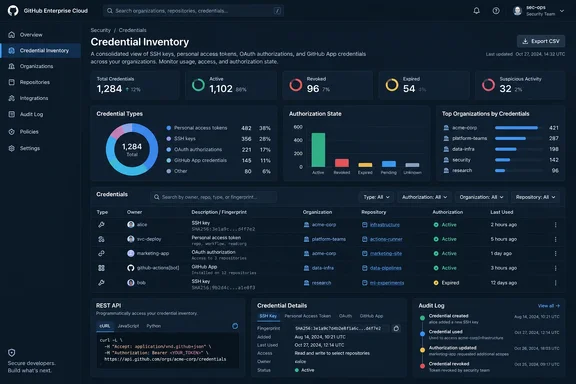
GitHub Enterprise Cloud brings credential visibility into one export
The September release gives enterprise owners and members with the fine-grained View enterprise credentials permission two ways to retrieve the inventory: an export from enterprise settings and programmatic access through new REST endpoints. GitHub also supports filtering by user, application, credential type, or organization. The announcement identifies the feature as available now for Enterprise Cloud, rather than a preview.
The exported metadata includes owners, scopes and permissions, creation and expiration dates, last-used dates, and target organizations or repositories. These fields answer different operational questions. Ownership identifies whom to contact; permissions and targets help establish potential exposure; dates help place a credential within a review or incident timeline.
GitHub’s REST documentation makes an important distinction that the announcement’s phrase “every credential that can access their enterprise” does not fully explain. The inventory includes both credentials currently authorized to access the enterprise and credentials owned by enterprise members that have no current enterprise authorization. It also describes coverage for GitHub App installations and federated credentials alongside the familiar user-token and SSH-key categories.
Consequently, appearing in the inventory does not necessarily mean a credential currently has enterprise access. The API exposes an authorization_state filter with two values: currently_authorized and member_owned_only. A report about current enterprise exposure should preserve that distinction instead of combining every returned record into a single access count.
The inventory provides access metadata and identifiers, not a means to recover usable secrets. GitHub’s documented responses include hashed token identifiers or SSH fingerprints where applicable, along with credential state and authorization information. This makes the feature useful for investigation and reporting without turning the CSV into a replacement for the credentials themselves.
There is still a reason to restrict access to the resulting files. A consolidated map of users, applications, permissions, and repository targets is operationally sensitive even without raw tokens. As an administrative precaution, the export should receive the same controlled handling as other detailed enterprise access reports.
GitHub’s credential CSV needs interpretation before it becomes a dashboard
The most consequential detail in GitHub’s CSV specification is its unit of measurement: a row represents a credential and an authorizing organization, rather than necessarily representing one unique credential. When a credential is authorized for several organizations, its credential fields repeat while the organization fields change. A credential without an organization grant appears once, with empty organization columns.
That design is useful for organization-level review, but it changes how administrators should count records. As a direct consequence of the documented format, one credential authorized for three organizations can occupy three rows. A spreadsheet row count therefore cannot safely be presented as the enterprise’s unique credential count, and removing apparent duplicates without examining the organization fields can erase meaningful access information.
GitHub also documents several identifier boundaries that matter when importing the CSV into a database or reporting system:
| Documented field or behavior | Consequence for reporting |
|---|---|
credential_id can collide across credential types. | For supported token classes, use it together with credential_type, rather than treating the number alone as globally unique. |
| SSH keys are identified by fingerprint. | Do not force SSH records into a token-ID matching scheme. |
| GitHub App installations and federated JTIs have no unique per-row column in the CSV. | Do not assume the same CSV deduplication rule works for every inventory category. |
owner_type distinguishes users, OAuth applications, and GitHub Apps. | Preserve the owner type when interpreting owner_id. |
The API’s opaque inventory_id can differ for the same credential between responses. | Use it unchanged for the documented item lookup, but do not assume it is a permanent cross-export identity. |
The CSV’s authorization_count introduces another reporting subtlety. GitHub defines it as the credential’s total number of organization authorizations across the enterprise, plus one when enterprise_authorized is true, independently of filters applied to the export. Filtering a report to one organization therefore does not turn that field into a count limited to the filtered organization. This is particularly important when building charts from a subset of the enterprise inventory.
Empty values also require deliberate handling. GitHub specifies that an empty CSV cell means null or unknown, never Boolean false. For expiration, the expiry_status field distinguishes expires, never, and unknown; a blank expires_at value alone is insufficient to conclude that a credential never expires. Reporting systems should keep “unknown expiration” separate from “no expiration” rather than placing both into the same policy bucket.
The remaining format details are straightforward but worth preserving in an importer. GitHub generates UTF-8 CSV with a header row, RFC 4180 quoting and escaping, LF line endings, and ISO 8601 UTC timestamps. Multi-value cells use semicolons, with permissions represented as resource:action pairs such as contents:write; issues:read. Use a CSV-aware parser first, then interpret the multi-value fields; simply splitting every line on commas would disregard the documented quoting rules.
View enterprise credentials enables review without implying revocation rights
For a manual review, the documented starting point is the enterprise’s Settings → Authentication Security → Credentials page. GitHub places Export CSV beside the Overview section. The September announcement allows enterprise owners and members granted View enterprise credentials to use the inventory capability.
A supported first-pass workflow is short:
- Confirm that the enterprise uses GitHub Enterprise Cloud and that the reviewing account is an enterprise owner or has View enterprise credentials.
- Open the enterprise’s Settings → Authentication Security → Credentials page.
- Select Export CSV beside Overview.
- Review the full inventory or use the available user, application, credential-type, and organization filters to narrow the investigation.
- Interpret repeated credential rows, authorization state, and unknown values before producing counts or recommending remediation.
The expected result is a credential metadata report that can be examined for ownership, access, permissions, and lifecycle information. Exporting the report does not itself revoke credentials or establish that an account has been compromised. That boundary should remain explicit in a runbook: collecting access evidence and changing access are separate operations.
Programmatic access has additional requirements. GitHub’s REST documentation requires an enterprise owner or a role with View enterprise credentials. When the calling credential is a classic personal access token or an OAuth App token, it must also carry the read:enterprise scope. For the documented fine-grained access route, GitHub lists GitHub App user access tokens and GitHub App installation access tokens with the enterprise-level Enterprise credentials: read permission.
The distinction between credentials being inventoried and credentials permitted to call the API is easy to overlook. Fine-grained personal access tokens are among the inventory’s contents, but the endpoint documentation’s fine-grained caller list names GitHub App user and installation access tokens. Administrators should follow that caller list rather than assuming every token category returned by the API is also a supported authentication method for retrieving it.
Nor should View enterprise credentials be confused with Manage enterprise credentials. GitHub’s separate August 18 announcement describes management capabilities for credential-type-specific deauthorization and revocation. The September inventory feature provides a read-oriented role boundary, allowing a review workflow to be designed separately from the authority to carry out disruptive containment actions.
GitHub’s REST API separates live enumeration from CSV export jobs
The REST interface offers four operations: list the inventory, inspect an individual inventory item, create a CSV export, and retrieve an export’s status or download. They serve different tasks. An application that needs filtered records can enumerate the list endpoint, while a process that needs a portable CSV artifact can use the export job.
The list operation is GET /enterprises/{enterprise}/credentials. GitHub describes the inventory as assembled on demand from canonical credential sources. Results use cursor-based pagination: the default page size is 30, the maximum is 100, and the next-page cursor is supplied through the HTTP Link header. The endpoint does not return a total count.
A complete collector therefore needs to follow pagination, not stop after the initial response or assume that requesting 100 records retrieves the whole enterprise. The supported filters include token_types, authorization_state, owner, organization, and application. Application filtering accepts a GitHub App slug or an OAuth App client ID. For a single-record inspection, use the returned opaque inventory_id unchanged with GET /enterprises/{enterprise}/credentials/{inventory_id}; GitHub warns that the identifier can vary between responses.
CSV export automation must wait for the completed job
Creating a CSV uses POST /enterprises/{enterprise}/credentials/exports. This starts an asynchronous job rather than immediately returning a file. GitHub documents a 202 Accepted response containing an export_id and queued status. The safe operational interpretation is that the request has been accepted, not that the report has finished generating.
The documented sequence is:
- Submit the export request with the desired filters.
- Retain the returned
export_id. - Request the job’s status through
GET /enterprises/{enterprise}/credentials/exports/{export_id}. - When the endpoint returns
302, follow the redirect to download the completed CSV. - Store or process the downloaded file under the organization’s access-report handling controls.
The download destination is short-lived, so it should not be treated as a permanent report location. GitHub also limits export generation to a small number of jobs per enterprise per day without stating a numerical allowance in the supplied endpoint documentation. A routine integration should therefore choose deliberately between paginated enumeration and CSV generation rather than creating a fresh full export for every query.
The error responses reinforce that separation. Export creation can return 429 Too Many Requests, 422 Validation failed, 404 Resource not found, or 500 Internal error; GitHub gives failure to enqueue the job as an example of the last condition. None represents a completed export. Automation should record the outcome and distinguish rejected creation requests from jobs that were accepted and are still waiting, rather than continuously submitting duplicate jobs.
GitHub inventory supports incident scoping, while audit logs supply activity
GitHub positions the release as a way to assess the credential risk surface and plan remediation and communications during a security incident. It explicitly supports correlating inventory records with audit-log activity. That pairing is the feature’s most useful operational application: the inventory describes credentials and access relationships, while audit events provide evidence about recorded activity.
The distinction prevents two common analytical mistakes. Broad permissions establish potential reach, not proof that an attacker exercised those permissions. A last-used timestamp establishes a piece of usage metadata, not a complete sequence of actions or a verdict on whether the activity was malicious. Those are conclusions an investigation must derive from additional evidence.
As a workflow derived from the documented filters and metadata, responders can first narrow the inventory by a suspected owner or application, then separate currently authorized credentials from member-owned-only records. Within the resulting set, scopes, permissions, and target organizations or repositories help identify which access relationships need investigation. Creation, expiration, and last-used dates provide comparison points for the incident timeline.
The same fields can improve communications. An owner-filtered report identifies the credentials associated with a user, while application filtering supports an app-centered investigation. Organization targeting helps divide follow-up work among the relevant administrators. These are practical uses of the reported relationships; the export does not automatically identify which owners are victims or which applications are untrustworthy.
GitHub’s August 18 credential-management release provides relevant context for the next stage. That update added token-type-specific bulk deauthorization and revocation, replacing an earlier all-credential-types-at-once limitation for those actions. Its announcement distinguishes removing single sign-on authorizations from deleting or revoking user-level credentials, and gives deleting personal access tokens for an individual Enterprise Managed User without touching their SSH keys as an example. Those separate management controls should not be generalized into a universal instruction to delete every credential associated with any user.
The inventory’s contribution is to make such decisions better informed. A reviewer can identify the affected credential category and access relationships before an authorized responder selects a containment action. Inventory visibility alone neither grants management authority nor removes the need to respect the account and authorization boundaries of the chosen revocation operation.
Put GitHub credential exports into the runbook before an incident
Enterprise Cloud administrators should validate read access and reporting behavior now, while Enterprise Server administrators should wait for a release that explicitly includes the feature. The most productive initial exercise is a controlled inventory review that checks pagination, authorization-state filtering, CSV interpretation, and the separation between review and remediation permissions.
For teams integrating the data into routine governance, define the question before defining the metric. “How many credentials are currently authorized?” differs from “How many credential-to-organization relationships exist?” and from “Which member-owned credentials appear in the inventory?” GitHub supplies distinctions that support those separate views, but a dashboard can lose them if every row is treated as equivalent.
The concrete takeaways are:
- Use View enterprise credentials for eligible reviewers, and separately verify the documented authentication scopes or app permissions for API access.
- Keep
currently_authorizedandmember_owned_onlyrecords distinct when assessing current enterprise exposure. - Follow every list-API pagination link, and account for asynchronous generation and daily limits when choosing CSV exports.
- Do not count CSV rows as unique credentials, assume
inventory_idis permanent, or interpret an empty expiration field as “never expires.” - Compare inventory metadata with audit-log activity before drawing conclusions about compromise, and keep revocation decisions within the appropriate management permissions and account scope.
The September release gives GitHub Enterprise Cloud teams a concrete way to bring credential ownership, permissions, and authorization relationships into the same review. Its value will come from preserving those distinctions as the data moves into spreadsheets, incident records, and automation. Teams that establish that handling now can use the next investigation to assess the evidence rather than discover how their credential report is structured.
References
- GitHub Enterprise adds credential inventory exports GitHub Changelog · 2026-09-21T21:13:18+00:00
- REST API endpoints for enterprise credential inventory - GitHub Enterprise Cloud Docs docs.github.com
- Credential revocation and deauthorization by token type - GitHub Changelog github.blog