

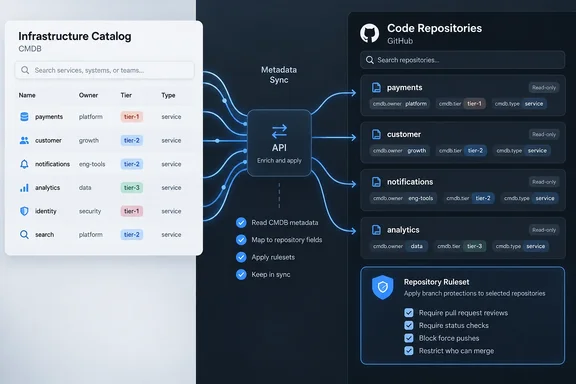
It's a small changelog entry, but it tackles a real headache for platform engineering and governance teams: who is allowed to change a piece of metadata, and where.
What GitHub actually shipped
GitHub already had custom properties: structured metadata you attach to repositories and use to filter repos and target rulesets. That feature isn't new. When GitHub first introduced it as a beta in 2023, organization administrators could only use custom properties for dynamically targeting rulesets, with filtering and search in an updated repository list promised later. Filtering and search have since arrived.
The new part is a second kind of property that GitHub doesn't own. GitHub now separates the two like this:
- Standard custom properties: you manage them inside GitHub, through the UI or the APIs.
- External custom properties: an outside system owns them and keeps updating them. GitHub stores and displays the values but doesn't let people edit them.
According to GitHub's announcement, external properties have three defining traits:
- Read-only in the GitHub UI. Users can't edit the values in GitHub, so the two systems can't overwrite each other.
- Ongoing synchronization. The external integration keeps values current through the dedicated external custom properties APIs as the source data changes.
- Dedicated namespace. Each integration manages its properties under its own prefix, apart from properties managed by other sources.
GitHub's Enterprise Cloud documentation spells out the namespace format. It says external properties are "structured metadata"-style fields that are namespaced as external_system.property_name, so it's clear where each one came from and it can't clash with other custom properties in the organization. The same documentation notes a limit the changelog doesn't mention: external properties work only on repositories and aren't available for organization-level custom properties.
Section summary: Standard custom properties are values you edit in GitHub. External custom properties are values a CMDB or portal writes, carry that system's prefix, and can't be edited in GitHub's UI.
Where the synced data shows up
GitHub says external properties work anywhere standard custom properties do today, including repository views, repository filtering and ruleset targeting. In practice, rulesets that require extra reviewers or block force-pushes can now be driven by data maintained in your system of record, not by tags someone typed in once and forgot.
Here's a simple example. Your CMDB marks a service as Tier 1, and your integration writes that value into GitHub under its own prefix. A ruleset aimed at Tier 1 repositories then applies stricter branch protections. When the CMDB later downgrades the service, the integration updates the value and the ruleset's targeting follows. Nobody has to fix the tag in GitHub, because nobody can.
Access follows the rules for standard custom properties. GitHub's organization documentation says the visibility of custom properties matches the visibility of the repository: properties on public repositories can be viewed by anyone, while properties on internal or private repositories can be viewed by accounts with read permissions to the repository. That rule is documented for custom properties in general. GitHub hasn't said whether the preview handles visibility differently, but if you plan to sync fields like compliance status or data sensitivity into public repositories, check that first.
Section summary: Synced values feed repository views, filters and ruleset targeting, so your governance runs on the system of record's data. Watch what you sync into public repos.
Port.io goes first, but you can build your own
GitHub names Port.io as the first partner integration. Port describes its setup on its own blog, so treat these details as the vendor's account. Port's GitHub integration claims the Port namespace in your GitHub organization, which lets Port write properties into GitHub without colliding with anyone else's, and stops anyone else from overriding them. Port says its workflows use a trigger that fires when a synced property changes in Port, plus a dedicated node type called update_external_custom_properties that calls GitHub.
Port's examples go beyond ownership tags. The company suggests targeting rulesets at a calculated "criticality" property, and it describes an AI agent that uses GitHub's MCP server to check a repository's "agent-readiness" score before working on it. That's Port's pitch, not a GitHub feature, but it shows the direction: repository metadata is becoming input for automated tools as well as people.
You don't need Port, though. GitHub says any enterprise can build its own integration against the external custom properties APIs, with fine-grained permissions controlling what the integration can touch. GitHub has also published a sample GitHub App, github/external-custom-properties-sample, that shows how an integration works. Its README says:
- External custom properties allow third-party integrations (GitHub Apps) to attach metadata to repositories — such as deployment environment, owning team, service tier, compliance status, or any custom key-value data your tooling produces.
- On permissions: The caller must be authorized for Admin on "External custom properties for repositories" in the org — this can be an organization owner/admin, or any user or fine-grained personal access token granted the organization_external_properties_for_repos:admin permission.
- To check the result, navigate to your organization's Settings → Custom properties to see the external custom properties attached to your repository (shown as acme.environment, acme.service, etc.)
- The sample syncs on a schedule. You can shorten the interval for testing and confirm that a
last_syncedproperty updates with the current timestamp.
The README also says request limits, display-name rules, property name and value constraints, and cleanup behavior are documented alongside the endpoints in GitHub's REST API reference for organization custom properties. Read that before building anything for production.
Section summary: Port is the launch partner, and GitHub's sample app shows a do-it-yourself integration. It needs a specific admin permission, and results appear under Settings → Custom properties with the integration's prefix.
A practical rollout checklist
This is a public preview, so pilot it before you rely on it. Here's a sensible sequence, based on the documented behavior above plus general enterprise practice:
- Decide which fields each system owns. Anything your CMDB or portal already treats as authoritative, such as owner, service tier, lifecycle stage or compliance status, is a candidate for an external property. Values that repository admins should maintain themselves stay as standard custom properties.
- Don't duplicate fields. Having both a GitHub-managed
tierand an externally syncedcmdb.tierinvites confusion. Pick one and retire the other. - Keep permissions narrow. Give the integration the external-properties admin permission and nothing broader. The README shows it can go to a GitHub App, a user or a fine-grained token, and a GitHub App is usually the cleaner choice for long-running automation.
- Test rulesets on a sandbox organization first. Once a ruleset targets an external property, a bad sync can change which repos get protected. Test before you connect production branch protections.
- Check public repositories. Remember the visibility rule and don't sync internal classifications onto public repos without thinking it through.
- Watch for stale data. A timestamp property like the sample's
last_syncedis an easy way to see when your integration has stopped writing.
The caveats
What's still unclear? Quite a lot, as you'd expect from a preview. GitHub's announcement doesn't say which GitHub plans qualify, when the feature might become generally available, or what service commitments apply. It also doesn't explain how failed syncs are reported or recovered. GitHub describes synchronization as ongoing and API-driven, not real-time, and the sample app syncs on a schedule rather than instantly. Plan for some lag between a change in your CMDB and the value GitHub shows.
There's also a trade-off built into the design. Read-only values mean GitHub users can't make an urgent correction. If the CMDB is wrong, it has to be fixed in the CMDB. That's intentional, and it's the whole point of a single source of truth, but it means the external system's data quality now directly affects your GitHub governance. Garbage in, force-push protections out.
It also fits a pattern in GitHub's recent governance work. The same changelog category recently featured Copilot suggesting custom property definitions, rule insights dashboards, and automatic migration of branch protection rules to rulesets. External custom properties fill a remaining gap: getting accurate business context into those rulesets without anyone retyping it.
Bottom line
External custom properties let a CMDB, developer portal or in-house catalog own repository metadata in GitHub. The values are read-only in the UI, carry the source system's prefix, and plug into repository views, filtering and ruleset targeting. Port.io is the first partner, and GitHub's sample app shows the permissions and workflow for building your own. It's still a preview, so pilot it in a sandbox, keep the integration's permissions narrow, and make sure the system you're trusting has accurate data.
References
- Bring business context with external custom properties GitHub Changelog · 2026-09-29T18:40:27+00:00
- GitHub - github/external-custom-properties-sample: Example GitHub App server that writes external custom properties to repositories · GitHub github.com
- Custom properties - GitHub Enterprise Cloud Docs docs.github.com