

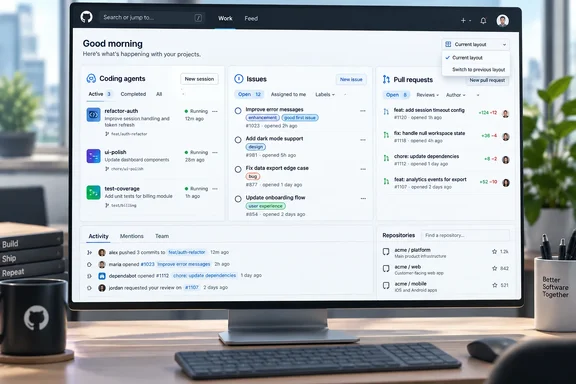
What changed on October 1
GitHub's announcement lists four things:
- One place for current work. Active agent sessions, issues and pull requests appear together on one page.
- Filters and a size limit. Each section has filters that control what it shows, and each list holds up to 12 items.
- A separate Feed tab. Updates from the people and projects you follow now sit in their own tab, apart from the dashboard.
- Starting work from the dashboard. You can assign an issue to Copilot coding agent or open a pull request in Copilot Chat without leaving the page.
GitHub also says anyone who prefers the old layout can switch back at any time from the dropdown next to the "Preview" label. A "Preview" label on something just declared the default is odd. The announcement doesn't say whether this is a permanent setting or a temporary opt-out, and it gives no date for removing the old dashboard. Use the switch for now, and don't assume it will last.
Summary: the dashboard now leads with your work: agent sessions, issues and PRs, up to 12 items per list. The feed has its own tab, and the old view is still available from the "Preview" dropdown.
How it got here: a year in preview
This didn't come out of nowhere. GitHub's Changelog for October 28, 2025 announced the home dashboard update in public preview, describing short, customizable lists of recent agent tasks, pull requests, and issues. That post also said the feed view has moved to its own page at github.com/feed when the preview is enabled, and that users could turn the experience on by enabling New Dashboard Experience in Feature preview.
The preview post covered a few details that today's notice skips:
- A new agent module shows the status of all your agent tasks and provides links to the task session.
- The feed's content and filters have not changed.
- When using the site on a mobile device, you can find a link to the feed in the hamburger navigation.
- Action menus, per the preview feedback thread, let you assign issues to Copilot coding agent or open pull requests and issues in Copilot Chat as references, with more shortcuts to come.
Those notes come from the preview, so treat them as background. Nothing GitHub has published today confirms that every preview detail survived unchanged.
The redesign also answers a long-running complaint. In October 2025, a community thread asked where the "Recent Activity" sidebar had gone. One reply explained that the section was consolidated into the main feed to create a more unified experience, and that the new default "For you" feed is more algorithmic. A GitHub staffer replied by pointing people to the New Dashboard Experience preview. A dashboard built around your own issues and PRs is largely a response to users who wanted that view back.
The preview feedback discussion was busy. When indexed, it showed 368 comments · 261 replies. Expect plenty of opinions now that everyone has it.
Summary: GitHub has been testing this since late October 2025. The feed has lived at its own page and tab since then, and the redesign partly addresses complaints about losing a personal activity view.
Part of a wider round of dashboard changes
The home dashboard is the latest of several GitHub pages to go from preview to standard:
| Surface | Milestone | Date |
|---|---|---|
| Repository dashboard | Generally available | February 24, 2026 |
| Global pull requests dashboard | On by default as an opt-out public preview | April 23, 2026 |
| Pull requests dashboard | Generally available at github.com/pulls | July 9, 2026 |
| Home dashboard | Now the default for everyone | October 1, 2026 |
The pattern holds each time: opt-in preview, then on by default with a way out, then general availability. The April PR dashboard notice had a similar escape hatch, saying users can still opt out from the Preview label at the top of the page or feature preview. Based on that history (an inference, not a GitHub commitment), the home dashboard is probably in that middle on-by-default stage, and the old view may not stay around forever.
Summary: GitHub is rebuilding its main navigation pages one at a time, and the home dashboard is following the same preview-to-default path.
A documentation gap
At the time of writing, GitHub's personal dashboard quickstart still says the updated home dashboard is in public preview. It also tells readers to turn on "New Dashboard Experience" in feature preview to see it. That contradicts the October 1 Changelog. The Changelog is dated and specific, so it's the better source on default status. The quickstart looks like it hasn't been updated yet. If you're writing onboarding guides for your team, use today's announcement, not the old enable-it-first steps.
The same docs page does describe what the dashboard is for. It gives you visibility into Copilot cloud agent sessions, lets you prompt Copilot from the dashboard, track the agent sessions you've started, open agent logs, and manage the resulting pull requests.
The Copilot angle: what's actually required
The dashboard's agent features are its most noticeable change, so here's what GitHub's documentation says about the agent itself:
- Plan requirement. GitHub's docs say Copilot cloud agent is available on all paid Copilot plans. That rule covers the agent, not the dashboard. Nothing GitHub has published says the redesigned dashboard needs a paid plan, so free users shouldn't assume they're locked out of the layout.
- Exclusions. The docs say the agent works in all repositories on GitHub except those owned by managed user accounts and those where it has been explicitly disabled. Enterprise users may find the agent features unavailable even though the dashboard looks the same.
- Assigning an issue always creates a pull request. If you hand an issue to Copilot from the dashboard, expect a PR, and expect Copilot to request your review when it finishes.
- Copilot only reads the issue once. According to GitHub's docs, Copilot gets the issue title, description and existing comments when you assign it. It doesn't see comments added later, so put follow-up instructions on the pull request.
- The prompt box is shared. The docs say the same task prompt box appears on the dashboard and in Copilot Chat (via
/task). Starting from a prompt works on a branch by default, so you can review and adjust before opening a PR.
Summary: the dashboard makes Copilot's agent easy to reach, but the agent needs a paid Copilot plan and may be disabled in managed environments. Assigning an issue to it from the dashboard creates a pull request.
What to do now
- Sign in and check the new layout. Look for the agent sessions, issues and pull requests sections, and the separate Feed tab.
- Set your filters. Each section has filters, and lists stop at 12 items. Narrow each section to what you actually act on so important items don't get pushed off.
- Find the feed. If you read the community feed every morning, it's in its own tab now. Based on the preview notes, mobile users should check the hamburger menu.
- Use the fallback if you need it. Click the dropdown next to "Preview" to go back to the previous experience. Since GitHub hasn't said how long that will last, start getting used to the new layout anyway.
- Admins: check agent policy. If your organization hasn't decided whether to allow Copilot cloud agent, people will now see the agent features on the first page they open. Decide on the policy and document it.
- Give feedback. GitHub is asking for comments in its Community discussion. Earlier GitHub dashboards picked up options like a configurable default view after preview feedback, so it can make a difference.
Analysis: is this better?
For anyone whose day is mostly reviews and issues, putting assigned work ahead of a stream of starred repos and follows makes sense. The 12-item limit keeps each list short. That helps until you have more than 12 things that matter, at which point the filters decide what you see.
There are two fair objections. First, the Copilot actions build GitHub's AI products into the most-visited page on the site. That suits GitHub's plans, but it means less to someone without a paid Copilot plan. Second, a "Preview" label on the new default, plus documentation that still calls it a preview, makes it unclear where the change stands. GitHub hasn't published adoption numbers, productivity data or a deprecation date for the old view, so claims that the new dashboard saves time are unproven for now.
You can still switch back, but given GitHub's recent pattern, the old dashboard probably won't be around much longer.
References
- New dashboard experience now the default GitHub Changelog · 2026-10-01T16:14:56+00:00
- Quickstart for your personal dashboard - GitHub Docs docs.github.com
- Kick off a task with Copilot agents on GitHub - GitHub Docs docs.github.com