

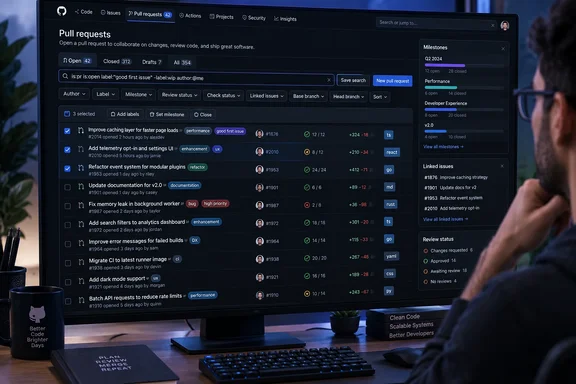
GitHub’s repository pull requests page moves beyond the preview’s limits
The most consequential change between preview and general availability is the ability to act on the work you find. GitHub now explicitly supports bulk actions on one or more pull requests, including closing them, applying labels, and changing milestones. Milestones, linked issues, and author badges are also visible in the refreshed list.
That gives maintainers a reason to revisit the page if the preview interrupted their usual administration. A list that helps identify a group of pull requests becomes more useful when it also supports updating that group. For teams organizing proposed changes around milestones, displaying those milestones restores context that GitHub explicitly acknowledged was absent from the preview.
The documented comparison is straightforward:
| Capability | September 10 public preview | September 21 general availability |
|---|---|---|
| Bulk updates | Listed as unavailable. | Closing, labeling, and milestone changes are explicitly supported. |
| Milestone visibility | Listed as missing. | Milestones are visible, alongside linked issues and author badges. |
| Advanced search | Supported AND, OR, and nested searches. | Remains a highlighted capability. |
| Compact presentation | Available in preview. | Remains available to fit more pull requests on the page. |
| Review-status filtering | Not listed among the preview highlights. | Clicking a review status filters the list. |
General availability should not be read as confirmation that every preview limitation has disappeared. GitHub previously listed inconsistent label-emoji rendering and unavailable custom-view saving, but the release announcement does not establish their current status. Likewise, the preview’s documented “Switch back” option should not be assumed to remain available after this release.
GitHub search separates finding work from managing it
The refreshed page offers several levels of filtering. The sidebar provides common starting points, including “Authored by me” and “Involves me,” while content assist helps users find and apply the correct filters. GitHub does not describe content assist as natural-language search or an AI feature, so neither characterization is warranted.
Advanced search supports the Boolean keywords AND and OR, plus nested searches. Conceptually, this lets a user require multiple conditions together or accept alternatives, then combine those relationships into a more specific search. The release does not supply complete query examples, so it would be premature to prescribe exact expressions or qualifier combinations from this announcement alone.
The practical distinction is between a quick personal view and a more selective working list. A contributor may need only the authored-by-me shortcut; a maintainer handling multiple categories of work may benefit from combining conditions. Clicking a review status supplies another direct route from a visible attribute to a filtered list.
Presentation controls address a separate problem: how much of that list fits onscreen. Compact mode increases the number of pull requests shown, and collapsing the sidebar leaves more room for the list. Those are choices about working space, not evidence of faster page loading or measured productivity improvements.
Pull request indicators guide attention without replacing review
GitHub adds status-check counts, a stack indicator, and unread-update indicators to the repository list. Together with linked issues and milestone visibility, these give users more information before they open an individual pull request.
The stack indicator has a specific workflow context. GitHub’s pull request documentation describes stacked pull requests as a way to divide a large change into smaller, dependent pull requests. Surfacing an indicator in the list can help a reviewer recognize that a proposed change belongs to a larger sequence, although the release does not specify the indicator’s exact behavior.
Status-check counts serve a different purpose from the checks themselves. GitHub’s documentation places automated test, build, and other validation results in the individual pull request’s Checks area. Its merge box summarizes outstanding requirements, such as required reviews or checks. The refreshed list is a triage surface, not a substitute for examining those results.
The scope also differs from GitHub’s cross-repository pull requests dashboard, which GitHub announced as generally available on July 9. That dashboard provides a central place to track work across teams and projects; September’s release updates the listing inside a repository. The two announcements describe different views, not conflicting availability dates.
What this means for GitHub maintainers and reviewers
Maintainers who avoided the preview because it lacked bulk updates or milestones have a concrete reason to reassess the refreshed page. Individual contributors can start with the common filters and display options without changing their code-review process.
- Use “Authored by me” or “Involves me” when those built-in views match the work you need to locate.
- Use review-status filtering and advanced search to narrow a repository’s queue before deciding which pull requests need attention.
- Consider compact mode and a collapsed sidebar when seeing more entries at once is more useful than keeping navigation visible.
- Before applying a bulk action, verify that the selected pull requests are the ones you intend to close, label, or move between milestones.
- Continue inspecting individual pull requests for discussion, changed files, check results, and remaining merge requirements.
Enterprise users have one additional conditional improvement: full profile names appear if they are enabled for the enterprise. The announcement does not establish a GitHub Enterprise Server version requirement, so administrators should not translate the broad availability statement into a claim about a particular self-hosted release.
GitHub’s September release makes the repository pull request list more useful by bringing search, context, and routine administration together. For teams returning from the preview, restored milestone visibility and newly available bulk actions are the decisive changes: they make it possible to carry more of the queue-management task through to completion without confusing that task with the review and validation work each pull request still requires.