

BleepingComputer reported the findings, and Dark Reading, The Hacker News and several security outlets covered them independently. Most of the technical detail below comes from Aikido's own write-up and from GitLab's documentation. GitLab's docs confirm the core mechanism.
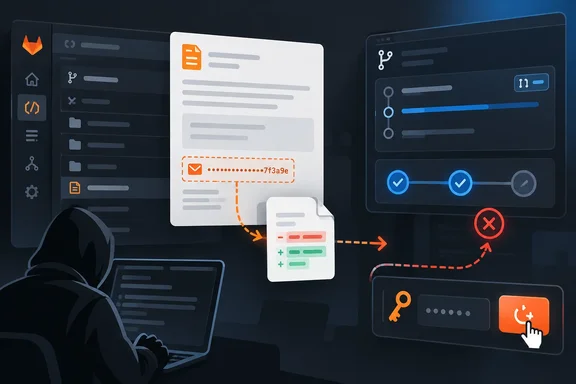
GitLab's "Email work item to this project" address carries a non-expiring glimt- token
GitLab lets users file issues by email. In a project, you open Plan > Work items, pick Email work item to this project from the More actions menu, and copy the address it shows. According to GitLab's documentation, the email subject becomes the issue title, the body becomes the description, and the new issue lists you as its author. Your GitLab instance needs incoming email set up with sub-addressing or a catch-all mailbox. Creating issues this way requires at least the Guest role.
The address has a token embedded in it. GitLab's token overview lists it as the incoming email token, with the prefix glimt-. The docs say every user has one, it does not expire, and it appears in all of that user's project-specific email addresses. The interface shows an address for one project, but Aikido found that the addresses generated for different projects all contain the same account-level token. BleepingComputer's report describes the token as shared across the addresses for one project. GitLab's own wording ("your personal project-specific email addresses") backs the broader, per-user reading that Aikido gives.
This is one feature among many that lets you create work items by email. Aikido points out that emailing issues to automatically generated addresses is common, and that Trello, Todoist and Monday.com offer something similar. The difference is where the email ends up. On GitLab, the account behind the address can also have write access to source code and CI/CD pipelines.
GitLab did warn about this. Its documentation says the address is "generated just for you" and that anyone who knows it can create issues or merge requests as if they were you. It also tells users to reset the token right away if they suspect a leak. Aikido's complaint is about how that warning was framed. Aikido says the dialog does warn that anyone with the address can create work items as you, but that warning describes spam, not code pushes and pipeline runs across every project on the account.
How a merge request email turns a bug-report address into a commit on main
The code-push risk comes from a second GitLab feature: creating merge requests by email. "Change the -issue suffix in the email address to -merge-request, and GitLab will open a merge request," Aikido says. A maintainer who posts the issue address has therefore also posted the merge request address, because they differ by one suffix.
GitLab documents this workflow in detail. The subject line names the source branch and the body becomes the merge request description. Commits go in as .patch attachments, up to 2 MB combined, and GitLab applies them in filename order. If the named branch doesn't exist, GitLab creates it from HEAD or the default branch. If it does exist, GitLab applies the patches on top of it. The merge request targets the default branch unless the sender uses the /target_branch quick action. The feature is enabled on GitLab.com. It requires the Developer, Maintainer or Owner role, or other permission to create merge requests.
That last rule about existing branches is our reading of how code gets committed rather than just proposed. If the subject names a branch that already exists, including one like main, GitLab applies the emailed patches straight to it, provided the token owner is allowed to push there. The Hacker News summarized Aikido's finding this way: anyone who gets the address can email a patch that GitLab commits in your name, to any branch you can push to, including main, and can start CI/CD jobs that run as you.
What an attacker can actually do depends on the victim's permissions. BleepingComputer, citing the researchers, says those permissions are the one limit an attacker can't get around. An attacker also needs the target project's path and ID. Those are public for public projects. For a private project the ID can be brute-forced, but the path would have to leak from somewhere. So a leaked Guest account's address mostly allows issue spam. A leaked Maintainer's address on a busy open-source project is a software supply-chain risk.
GitLab does not check who sent the email. An attacker does not need to spoof the sender, because GitLab does not require the email to come from an address verified on the token owner's account. According to BleepingComputer, Aikido said a sender check would add some defense, and that GitLab is now considering one.
IP allowlists and enforced 2FA do not cover GitLab incoming email
Many GitLab administrators rely on two controls that do nothing here. The first is IP restrictions on groups. GitLab's documentation says incoming email is not subject to IP restrictions. Aikido locked a private project to a single IP address that wasn't its own. GitLab blocked browser access and refused a git clone, but still accepted the merge request email, and the commit landed on main.
The second is two-factor authentication. The email path also skips 2FA, and GitLab's documentation says incoming email features work without it, even on instances that require 2FA. Your login is still protected. The email workflow simply never goes through the login, so enforcing 2FA doesn't protect anything done through it.
Aikido's list of consequences follows from this. BleepingComputer's account says a compromised address could be used to push code to protected branches of private repositories, steal source code, collect secrets from CI/CD variables, or read confidential issues, all within the owner's permissions. Aikido's own summary is that GitLab "built a credential that reaches every project in the account and bypasses IP restrictions, then presented it as an email address."
Here is how exposure breaks down by offering. Every GitLab.com account has one of these tokens, and so does every self-managed instance with incoming email turned on (it's on by default on GitLab.com). GitLab Dedicated doesn't appear to be affected, but Aikido said it couldn't test Dedicated directly. On self-managed GitLab, the first thing to check is whether incoming email is configured at all, since both email workflows depend on it.
Aikido found a dozen live addresses in public READMEs and CONTRIBUTING files
Aikido got hold of real addresses by searching for them, not by breaking anything. Maintainers had published them on purpose in READMEs, contribution guides and support pages as a way to receive bug reports. "A few belonged to very popular open source projects," the researchers wrote. They didn't name those projects.
Aikido's point is that a leaked address is different from a leaked password or API key. A developer who pastes a glpat- personal access token into a README has made a mistake. A developer who pastes an email address into a README has done what email addresses are for. Aikido notes that GitLab calls the value an email address, formats it like one, and gives you a button to copy it, so nothing about it looks like a credential.
Here is what that sample shows and what it doesn't. A dozen addresses found in one afternoon is Aikido's own observation. It is not a count of how many exist, and no one has reported any of them being abused. Aikido says it notified the affected accounts before publishing. Secret scanners that look for token prefixes may miss these, because the credential sits inside an email address rather than on its own. Maintainers should search their own repositories and websites instead of assuming a scanner would have flagged it.
GitLab called it intended behavior, then rewrote its incoming email warnings
According to Aikido, GitLab didn't treat this as a vulnerability at first. Aikido says it reported the issue through HackerOne in May and GitLab closed it as "intended behavior." A second report in June led GitLab to update its UI to mention merge requests, remove false statements about what the token can access, and document that incoming email bypasses IP restrictions.
The removed statement was a notable one. GitLab's UI had described the address as a way to add work items to a project and said that "It cannot be used to access any other data." Aikido calls that demonstrably false. Aikido lists three changes: GitLab removed that sentence, added "and merge requests" where the UI had only mentioned work items, and documented the IP restriction exemption.
Aikido also describes GitLab's reasoning. As Aikido understands it, GitLab's position is that this is a token like any other and every leaked token leads to bad outcomes. Aikido agrees that's accurate, but says it sidesteps what makes this token different. GitLab has treated the behavior as part of the feature's design rather than as a traditional vulnerability, but has still updated its interface and documentation to explain the risks more clearly.
The core behavior hasn't changed. The token still doesn't expire, GitLab still doesn't check who sent the email, and individual users still can't turn the feature off. The May and June disclosure timeline comes from Aikido. GitLab hasn't published a timeline of its own.
What this means for you
If you maintain a GitLab project and have ever posted an incoming email address anywhere public, reset your token now, even if you've already deleted the address. Everyone else should still check which addresses have been shared, because this token also sits behind addresses you may have copied into bug trackers, wikis or mail filters.
Reset a leaked GitLab incoming email token
GitLab documents two places to do this. Both reset the same per-user token.
- In GitLab, select your avatar in the upper-right corner and choose Edit profile.
- In the left sidebar, go to Access > Personal access tokens.
- Under Incoming email token, select reset this token.
You can also go to the project's Issues page, open Email issue to this project, and select reset this token there. After the reset, GitLab shows a new address. Every old address containing the previous token stops working, including ones you meant to keep, so update any legitimate forwarding rules or saved contacts afterwards. Deleting the address from a README doesn't invalidate the token. Copies stay in Git history, forks, mirrors and search caches.
Replace the bug-report workflow
The underlying problem is that maintainers want a public way to receive reports by email, and this address was never built for that. GitLab offers Service Desk for email support: once enabled, a customer's email can create an issue in the project. It's the documented feature for taking in mail from outsiders. The personal address, as GitLab puts it, is "generated just for you."
- Search your READMEs, CONTRIBUTING files, project websites and support pages for GitLab incoming email addresses, and search Git history too, because deleting the current copy isn't enough.
- Reset the incoming email token for any account whose address was ever published. The reset works across all of that user's project addresses, since they share one token.
- Don't count on group IP allowlists or enforced 2FA to limit misuse of a leaked address. GitLab documents that incoming email bypasses both.
- Accounts with the Developer, Maintainer or Owner role are the highest-risk leaks, because email-created merge requests and patches only work with those permissions.
- Check branch protection on
mainand other key branches so that fewer accounts can push directly. That limits what any single leaked credential can do. - On self-managed GitLab, find out whether incoming email is enabled. If your organization doesn't use email-created issues or merge requests, raise that with your administrators.
GitLab has changed the wording but not the design. The token still never expires, the sender isn't checked, and users can't opt out, so the burden falls on maintainers and administrators. The only protection is to keep the address secret, and GitLab's position means that won't change unless it adds the sender check it is reportedly considering. Until then, a maintainer who posted a bug-report address a year ago has given anyone who found it a way to open merge requests, and possibly push code, in their name. A token reset takes a minute and cuts that off.