

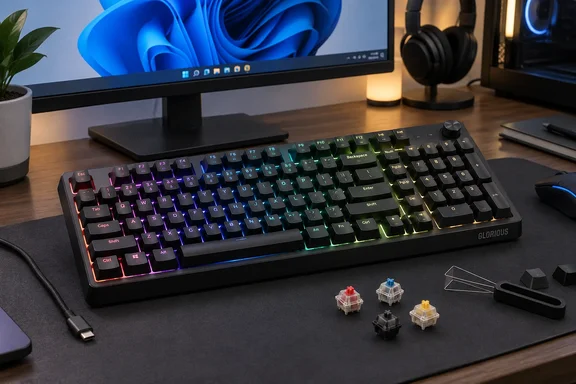
Glorious’ product listing confirms the central proposition: a 96% layout, hot-swappable switches, per-key RGB lighting and three layers of sound dampening. Those features give the Eternal a reasonably clear audience. It is worth considering if you want to keep a number pad without keeping the width of a traditional full-size keyboard—and you are happy to connect it with a cable.
GMMK Eternal’s 96% layout saves space by moving familiar keys
The Eternal has 99 keys, including a full function row, arrow keys and a number pad. Its compactness comes from bringing those groups together and reducing the conventional navigation cluster. You retain much of a full-size keyboard’s functionality, but your fingers encounter a different arrangement.
Glorious’ official product guide lists dimensions of 372 × 122 × 44mm, matching the measurements in the Tom’s Hardware review. The last figure includes the keycaps. This is a narrow, shallow board, but buyers should distinguish a small desk footprint from a low-profile typing surface.
The review offers a useful comparison with the Asus ROG Strix Scope II 96 Wireless, which it lists at 377 × 131 × 40mm. On those figures, the Eternal saves only 5mm in width and 9mm in depth against that particular compact competitor, while standing 4mm taller. Its space advantage is therefore most compelling for someone leaving a conventional full-size layout, rather than someone already using a compact number-pad keyboard.
The arrangement also has more structure than “everything squashed together” might suggest. Tom’s Hardware describes the function keys as visibly grouped in fours, with a little separation between the arrows and the main typing block. Print Screen, Delete, Insert, Page Up and Page Down remain accessible beside the function row and above the number pad.
That is a useful set for everyday Windows work, but it deserves a closer look if you navigate documents or code mainly from the keyboard. The listed navigation group has no dedicated Home or End key. The supplied documentation does not establish their default alternative bindings, so buyers who depend on those keys should not assume the transition will be effortless. Glorious Core offers remapping, discussed below, but remapping still requires choosing which assignment or layer will carry a command.
The reviewer reported a normal learning curve around the arrow keys’ proximity to the alphanumeric block. That observation is more helpful than a blanket claim that a 96% keyboard feels like a full-size one: the Eternal preserves the number pad while changing the spatial cues around it. For spreadsheet users, keeping that pad may justify the adjustment; for someone whose hands constantly move between dedicated navigation clusters, the trade-off needs more thought.
GMMK Eternal’s acoustic treatment earns more attention than its styling
The Eternal’s exterior is restrained: a black anodized aluminum top plate over an ABS plastic bottom case, with little visible branding on the top or sides. Tom’s Hardware puts its weight at 879g, or just under two pounds. Rubber strips and two sets of flip-out feet sit underneath, while the detachable cable connects to a centered USB-C port.
The acoustic treatment is the more interesting part of that otherwise straightforward construction. The keyboard has a molded silicone layer and two polyurethane foam layers around the printed circuit board, or PCB. Glorious markets the combination as triple-layer sound dampening; DVHARDWARE’s launch coverage also describes those materials, based on information supplied by Glorious.
The distinction between construction and listening results is important here. Three layers tell you what the manufacturer put inside the case. The hands-on review provides evidence of what that implementation sounded like: Tom’s Hardware reported a solid case without noticeable ping, deeper bottom-out sounds and a small amount of rattle.
The reviewer was impressed by the result at this price, while stopping short of endorsing the manufacturer’s “thock” description without qualification. That supports a specific conclusion: the Eternal’s out-of-box sound is a credible reason to consider it. It does not establish that this is the best-sounding keyboard under $100, or that it will be quiet enough for every shared office.
The supplied Glorious Fox switches are pre-lubricated linear switches. As the review explains, their travel has no tactile bump or deliberate audible click, and the reviewer found the keypresses smooth and stable. Linear operation does not make the entire keyboard silent—the reported bottom-out sound and residual rattle remain part of the experience.
The keycaps are double-shot ABS in an OEM profile, with shine-through primary legends and secondary markings printed on their sides. Tom’s Hardware describes lightly cupped, textured tops and found them comfortable despite the reviewer’s preference for lower-profile caps. The reviewer also felt no need for a wrist rest. Those are useful individual comfort observations, not a promise about everyone’s preferred typing angle; the Eternal’s 44mm overall height and adjustable feet are the more concrete starting points for a buying decision.
Hot-swappable switches make the Eternal adaptable, within clear limits
Glorious’ product guide confirms that the Eternal accepts both three-pin and five-pin mechanical switches. Its hot-swappable design allows compatible switches to be replaced without soldering, making the factory Fox switches a starting configuration instead of a permanent commitment.
That flexibility has practical value for a buyer who likes the layout but later wants a different switch feel. It also distinguishes switch replacement from replacing the whole keyboard. The box includes switch- and keycap-removal tools, although the review describes a combined tool while the official guide lists the pullers separately.
Compatibility needs to stay within the documented boundary. Support for three- and five-pin mechanical switches should not be read as support for arbitrary switch technologies or an upgrade path to magnetic-switch features. The Eternal ships as a conventional mechanical keyboard, and neither the product guide nor the review describes a conversion to adjustable actuation or Rapid Trigger.
The Fox switches carry a 50-million-press rating in Glorious’ guide. That is a manufacturer durability rating, not a measurement of the review unit’s life expectancy. For purchasing purposes, the replaceable-switch design is a more directly usable feature than treating a large actuation count as a guarantee of years of service.
There is also a support boundary worth understanding before planning modifications. Glorious says it cannot provide comprehensive support for third-party firmware or parts, including other companies’ switches, keycaps and stabilizers. Its warranty notice excludes damage resulting from opening the keyboard. The useful distinction is between using the advertised hot-swap capability and assuming that every internal modification carries the same support coverage.
The guide lists a two-year limited manufacturer warranty, with an additional year available through registration for eligible devices registered within 365 days of purchase. Buyers intending to keep the board for several years should consider that registration window alongside the switch flexibility. Both are more tangible ownership benefits than a promise that customization will make the board future-proof.
Glorious Core adds customization without changing the Eternal’s gaming class
The Eternal runs at a default polling rate of 1,000Hz. Glorious’ guide lists selectable settings of 125, 250, 500 and 1,000Hz, along with N-key rollover. This is a conventional configuration for a wired gaming keyboard, not a product built around unusually high polling rates.
In its hands-on testing, Tom’s Hardware reported no problems with typing accuracy, speed or response time beyond adapting to the layout. The review does not supply an instrumented latency comparison, so the useful finding is that the reviewer experienced responsive everyday operation. There is no measured basis here for ranking it against competing esports-focused boards.
Glorious Core is where the keyboard’s customization becomes more substantial. The official guide identifies CORE 2.1 as the accompanying software and confirms that personalized profiles can be saved to onboard memory. The review reports three onboard profiles, key remapping up to two layers deep, and a built-in macro recorder and manager.
For a Windows user, those features offer a way to tailor the compact layout to recurring tasks. A work configuration and a gaming configuration can use different assignments, with profiles stored on the keyboard. Neither the review nor the guide supplies a complete account of which individual settings persist in every situation, however, so it would be premature to promise that every software feature operates independently of Core.
The review also identifies controls for polling rate, input latency, lighting standby timing and Windows/Mac mode. Its reported 17 lighting presets and per-key lighting customization provide plenty of scope for changing the appearance. The reviewer found the lighting bright, helped visually by the plain black chassis and shine-through legends.
Core required a restart after installation in the reviewer’s experience. That is a modest but relevant consideration on a work PC: advanced remapping is something to schedule around your organization’s software permissions and restart requirements. Basic operation has a simpler path, because Glorious documents the keyboard as plug-and-play.
Setting up the GMMK Eternal does not require starting with Core
For ordinary keyboard use, Glorious lists an available USB-A port and Windows 10 or later, or macOS 10.11 or later, as the requirements. Those are keyboard compatibility statements; they should not be treated as confirmation that every Core software feature has identical support across both operating systems.
The documented initial connection is straightforward:
- Connect the USB-C end of the included cable to the keyboard.
- Connect the USB-A end to an available USB-A port on the computer.
- Allow the operating system to install the necessary drivers automatically.
The supplied cable is 1.8m long according to the review. The keyboard is wired only, and there are no additional ports for connecting another peripheral through it. Someone moving from a keyboard with USB pass-through should account for that lost connection separately.
Several useful controls are available directly from the keyboard, avoiding a software installation just to adjust lighting or playback. Glorious’ guide documents the following combinations:
| Task | Keyboard shortcut |
|---|---|
| Select the previous or next lighting effect. | Fn + Left Arrow or Fn + Right Arrow. |
| Increase or decrease lighting brightness. | Fn + Up Arrow or Fn + Down Arrow. |
| Cycle colors for a compatible lighting effect. | Fn + X. |
| Decrease or increase lighting-effect speed. | Fn + C or Fn + V. |
| Play or pause media. | Fn + F7. |
| Mute audio. | Fn + F9. |
| Increase or decrease volume. | Fn + F10 or Fn + F11. |
| Enable or disable the Windows key. | Fn + Windows. |
| Open Calculator. | Fn + F3. |
These shortcuts soften the absence of dedicated media keys, but they do not offer the same one-touch operation. Someone accustomed to a volume wheel or separate playback buttons will still be making a workflow change.
The Windows-key shortcut is particularly worth remembering. If the Windows key stops opening Start after you have changed keyboard settings, Fn + Windows is the documented toggle to check. It is a keyboard-level control, not an instruction to change Windows policy or edit the registry.
Glorious also documents a factory reset, but it erases all profile information and restores the keyboard’s settings to their defaults. Use it only when that is the intended outcome, rather than as a casual first step:
- Hold Fn + Esc for three seconds.
- Then press and hold F1 + F3 + F5 together for two seconds.
The guide does not specify a confirmation light sequence or a profile-recovery procedure. Anyone who has invested time in remapping should account for that loss before performing the reset.
Choose the GMMK Eternal for its number pad and sound, not a gaming upgrade promise
Put the Eternal on your shortlist if you need a number pad, want to reclaim desk space and prefer a ready-made mechanical keyboard with room for later switch changes. The $99.99 price reported by Tom’s Hardware places it in a category where a well-executed basic experience can be more useful than a longer feature list.
The strongest decision points are concrete:
- Measure your available space against the Eternal’s 372 × 122mm footprint, while remembering that its 44mm height makes it compact rather than low-profile.
- Consider your dependence on dedicated Home and End keys before moving to its reduced navigation arrangement.
- Treat the positive acoustic findings as Tom’s Hardware’s listening assessment, including its report of some remaining rattle.
- Choose another model if wireless connectivity, dedicated media controls or magnetic-switch gaming features are requirements.
- Use the documented onboard shortcuts for basic lighting, media and Windows-key control, and add Core when you need deeper customization or profiles.
- Keep the warranty and third-party-parts support limits in mind if switch replacement or more extensive modification is part of your plan.
The GMMK Eternal makes its best case through the parts of a keyboard people encounter all day: its footprint, key arrangement, switch feel and sound. The evidence supports a solid compact option for Windows work and gaming, with a useful number pad and replaceable switches. If that combination matches your desk and habits, the next decision is whether the compressed navigation layout suits you—not whether another polling-rate headline would make it a better purchase.