

Googlebook OS Moves Google's Laptops From ChromeOS to the Android Stack
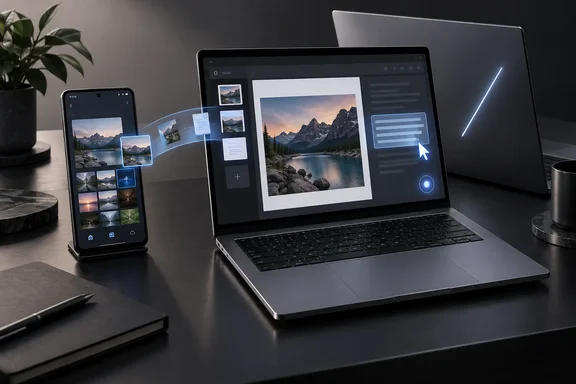
The biggest change is underneath. In its launch announcement, Google describes Googlebook as "built on the Android technology stack and paired with desktop foundations from ChromeOS." Chromebooks run ChromeOS. Thurrott.com and Technology.org, which both covered the launch, describe the platform the same way. Technology.org summarizes it as running on the Android technology stack with desktop foundations borrowed from ChromeOS, and notes that because phone and laptop share that base, Google has built several bridges between them.
Google first previewed the platform on May 12, 2026. That post recalled that the Chromebook launched more than 15 years ago as a laptop for a cloud-first world, and presented Googlebook as a combination of Android, with its Google Play apps and an OS designed around AI, and ChromeOS, with its Chrome browser. Google also said that building on part of the Android stack lets it ship new features to all its users faster, now including laptops.
Google's own FAQ is clear that the product lines are separate. It calls Googlebooks "a brand-new category of flagship laptops," and says Chromebooks "run ChromeOS" and are built for "simplicity, speed and efficiency." Nothing Google has published says Chromebooks are being discontinued. It is adding a tier above them.
One claim in some early comparisons needs correcting. Chromebooks already have phone integration. Google's FAQ lists Phone Hub and Quick Start as current Chromebook features. Google's point is that Googlebook goes further, letting you start a task on the phone, finish it on the laptop, and use the phone's apps and files directly from the laptop.
Continue On, Files and Cast My Apps Need an Android 17 Phone
Phone integration is where the Android foundation makes the most visible difference. When you sign in to a new Googlebook, Google says your Android phone's settings, saved passwords, Wi-Fi networks and messages move over to the laptop, protected by end-to-end encryption. Technology.org puts it this way: a new Googlebook begins its setup by reaching for your phone, and on sign-in the handset passes over its settings, saved passwords, Wi-Fi networks and messages.
After setup, Google advertises three cross-device features:
- Continue On resumes a task you started on your phone. Google's example is a project begun in BandLab on the phone, which you can pick up from the Googlebook taskbar.
- Files lets you view, search and open the phone's files and photos from the Googlebook's Files app, so you don't have to email attachments to yourself.
- Cast My Apps streams your phone's apps into a desktop window where you can use them, for example to order food or copy a one-time code from Messages, without installing those apps on the laptop.
The name of the file feature changed along the way. In the May preview it was called "Quick Access" and was described as letting you view, search or insert phone files with no transfers needed. The September launch material calls it "Files." Readers following earlier coverage should treat these as the same capability under its final name.
The requirements are the part that affects buying decisions. Google's FAQ says some features may need the latest software on both the phone and the laptop, and it lists Android phones running Android 17 or later as compatible. Owners of older Android phones, and all iPhone owners, get a much smaller version of the product's main selling point. Google also presents Continue On through selected examples and has not said every app supports it. Assume it works with the apps Google names until it has been shown to work more widely.
Magic Pointer, Rambler and Create My Widget Put Gemini in the Desktop Itself
The second big difference is how AI is built in. On a Chromebook, Gemini features arrive as additions to ChromeOS. Google says Googlebook is "designed for Gemini Intelligence," with Gemini built into the cursor, dictation and desktop widgets. According to Thurrott, Gemini Intelligence first appeared on Google's Pixel 11 series and Samsung's latest Galaxy Z series.
Magic Pointer is the headline feature, and Google says it was built with Google DeepMind. You wiggle the cursor to call up Gemini, then ask about whatever text or images are on screen. Google's examples include highlighting a marathon training plan on a web page and asking Gemini to put the runs into Google Calendar, hovering over a suspicious email to ask whether it is spam, and selecting several images to combine. Wccftech describes it as a feature users can shake to enable Gemini mode. Google says Magic Pointer only activates when summoned and can be turned off. That is Google's description of the design, and no one has independently audited it.
Rambler is Google's reworked voice dictation. Google says it sits next to the Quick Insert key and turns rambling speech into organized text with headers, checklists and action items, cleaning up filler words and mistakes along the way. Google also says it is natively multilingual, so you can switch languages mid-sentence.
Create My Widget builds a desktop widget from a plain-language description, with no coding. In the May preview, Google said Gemini could search the web or pull from Gmail and Calendar to build a widget, using the example of a family-reunion trip dashboard combining flights, hotel, restaurant bookings and a countdown.
Google also lists Gemini Live, task automations, and proactive suggestions based on what's on screen. It adds Gemini Spark, which it says keeps working on complex requests in the background after you close the laptop. All of these are announced capabilities. VideoCardz noted that few reviews had appeared at launch, so independent testing of how well any of these features work in practice has barely started.
Five Launch Googlebooks Run From $899 to $1,299
Hardware is where the Googlebook and Chromebook lines separate most clearly. Chromebooks cover a wide range of prices and specs. Googlebook starts at the premium end. VideoCardz reports that the launch includes five systems from Acer, ASUS, Dell, HP and Lenovo, with prices ranging from $899 to $1,299. Several outlets report the same lineup:
| Model | US price | Processor | Notes |
|---|---|---|---|
| Acer Googlebook 14 | $899 | Intel Core Ultra 5 | Only convertible; 14-inch 2.8K OLED |
| Lenovo Googlebook 15 | $1,099 | Intel Core Ultra 5 | 15.3-inch 2.8K OLED |
| Dell XPS Googlebook | $1,199 | Snapdragon X Elite | 13.4-inch LCD |
| ASUS Googlebook 14 | $1,299 | Intel Core Ultra 7 | 2.8K OLED |
| HP Googlebook 14 | $1,299 | Snapdragon X Elite | 14-inch |
The pricing and processor details come from Windows Report's rundown: the Acer Googlebook 14 at $899 with an Intel Core Ultra 5, 16GB of RAM and 512GB of storage; the Lenovo Googlebook 15 at $1,099 with an Intel Core Ultra 5; Dell's XPS Googlebook at $1,199 with a Snapdragon X Elite; and the ASUS and HP Googlebook 14 models at $1,299, with ASUS using an Intel Core Ultra 7 and HP a Snapdragon X Elite. Thurrott confirms that Acer is the only manufacturer offering a convertible, with its Intel-powered 14-inch model at $899. Cyber Kendra reports only one US configuration per laptop for now, each with 16GB of RAM and 512GB of storage, and notes the Dell is the only model with an LCD instead of OLED. Google itself says some models offer up to 32GB of RAM. Its phrase "up to 2.8K OLED" describes the best screen in the lineup, not what every model gets.
The NPU number needs a correction. The Windows Report comparison says the NPUs deliver "more than 40 TOPS." Google's launch post puts it higher, "dedicated NPUs capable of over 45 TOPS," and Technology.org repeats Google's figure. VideoCardz lists the Acer's Intel Core Ultra 5 at up to 49 TOPS of NPU performance. TOPS stands for trillions of operations per second, a vendor-rated measure of AI throughput. These are chipmakers' ratings, not measured results.
Battery claims vary by source. Google quotes up to 14 hours of video playback and 16 hours of web browsing, and Thurrott reports that all models will offer up to 14 hours of video playback and 16 hours of web browsing. Cyber Kendra's per-model breakdown lists different ratings, including 13 hours for the Lenovo and an 18-hour rating for the Dell. The safest reading is that ratings differ by model and all of them are manufacturer claims.
Every model also gets Google's exterior light strip, the Glowbar. Google says it lights up at startup, sweeps across to show battery level and animates when you talk to Gemini.
Google also bundles subscriptions. Every Googlebook purchase includes 12 months of Google AI Pro, 3 months of YouTube Premium and Adobe Photoshop, and one year of cloud gaming with GeForce NOW. Technology.org notes that the AI Pro plan includes 5TB of cloud storage and normally costs $19.99 a month, so buyers should plan for that renewal cost after the first year.
Chrome Extensions, Microsoft 365 and a pKVM-Isolated Linux Terminal Set the App Boundaries
For WindowsForum readers, the practical question is whether a Googlebook can run their work. Google says it offers desktop-class Chrome with extensions alongside Android apps from Google Play, many of them optimized for large screens and keyboard-and-mouse input. Its examples include Adobe Photoshop, Adobe Lightroom and CapCut, plus Netflix and HBO Max with offline viewing. Wccftech notes that Android apps run natively, without emulating the Android experience.
Microsoft 365 support is limited. Google's FAQ says you can open, edit, download and save Word, Excel, Outlook and PowerPoint files using the Microsoft 365 app, and a footnote says some functionality needs a Microsoft 365 subscription. That is the Android-based Microsoft 365 app. It is not the Win32 Office desktop suite, and nothing Google has published claims the two match feature for feature. Users who rely on heavy Excel macros, add-ins or anything that needs Windows desktop Office should treat this as a real gap until testers show otherwise.
For gaming, Google points to Android titles on Play and PC games you already own through NVIDIA GeForce NOW. Its FAQ mentions Counter-Strike 2, Cyberpunk 2077 and Arc Raiders. That is cloud streaming. The games do not run locally.
For developers, Google says every Googlebook includes Antigravity, its AI agent development platform, and a full Linux terminal for tools such as Claude Code or Antigravity CLI. According to Google, the Linux environment runs isolated on a "Level 5 security-certified pKVM hypervisor," which it calls a first for laptops. Google also says Googlebook uses the same security architecture as ChromeOS, anchored by the Titan hardware root of trust, with on-device malware detection. These are Google's claims about its own design, not findings from an outside security review. Separating Linux tools and autonomous agents from the main OS is still a sensible choice for anyone running code pulled from a repository or letting an agent act on its own.
Chromebooks keep their own broad app model: ChromeOS continues to support Android apps, Chrome extensions, Linux applications and Google's growing set of Gemini features. Support for specific apps and Linux setups varies by device.
What this means for you
If you're shopping in October, decide based on your phone, your apps and your budget. The name tells you little. If you own a recent Android phone, want the phone-to-laptop features, and spend most of your day in Chrome, Google apps or Android apps, Googlebook is a real alternative to a similarly priced Windows laptop from the same five manufacturers. If your work depends on Windows desktop software, full Office, or managed Windows endpoints, nothing in Google's launch material changes that decision. If you want an inexpensive, simple laptop, Chromebooks are still Google's answer for that part of the market.
Before you pre-order, check the details that decide whether the product works for you. That means your phone's Android version, whether your key apps are on Google Play, and the per-model screen, weight and battery trade-offs in the table above. Early buyers are paying for features that have had very little independent review so far.
- Googlebook runs Googlebook OS on Google's Android stack, while Chromebooks keep running ChromeOS, and Google has not announced any end to Chromebooks.
- Phone features such as Continue On, Files and Cast My Apps need an Android phone running Android 17 or later, and Google says both devices may need the latest software.
- The five launch models cost $899 to $1,299 in the US, and each currently comes in a single configuration with 16GB of RAM and 512GB of storage.
- Google rates the NPUs at over 45 TOPS, higher than the "more than 40 TOPS" figure in some early comparisons, and battery ratings differ by model.
- Microsoft 365 on Googlebook means the Microsoft 365 app, with some functionality requiring a subscription, not Windows desktop Office.
- Google AI Pro is free for the first 12 months only, and Google promises updates for up to 10 years without guaranteeing identical support terms for every model.
Googlebook doesn't retire the Chromebook. It moves Google's laptop ambitions onto Android and prices them against premium Windows machines built by the same five manufacturers. The devices reach US shelves on October 4 and Canada, the UK, Ireland, France, Germany and Australia on October 5, and from then on reviewers can test Google's claims about Magic Pointer, phone integration and battery life on shipping hardware.
Update: Google confirms some Chromebooks will be eligible for Googlebook OS upgrades (September 28, 2026)
Google will allow certain existing Chromebooks to upgrade from ChromeOS to Googlebook OS, according to PCWorld, which reported that the company disclosed the plan in a newly published support page.
That changes an important practical point in the launch story: Googlebook will not be limited permanently to the five new premium laptops announced for October. Google has not yet identified eligible Chromebook models, set a rollout date, or explained whether upgrades will require particular hardware features such as newer processors or Android-phone compatibility.
Chromebooks that are not selected will remain on ChromeOS and continue receiving updates through their normal support period, PCWorld reports. That means the Chromebook line is not being retired, but some devices may eventually cross into Googlebook's Android-based platform rather than staying on ChromeOS for their entire lifespan.
For Chromebook owners and IT administrators, the unanswered details matter. Until Google publishes a supported-device list and migration guidance, organizations should not assume a current Chromebook can receive Googlebook OS—or that its existing management, app compatibility and support arrangements will carry over unchanged.
Update: Google sets a mid-2034 end date for ChromeOS updates (September 28, 2026)
Contrary to the earlier launch messaging, Google has now confirmed that ChromeOS updates will be phased out in mid-2034, according to Tom’s Hardware. The company says newer Chromebooks may be eligible to move to Googlebook OS, but it still has not published a supported-model list or explained the upgrade process.
That cutoff can shorten the expected support life of Chromebooks whose normal 10-year update window would otherwise extend beyond 2034. Google says it will support enterprise and education customers through the transition, with many devices offering direct migration paths.
Tom’s Hardware also reports that Googlebook management capabilities are not expected until the second half of 2027. Googlebook devices and upgraded Chromebooks will use new licensing rather than existing Chrome Education or Enterprise upgrade licenses; pricing and terms have not been announced.
For IT teams, ChromeOS should now be treated as a platform with a defined sunset date rather than an indefinitely maintained parallel line. Existing fleets should not be assumed eligible for migration until Google releases model-specific compatibility and management guidance.
Update: Best Buy adds Pixel Buds and Game Pass to Googlebook preorders (September 28, 2026)
Best Buy is offering free Google Pixel Buds 2a with Googlebook preorders, according to Android Police. The retailer promotion also includes one month of Xbox Game Pass Ultimate and six months of Webroot, while Acer and ASUS Googlebook buyers can receive 25% off Logitech accessories.
The Pixel Buds 2a offer is the notable addition: Android Police reports a retail value of $129 and says it is specific to Googlebook purchases, unlike the Game Pass and Webroot bonuses that Best Buy commonly attaches to PC sales.
For prospective buyers, the bundle slightly improves the effective value of the $899-to-$1,299 launch range, but it is a retailer deal rather than a change to Google's hardware, software, or support commitments.
Update: PCMag hands-on shows Rambler working, but widget creation remains unproven (September 30, 2026)
According to PCMag’s September 29 hands-on report, a live Googlebook demonstration showed Rambler converting a deliberately rambling spoken request into an organized email with action items. The speaker corrected herself, mixed meeting notes with a to-do list, and switched from English to Spanish; the resulting recap was in English. That adds an observed demonstration to Google’s earlier claims, although it is not independent testing under everyday conditions.
PCMag also reports that Magic Pointer’s calendar demonstration opened a separate chat window to process the request. That offers a clearer picture of the workflow: invoking Gemini from the cursor does not necessarily mean the requested action happens immediately or without an additional conversational interface.
Custom widget creation was less convincing in the briefing, according to PCMag. A request for a sports-schedule widget was slow to retrieve information over the event’s Wi-Fi, leaving the reporter unable to judge typical performance.
For Windows users weighing a switch, these observations provide early evidence rather than a buying verdict. PCMag explicitly withheld firm conclusions pending extended testing, so reliability, responsiveness and suitability for daily work remain open questions ahead of the October 4 release.
Update: Additional details (October 3, 2026)
TechRadar’s comparison adds model-specific hardware details absent from earlier coverage: the ASUS Googlebook 14 reportedly weighs 1kg, has a 3K OLED display and is rated for up to 16 hours of video playback. The Lenovo Googlebook 15 and HP Googlebook 14 are each listed at 1.2kg; TechRadar rates them at up to 13 and 19 hours of battery life, respectively.
It also lists the Dell XPS Googlebook at 1.09kg with a 2.5K non-OLED display and up to 18 hours of battery life. These remain vendor battery estimates, and the HP figure differs from earlier per-model reporting, reinforcing that buyers should wait for independent battery testing.
References
- Googlebooks are bringing Gemini Intelligence to premium laptops, but is the cost worth it for these Android based-devices compared to Chromebooks? TechRadar · 2026-10-03T13:00:00+00:00
- Google will let some Chromebooks upgrade to Googlebook OS PCWorld · 2026-09-28T15:21:54+00:00
- I Got My Hands on All the New Googlebooks. Are They Better Than Chromebooks? - PCMag PCMag · 2026-09-29T12:40:39+00:00