

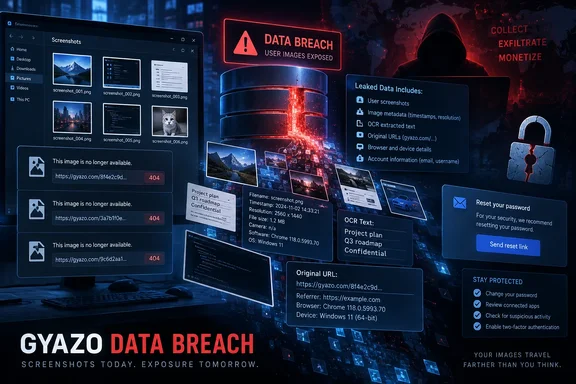
The company says it blocked the attack paths and fixed the exploited vulnerability by early September 12. But its September 16 disclosure, independently reported by BleepingComputer and SecurityWeek, makes clear that the containment work came after the intruder had reached Gyazo’s database and executed arbitrary commands on the affected systems.
For Windows users who have relied on Gyazo to capture support screenshots, bug reports, game clips, internal documentation, or ad hoc work files, the practical action is straightforward: change the Gyazo password now, change every password that was reused or even closely patterned after it, and assume that old Gyazo links may deserve review rather than continued casual sharing.
The count is records, not necessarily 23.62 million people
Helpfeel’s headline figure is approximately 23.62 million records containing Gyazo user data. That is an important distinction from 23.62 million confirmed individual victims. The company says the total includes anonymous-account records, some of which have no associated email address, and it is still determining the actual number of people whose personal information was disclosed.
That does not make the incident small. It means affected-user notifications will be incomplete by design: Helpfeel plans to contact reachable users through registered email addresses, while users of anonymous accounts will have to be notified through the Gyazo interface. Anyone who created an account years ago, used a disposable email address, or uploaded images without a normal registered profile should not wait for an alert before taking precautions.
The exposed user-data categories vary by account. Helpfeel lists names or nicknames, email addresses, password hashes, user and device IDs, login session IDs, profile data, registration and last-login information, subscription plan, billing status, and usage statistics. X integration tokens may be included for accounts linked to X, while Google sign-in users may have had their Google SSO email address exposed.
The company says payment-card numbers and other payment-method information were not exposed. That limits one form of direct financial risk, but it does not materially reduce the phishing and account-takeover risk created by a database containing email addresses, password hashes, account activity data, and identity-linked service details.
The image-metadata exposure is the harder problem to clean up
The most consequential detail in Helpfeel’s disclosure is that the attackers obtained metadata for roughly 490 million images, mainly images registered in or before January 2019. The official notice also adds another 2.4 million image-metadata records retrieved using more narrowly filtered criteria — a detail absent from many first reports but material to the total scope.
The metadata can include image IDs, upload IP addresses, browser User-Agent strings, EXIF location data if it was embedded in an image, OCR-extracted text, titles, source URLs, and hashes of passphrases used for private images. Gyazo says its image IDs can be used to construct the corresponding image URLs, creating a path to viewing affected material without authorization.
Helpfeel has responded by temporarily disabling viewing for some images. It resumed delivery for images uploaded after the post-incident countermeasures were completed, but older affected content may remain unavailable while the company limits secondary exposure. This explains why a Gyazo link that used to work may now fail even though the overall service is no longer uniformly offline.
The company says it has not confirmed the loss of image files themselves. That wording should not be mistaken for a guarantee that image contents are safe. Helpfeel separately confirmed that the attacker obtained a list identifying private images and said it cannot exclude the possibility that some private images were viewed. In practice, the distinction is between a confirmed bulk export of stored image files and the real possibility that exposed metadata enabled access to specific images.
For users, this is where the breach differs from a normal password-reset incident. Old screenshots commonly contain more than their creators remember: email addresses, ticket numbers, IP addresses, documents, browser tabs, QR codes, device names, serial numbers, game-account details, customer records, or snippets of source code. OCR data can make text inside a screenshot more searchable and usable to an attacker than the image itself would be.
Helpfeel disclosed the server role, but not the vulnerability
Helpfeel’s corporate incident report says the attacker exploited a vulnerability in Gyazo’s image-upload server, gained unauthorized access, and executed arbitrary commands. This is a meaningful admission: the breach was attributed to an exploited server-side weakness rather than to stolen customer passwords or an individual user’s compromised device.
Yet the company has not published a vulnerability identifier, software component, version range, technical root cause, indicators of compromise, or an explanation of how long the flaw was present. No CVE has been identified in the public disclosure. SecurityWeek likewise reported the arbitrary-command capability but did not identify the underlying defect.
For Gyazo users, that gap means there is no client update to deploy and no local Windows setting that can remediate the original intrusion. The vulnerable component was Helpfeel’s infrastructure. For security teams, however, the absence of technical indicators also means there is little basis to hunt for a related intrusion beyond monitoring for the follow-on abuse that breaches like this routinely enable: targeted phishing, password-spraying attempts against reused credentials, and suspicious sign-ins aimed at users whose identities or habits may be inferred from screenshot metadata.
Helpfeel says it has taken “necessary measures,” including invalidation or restrictions where appropriate, after reviewing the exposed authentication-related information. It has not said precisely whether all potentially exposed Gyazo sessions were invalidated, whether X tokens were rotated or revoked, or whether affected users must reconnect linked accounts. Users with X integration should review their connected-app permissions and watch for a more specific notice from Gyazo rather than assuming a password change alone resolves every token-related risk.
What Windows users and IT admins should do now
The priority is to reduce the value of the stolen data before it can be turned into access elsewhere. A password hash is not plaintext, but it can be subjected to offline cracking; more immediately, attackers can try passwords already known from other breaches against Gyazo accounts and try cracked or reused Gyazo passwords against other services.
- Change the Gyazo password and any reused or closely similar password on email, Microsoft accounts, Discord, Steam, GitHub, X, cloud storage, password managers, and work services.
- Review saved credentials in browsers and password managers for old Gyazo entries, including accounts created under alternate email addresses or nicknames.
- Treat unexpected Gyazo breach notices, password-reset prompts, and file-sharing messages as potential phishing attempts. Open Gyazo directly rather than following a link in an unsolicited message.
- Review old Gyazo links embedded in internal wikis, bug trackers, chat histories, technical forums, and support documentation. Replace screenshots containing credentials, customer information, infrastructure details, or other sensitive material when possible.
- Organizations that allow unsanctioned screen-sharing tools should search collaboration platforms and documentation repositories for Gyazo URLs, particularly links created before January 2019, then assess whether linked material contains secrets or regulated data.
- Users who connected Gyazo to X should check their X connected-app settings and pay attention to any account activity that follows this disclosure.
There is no reason to conclude from Helpfeel’s notice that Helpfeel or Cosense customer databases were also breached. Helpfeel says those services use different system architectures and that its investigation, as of September 16, found no unauthorized disclosure from those systems. Some images embedded there may still be unavailable because Gyazo image delivery was restricted.
The breach turns old screenshots into a live exposure issue
Helpfeel’s timeline shows the company detected suspicious activity on September 11, blocked access and remediated the flaw early on September 12, confirmed data disclosure on September 14, and began precautionary image-delivery restrictions before publishing its detailed notice on September 16. It also says it reported the matter to Japan’s Personal Information Protection Commission and is working with external specialists.
What remains unresolved is the exact reach of the attacker’s access. Helpfeel has not publicly identified the attacker, disclosed a ransom demand, released forensic indicators, or said whether data has been published, sold, or otherwise used. It has also not provided a definitive list of the private images that may have been accessed.
For now, the company’s most important technical confirmation is also the reason this incident deserves wider attention: Gyazo image links were often treated as disposable, low-risk sharing tools. The exposed metadata means a screenshot uploaded years ago can remain a present-day security problem, even after its owner changes a password.
References
- Gyazo server flaw exploited to steal 23.6 million user records BleepingComputer · 2026-09-18T12:00:38-04:00