

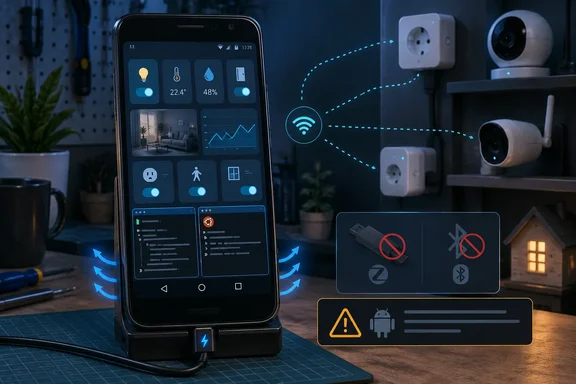
The distinction matters because the experiment’s two paths are not equivalent. The first used Home Assistant Container through Podroid, while the working second attempt used Termux, an Ubuntu userspace environment through proot-distro, and the Linux-Android project’s setup script to install Home Assistant Core in a Python virtual environment. The latter is the method that reached the author’s smart-home devices, loaded a restored configuration, and exposed the Home Assistant interface on the phone’s LAN address at port 8123.
That is a real achievement for discarded hardware. A 64-bit Android handset with adequate storage, a stable charger, and Wi‑Fi can perform many of the tasks people expect from Home Assistant: dashboards, standard integrations, automations, blueprints, and direct control of IP-connected devices. But the project also illustrates why “Home Assistant runs” is a much lower bar than “this is a dependable smart-home server.”
The working Android route is Home Assistant Core, not Home Assistant OS
The Linux-Android repository used in the experiment installs Home Assistant Core, the application itself, rather than Home Assistant OS or Home Assistant Container. The project’s script creates an Ubuntu environment under Termux, installs Python dependencies, builds a virtual environment, adds Home Assistant through pip, and writes a minimal configuration that binds the web server to 0.0.0.0.
This arrangement sidesteps the biggest obstacle to putting Home Assistant on an ordinary, non-rooted Android device: Docker is not a normal, fully privileged part of Android’s application model. Podroid can provide a Docker-like environment without root, and XDA Developers found that it could start the Home Assistant Container image and forward port 8123. But starting a web application is not the same as granting that application the network access it needs for device discovery and local integrations.
According to XDA Developers, the Podroid installation recognized the restored dashboards, device addresses, and credentials, yet it could not actually connect to the author’s smart-home hardware. That result is consistent with the difficult part of containerizing Home Assistant on Android: network namespaces, host networking, multicast traffic, and privileged access are central to many Home Assistant integrations. A command containing --network=host and --privileged may be accepted by a compatibility layer without providing the same host-level behavior it would on a conventional Linux machine.
The Termux route improves the odds because it runs Home Assistant closer to the Android user-space network stack and explicitly configures the server to listen on the phone’s network interface. It is still a compromise. proot is a userspace compatibility layer, not a virtual machine or a replacement Linux kernel, and the installation script itself patches Home Assistant’s network-interface handling to avoid an Android-related failure.
That patch is the most important detail missing from the casual “old phone server” pitch. The setup script changes the behavior of the ifaddr library because Android 10 and later restrict access that Home Assistant normally uses to inspect network adapters. In other words, the installation works partly because the script works around a known platform mismatch; it does not make Android behave like a supported Linux host.
The experiment’s biggest caveat is official support, not performance
XDA Developers correctly identified the central problem with the Termux installation: Home Assistant Core is no longer an officially supported installation method. The Open Home Foundation announced the deprecation of Core and Supervised installations on May 22, 2025, gave existing users a support window through Home Assistant 2025.12, and directed new installations toward Home Assistant OS or Home Assistant Container.
As of September 16, 2026, that support window has long passed. Home Assistant’s current installation guidance treats Home Assistant OS and Home Assistant Container as the supported choices; older references to Core and Supervised are explicitly described as no longer offered or supported.
That does not mean a Core installation instantly stops running. It means an Android owner who hits a regression, dependency failure, integration breakage, or upgrade issue is outside the project’s supported path. The difference is practical: a Home Assistant OS user can use the project’s normal backup, update, app-management, and troubleshooting workflows, while a Termux user may need to diagnose Python packages, Ubuntu userspace behavior, Android battery controls, and a community setup script at the same time.
The article also blurs two different Home Assistant extension models that administrators should keep separate. Apps—formerly called add-ons—are managed packages such as ESPHome Device Builder, Node-RED, and certain backup or network services. They require the Supervisor layer supplied with Home Assistant OS, and they are not part of a Core or Container deployment.
HACS is different. It is a community distribution mechanism for integrations, frontend cards, and themes. The Linux-Android project says its script can offer a HACS installation, so calling HACS an unavailable “app store” would be misleading. Installing HACS does not restore Home Assistant OS apps, does not supply Docker, and does not solve Android’s USB, Bluetooth, or discovery restrictions. It can, however, provide selected custom integrations and dashboard components if their dependencies work in the Termux environment.
For users restoring a backup from Home Assistant OS, this separation explains why the dashboards and much of the configuration can reappear while app-backed functionality does not. A backup can carry configuration and data, but it cannot turn a Core deployment into a Supervisor-managed appliance.
Android blocks several integrations before Home Assistant gets a chance
The Linux-Android project lists three structural limits that should decide whether this is a viable deployment: Bluetooth access, USB radio dongles, and multicast discovery.
First, Home Assistant under Termux cannot simply commandeer the phone’s built-in Bluetooth radio. A handset having Bluetooth hardware does not mean an application running inside a proot Ubuntu environment can access Android’s Bluetooth stack as a Home Assistant adapter. That rules out a significant class of local devices, including many BLE sensors, Bluetooth proxies, trackers, and nearby smart-home accessories.
Second, Zigbee and Z-Wave are usually deployed through USB coordinators. On a normal Home Assistant OS box, a coordinator can be passed through directly to the host. On an unrooted Android phone, a Termux-based Core installation generally lacks the required USB device access and kernel support. The result is that the phone can be an IP-device hub, but it is a poor choice for a radio-controller hub.
Third, automatic discovery is impaired. The Linux-Android setup notes that Android 10+ restrictions interfere with the network information needed for Zeroconf and mDNS discovery. XDA Developers encountered the consequence: without a restored configuration, many devices would need to be added manually by address or through their cloud integrations.
For a small deployment of Wi‑Fi plugs, lights, cameras, or cloud-connected services, manual setup may be tolerable. For a household with Matter devices, local multicast discovery, Bluetooth sensors, Zigbee coordinators, and frequent hardware additions, it turns a convenience platform into an ongoing maintenance task.
A phone needs server discipline to remain useful after setup
The reported responsiveness of the Termux installation is encouraging, but UI speed should not be mistaken for availability. A phone used as a server needs its display-independent processes to remain alive, stay on the local network, and recover predictably after interruptions.
The Linux-Android project addresses part of that with Termux wake locks and a background launch command. A wake lock can prevent Android from suspending the process under ordinary conditions, but it does not grant the kind of appliance-style lifecycle control that Home Assistant OS provides. Android’s battery-management policies, vendor-specific background restrictions, Wi‑Fi power-saving behavior, reboots, app updates, and a failing charger remain operational risks.
A careful user treating this as a real service should at minimum test it under the failures that matter:
- The phone should remain reachable from another device after the screen has been off for several hours.
- Home Assistant should still start after a power interruption or a deliberate reboot.
- The handset should be kept on reliable power, with battery swelling and sustained heat monitored rather than ignored.
- Every critical integration should be tested from a cold start, especially devices added by IP rather than automatically discovered.
- Backups should be exported to another machine because the phone is both the server and a consumer device with a relatively fragile storage and power profile.
There is a useful role here for an old Android handset: a low-cost training system, a travel kit, a short-lived migration bridge, or a secondary dashboard-and-automation node for network-only devices. It can also be a viable stopgap for someone who needs basic Home Assistant functions before buying or repurposing supported hardware.
But the experiment does not establish that an Android phone is a substitute for a dedicated Home Assistant appliance. It establishes something narrower and more valuable: with Termux and a community script, an old phone can host Home Assistant Core well enough to control many IP-based devices—provided the owner accepts manual discovery, no managed apps, no practical Bluetooth or USB radio support, and no official support path when the workaround breaks.
References
- I turned my old Android phone into a Home Assistant server, and it actually works XDA · 2026-09-16T14:01:15+00:00