

One thing to know first: this is a commercial roundup. It's full of provider links and promotional prices, and Gizmodo says it may earn commissions. The test numbers are still worth reading. Treat the rankings as one outlet's measurements from one location, and treat the prices as examples that will change.
The test setup
Gizmodo ran every test from a Windows 11 PC in Europe on a 190.36 Mbps line with 10 ms of baseline ping. It tested five services: NordVPN, ExpressVPN, Surfshark, Proton VPN and Private Internet Access (PIA). The main comparison used Vienna servers. The "cloud gaming latency" figure is the number Xbox Cloud Gaming shows in its own stream stats in a browser, not a separate speed test.
| VPN | Vienna download | Vienna ping | Cloud gaming latency | Smart DNS |
|---|---|---|---|---|
| NordVPN | 177.96 Mbps | 38 ms | 72 ms | Yes |
| ExpressVPN | 181.62 Mbps | 24 ms | 68 ms | Yes |
| Surfshark | 179.91 Mbps | 20 ms | 63 ms | No |
| Proton VPN | 179.86 Mbps | 21 ms | 70 ms | No |
| PIA | 147.06 Mbps | 22 ms | 69 ms | Yes |
Compared with the 190.36 Mbps baseline, four services lost roughly 5–6.5% of download speed. PIA lost 22.7%, and that was over WireGuard.
Section summary: The results come from one European test bench. They show the trade-offs clearly, but they won't necessarily hold for your ISP, your region or your server.
Each pick, and its drawback
NordVPN: best for distant servers
- Lowest average ping in Gizmodo's UK/US/Japan round: 130 ms, including 215 ms to Japan.
- Fastest US download measured: 181.50 Mbps.
- Drawback: the highest nearby ping (38 ms in Vienna) and the highest cloud stream latency (72 ms). The tester noticed slightly more input delay, which competitive players may feel.
- A Windows issue to watch: the NordVPN app sometimes wouldn't connect while other VPN software was installed on the PC. If that PC is sharing its connection with your Xbox, the console goes offline too. If you're trialling several VPNs on one machine, keep that in mind.
ExpressVPN: best for router setup
- Fastest Vienna download (181.62 Mbps), 24 ms ping, 68 ms stream latency. The Windows app connected within two seconds in Gizmodo's tests.
- The main draw is the new Fortify router. ExpressVPN's announcement says it runs on GL.iNet's Flint 2 platform with Wi-Fi 6 AX6000, 4×4 MU-MIMO, two 2.5GbE ports and support for up to 86 devices at once. It claims VPN speeds of up to 900 Mbps on WireGuard, compared with 330 Mbps on Aircove. ExpressVPN notes that figure comes from controlled local tests, and real speeds depend on the server, ISP and network conditions.
- The company lists an MSRP of $199.99, sold through GL.iNet from September 16. The bundle includes 12 months of its Advanced plan for new and returning users.
- Aircove owners: Aircove and Aircove Go are no longer sold, but ExpressVPN says Aircove gets critical security updates and support through 2027 and Aircove Go through 2028.
Surfshark: best for cloud gaming latency
- Lowest Vienna ping (20 ms) and lowest stream latency (63 ms). Streams ran without drops or noticeable input delay in Gizmodo's test. There's no device limit.
- Drawback: no Smart DNS, so you're limited to PC sharing or a router. In an earlier round its UK server was also slower (51 ms against NordVPN's 41 ms), which is another reminder that rankings shift by location.
Proton VPN: best for privacy
- Secure Core sends traffic through servers in privacy-friendly countries before it reaches your chosen exit server. Gizmodo measured a 12.1% speed loss from Switzerland to the US with it on. VPN Accelerator added 4.9% to US speeds.
- Vienna: 179.86 Mbps and 21 ms. Stream latency was 70 ms, with slight input delay that fast multiplayer games could show.
- No Smart DNS.
PIA: best budget option
- The cheapest of the five in Gizmodo's pricing (under $2 a month on a 26-month plan), with no device limit and Smart DNS. The server list shows the ping to each location, which helps you choose before a match.
- Two drawbacks: the 22.7% download drop, and a kill switch that let unencrypted traffic out after a PC restart in Gizmodo's testing. If you're sharing a PC's connection with your console because you want privacy, that second one matters more than the price.
Section summary: Pick NordVPN for lobbies on other continents, Surfshark for nearby servers and cloud streaming, ExpressVPN if you'd rather not keep a PC running, Proton for multi-hop privacy, and PIA if price matters most and you can live with its caveats.
How to share a VPN from Windows to your Xbox
These are the Internet Connection Sharing steps Gizmodo gives. The PC or laptop has to stay on and connected to the VPN the whole time you play.
Over Wi-Fi (a laptop, or a desktop with a Wi-Fi adapter)
- Open Settings → Network & internet and turn on Mobile hotspot.
- Set Share my internet connection from to Wi-Fi.
- In Control Panel, open Change adapter options, right-click the VPN adapter and choose Properties.
- On the Sharing tab, tick Allow other network users to connect through this computer's Internet connection.
- Under Home networking connection, choose the Local Area Connection entry with an asterisk in its name. That's the hotspot's virtual adapter.
- Connect the VPN to a server, then join the hotspot from the Xbox.
Over Ethernet (lower latency)
- Connect the Xbox to the PC with an Ethernet cable.
- Open Network and Sharing Center → Change adapter settings.
- Right-click the VPN adapter, choose Properties, and tick the sharing box on the Sharing tab.
- Under Home networking connection, pick Ethernet and click OK.
- Connect the VPN.
On a Mac, the equivalent is System Settings → General → Sharing → Internet Sharing. Choose the VPN connection as the source and Ethernet as the destination.
Check that it worked
Open Microsoft Edge on the Xbox and load any IP-check page. It should show the VPN server's country, not yours.
If it doesn't work
This part is general Windows knowledge, not from Gizmodo's testing:
- Windows only lets one adapter share at a time. If you enabled sharing on another adapter earlier, turn it off there first.
- Adapter names vary by VPN client and protocol. Some clients create adapters with generic or protocol-specific names, and not all of them expose a Sharing tab the same way. Check your provider's current documentation before assuming the setting is broken.
- Running more than one VPN client on the same PC can cause connection failures. Gizmodo saw this with NordVPN.
Section summary: PC sharing works, but it ties your gaming session to a PC that has to stay on. A VPN router removes that dependency, although ISP-supplied routers rarely support VPN setup.
Smart DNS changes your region, not your privacy
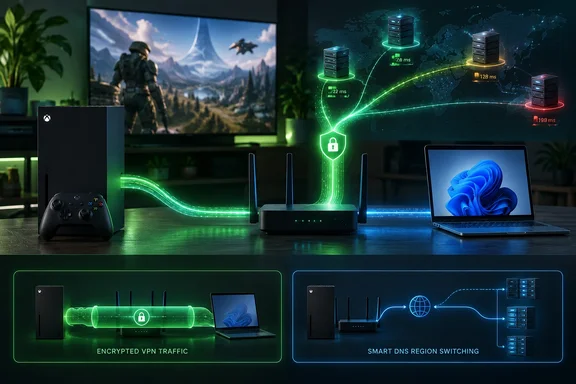
NordVPN's SmartDNS, ExpressVPN's MediaStreamer and PIA's Smart DNS can change which region streaming apps on the Xbox think you're in, without a PC or router. You register your home IP address in your VPN account, then enter the DNS addresses it gives you under Settings → General → Network settings → Advanced settings → DNS settings → Manual. The same menu is where public resolvers like Cloudflare (1.1.1.1 / 1.0.0.1) or Google (8.8.8.8 / 8.8.4.4) go, on Series X/S and Xbox One.
Two caveats matter:
- Smart DNS doesn't encrypt traffic and doesn't hide your IP address from other players. It's only useful for streaming apps.
- Changing DNS can speed up lookups, but it doesn't reduce your ping to a game server.
Xbox Cloud Gaming through a VPN
Gizmodo's most notable claim is that Xbox Cloud Gaming loaded over all five VPNs on a Vienna server, from a European country where the service isn't offered. Its team also subscribed over Austrian and US IP addresses using a card issued in a country without cloud gaming. Both payments went through, and after that the service worked from any supported country. By Gizmodo's account, the region check happens when you play, not when you sign up.
Background worth knowing:
- Microsoft's own count is 29 countries. Xbox Wire gave that figure in November 2025, when the service expanded to India. Availability can change, so check Xbox's region list rather than assuming it's fixed.
- Stream latency in Gizmodo's test was 63–72 ms, against 20–38 ms of plain VPN ping. The video stream has to travel past the VPN server to Microsoft's cloud servers.
- Microsoft's terms don't allow misrepresenting your location, and Gizmodo says so itself. Using a VPN this way is your risk, not a supported feature.
The November caps
Cloud time is also getting rationed. Microsoft announced on Xbox Wire that starting in November, Game Pass plans will include a set number of cloud gaming hours each month: Game Pass Ultimate: 15 hours · Game Pass Premium: 10 hours · Game Pass Essential: 5 hours. Microsoft says it expects this upcoming change to impact 4% of Game Pass subscribers, and once subscribers use their included hours, they will be able to purchase additional cloud playtime through the XBOX Store. According to Gadget Hacks, the cap only touches cloud streaming, and downloaded games have no playtime limit.
Gizmodo describes the caps as applying to new subscriptions. Microsoft's announcement presents them as a change to the Game Pass plans in general. Check your own plan instead of assuming you're exempt. Either way, for someone outside the supported countries, a VPN subscription plus Ultimate now buys about 15 hours of streaming a month before extra charges.
What a VPN actually does for Xbox
- IP privacy: in peer-to-peer lobbies, other players see the VPN server's IP address instead of yours, which makes DDoS attacks against your home connection harder.
- Regional access: cloud gaming, streaming apps and some store content follow your IP address's country.
- Throttling: encryption hides the type of traffic, so an ISP can't slow gaming traffic by type. It won't fix a congested line.
- Ping: usually worse, not better. Vienna servers took Gizmodo's 10 ms baseline to 20–38 ms. A VPN only lowers ping when your ISP's own routing to a game server is poor.
Free options
Gizmodo also tested two free plans through PC sharing. Proton VPN Free has unlimited data and no ads, and its kill switch worked, but it picks your server country for you from ten. That makes it poorly suited to low ping or choosing a supported cloud gaming country. PrivadoVPN Free lets you choose from ten countries and measured 37 ms to the UK. Its 10 GB monthly allowance has to be renewed manually and drops to 1 Mbps once used up, and cloud gaming will use it quickly.
Bottom line
Gizmodo's testing supports a simple rule: choose based on where your games are hosted, not on which provider has the biggest promotion. For Windows users, the practical options are Internet Connection Sharing from a PC or a dedicated VPN router, with Smart DNS reserved for streaming apps. Cloud gaming through a VPN appears to work in Gizmodo's tests, but it breaks Microsoft's terms, adds latency, and from November it runs against monthly hour caps.
References
- Best VPN for Xbox One and Series X/S in 2026: 5 Tested - gizmodo.com gizmodo.com · 2026-09-28T20:00:05+00:00
- Fortify: ExpressVPN’s New Router With GL.iNet expressvpn.com
- Xbox Cloud Gaming with Game Pass Up 45%, Now Available in Nearly 30 Countries - XBOX Wire news.xbox.com