

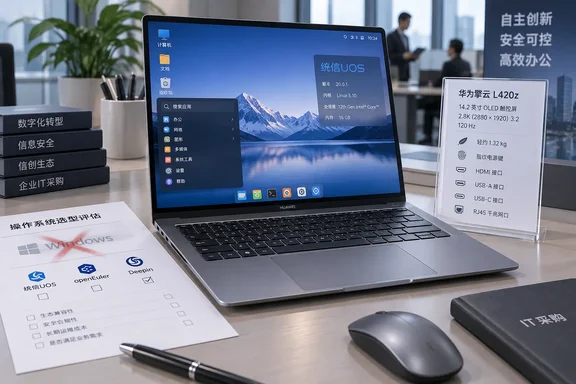
Notebookcheck first reported the L420z launch, while Huawei’s Qingyun product pages confirm the core hardware claims. Gizmochina and Chinese outlet CNMO have also reported the model’s appearance. The evidence supports a new L420z designation; it does not yet show a clearly new platform underneath it, nor does it establish a price, a shipping date, or availability outside China.
Huawei is positioning the machine in the commercial-PC segment, where operating-system support, application compatibility and fleet-management tooling outweigh a good display spec sheet. For organizations running Windows applications, the L420z should therefore be treated as a China-focused Linux desktop deployment, not as a conventional Windows ultrabook or a drop-in MacBook Neo alternative.
The 120 Hz claim comes with a factory-default catch
The Qingyun L420z has a 14.2-inch, 2880 × 1920 OLED touch panel with a 3:2 aspect ratio, 450-nit rated brightness, 100% sRGB and P3 color-gamut modes, and a claimed average Delta E below 1 after factory calibration. Huawei also claims TÜV eye-comfort certification and 1,920 Hz PWM dimming.
The 120 Hz number is real, but it is not the out-of-box operating mode. Huawei’s product page says the display leaves the factory at 60 Hz, with the option to switch to as high as 120 Hz. It further warns that actual refresh behavior varies by application. That is a sensible power-saving default for a business notebook, but it means prospective buyers should not interpret the launch material as a promise that every desktop task, video stream or Linux application will render at 120 Hz.
For office productivity, the difference may be modest outside scrolling and pointer movement. For organizations considering the machine for design review or presentation work, the more consequential feature is likely the 3:2 2.8K OLED panel and its color modes—provided their chosen Linux distribution and graphics stack expose the panel’s refresh-rate and color-management controls correctly.
Huawei’s quoted 14-hour battery life is video playback, not a working day
Huawei rates the 70 Wh lithium-polymer battery for more than 14 hours of local 1080p video playback. Its own test conditions are specific: a 16 GB memory and 512 GB storage configuration, display brightness at roughly 150 nits, and video played through the system’s default player. Huawei separately lists about 10 hours of web browsing.
Those details put the headline in context. A local-video test is useful for comparing vendor claims under a controlled workload, but it does not predict battery life during video calls, browser-heavy workflows, virtual private network use, development tools or external-display work. OLED power consumption also varies substantially with content brightness and color.
The L420z does offer one practical advantage for road workers: Huawei says 15 minutes on its original charger can replenish 25% of the battery, and the system can use compatible phone chargers for top-ups. The company has not published the charger wattage or a full charge-time figure in the material reviewed, so a short-charge claim should not be confused with a complete charging specification.
The operating system is the bigger specification
Huawei lists Galaxy Kylin Desktop Operating System V10 and UnionTech Desktop Operating System V20 as supported operating systems. Neither Huawei’s launch page nor its detailed specifications list Windows. That omission is central, particularly for readers accustomed to treating thin, metal-bodied laptops with USB-C, HDMI and Ethernet as interchangeable Windows hardware.
Galaxy Kylin and UnionTech UOS are Chinese desktop Linux platforms used in domestic computing initiatives and commercial deployments. A business that relies on Windows-only endpoint-management agents, Microsoft 365 desktop features, Active Directory-dependent line-of-business software, specialized peripherals, or x86 Windows applications should not assume compatibility from the hardware alone. Huawei also does not identify the L420z processor, leaving open fundamental questions about architecture, Windows support, driver availability and performance.
The company markets the machine around “independent” computing capabilities, and the absence of a CPU disclosure is conspicuous in that context. Earlier Qingyun L420-family systems have been associated with Huawei’s Arm-based Kirin 9006C, but Huawei has not confirmed that chip—or any successor—for the L420z. It would be premature to assign a processor based on its predecessor’s history.
For IT administrators, the immediate procurement rule is simple: require a full configuration sheet that identifies the CPU, firmware policy, storage interface, Wi-Fi chipset, supported operating-system image, device-management method and commercial support terms. The published product page is not enough to validate a fleet purchase.
This looks closer to a revision than a wholesale redesign
Huawei describes the L420z as the successor to the Qingyun L420x, but many of the advertised figures closely mirror the previous model’s published specifications. Huawei’s L420x materials also describe a 14.2-inch 2.8K OLED display, 120 Hz support, a 70 Wh battery, up to 14 hours of local video playback, and a chassis measuring 312.6 × 226.8 × 14.5 mm at about 1.32 kg.
That does not prove the L420z is merely a rebadge. Internal components, board design, security features, memory configurations and supply-chain sourcing can change without appearing in a marketing comparison. It does mean the current announcement has not demonstrated a generational leap in the areas Huawei is emphasizing.
The port layout remains more enterprise-friendly than that of many premium thin laptops: one USB-C port, two USB-A ports, HDMI, 3.5 mm audio and wired Ethernet through a compact RJ45 arrangement. Huawei also lists a physical privacy switch, fingerprint reader integrated into the power button, 720p webcam, backlit keyboard, dual microphones and dual speakers. Those features suit managed office deployments, but they do not resolve the unanswered processor and platform questions.
The MacBook Neo comparison only goes so far
Notebookcheck frames the Qingyun L420z as a MacBook Neo alternative, largely on its compact all-metal construction and portable dimensions. Apple’s MacBook Neo is lighter, at roughly 1.23 kg, while the L420z counters with a larger 14.2-inch OLED touchscreen, native HDMI, USB-A and Ethernet.
The comparison breaks down at software and procurement. Apple sells the MacBook Neo as a mass-market macOS laptop built around its A18 Pro chip. Huawei has listed the L420z with domestic Linux operating systems and has withheld the identity of its processor. They may occupy adjacent physical categories, but they serve substantially different software environments and buying channels.
Huawei has not published L420z pricing or said whether it will reach markets beyond China. Until it does, the machine’s strongest confirmed story is its display-and-battery package—not a proven new computing platform, and not a Windows-ready answer to Apple’s entry-level Mac.
References
- Huawei unveils new MacBook Neo rival with 120 Hz OLED display and 14 hours of battery life Notebookcheck · 2026-09-18T18:46:00+00:00