

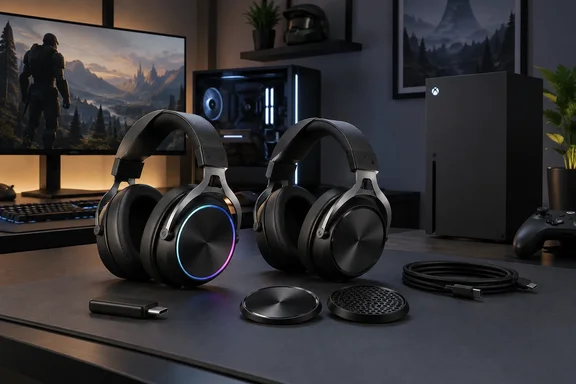
The findings come from one reviewer, and there is a disclosure to keep in mind. SoundGuys says it tested the HyperX CloudX Flight 2 Wireless over a period of 2 weeks. It was running firmware version 3.1.0.6, and the NGENUITY app ran version 6.1.2.9. It also states that the company provided the unit for this review, and this review was expedited as part of a paid collaboration with HyperX. The outlet says HyperX did not preview or approve the piece. Below, the review's observations are checked against HyperX's own product listing wherever they overlap.
HyperX CloudX Flight 2 Is the Xbox-Licensed Branch of the Cloud Flight 2 Line
The naming is confusing. HyperX sells two models: the Cloud Flight 2 and the CloudX Flight 2. The CloudX model is the Xbox-licensed version. HyperX describes it as officially licensed for Xbox, easily toggle between Xbox and PC modes with a switch on the USB wireless dongle. The company says it was designed for seamless compatibility with Xbox Series X|S and Xbox One consoles.
The standard Cloud Flight 2 goes after PC owners in a different way. HyperX says its Instant Pair support lets you connect to select OMEN laptops without a dongle, while a simple switch toggles between 2.4 GHz wireless and Bluetooth modes. If you mainly game on Windows and never touch an Xbox, the lettering on the box matters. The X model's selling point is its dongle, which switches between Xbox and PC modes.
The Xbox license does not lock the headset to Xbox. The SoundGuys reviewer says it also works well with PC, PlayStation, Switch, Mac, and mobile devices. They also report that other consoles, such as the Nintendo Switch, PlayStation 4, and PlayStation 5, are also supported. The review describes that console support in general terms only. It does not walk through pairing on each platform or check that every feature works the same everywhere.
Release timing and retail identifiers help if you are comparing store listings. SoundGuys gives a release date of December 1, 2025, and an original price of $139.99. Best Buy lists the black Xbox model under MPN: B5VC6AA#ABA , UPC: 198990148342, with a comparable value of $139.99.
Two Radios and No Cable Define the CloudX Flight 2 Connection Story
The headset connects two ways. SoundGuys reports that for console support, the HyperX CloudX Flight 2 Wireless can be connected to the Xbox Series X and S, and has an official Xbox license. Beyond consoles, the reviewer connected it to a phone and a gaming PC with no problems. Over Bluetooth, the review lists SBC and AAC codec support. HyperX pitches Bluetooth for secondary jobs: you can enter Bluetooth mode on the headset to take calls or stream media on your mobile devices.
The dongle has a USB-C plug, and HyperX bundles an adapter. According to the Amazon listing, the box contains a Wireless Gaming Headset, Detachable Microphone, Wireless Dongle, USB-C to USB-A Adapter, USB-C Charge Cable, Quick Start Guide. That covers both older PCs with only USB-A ports and newer devices with USB-C.
The limitation that affects daily use most is simple: there is no wired audio. The reviewer puts it plainly. There is no wired connection option, so when the battery runs out you need a charger before you can keep playing. SoundGuys lists this among its main dislikes, next to short battery life with RGB on. Many rival wireless headsets let you plug in a 3.5 mm cable when the battery dies. This one does not, so battery management is part of owning it.
Battery Life on the CloudX Flight 2 Hinges on One Lighting Decision
HyperX's battery figures are generous, and they come with a large condition attached. The company says to turn the lighting off to conserve battery and keep going with up to 100 hours of 2.4 GHz gameplay or 150 hours via Bluetooth. HyperX frames the 100-hour number as play 4 hours a day for 25 days.
Turning on the lighting changes those numbers a lot. HyperX's product page says you can maintain full RGB glow for up to 23 hours. SoundGuys breaks this down by connection type. It reports HyperX's claims as 20 hours over 2.4 GHz and 23 hours over Bluetooth with RGB on. Across the two sources, full lighting cuts runtime by roughly 80 percent or more compared with lighting off.
All of these are manufacturer claims. SoundGuys does not publish a measured runtime from its own testing. The reviewer's assessment is that battery life is plenty as long as you don't leave RGB on all the time, and that heavy users should still get more than a week per charge with lighting off. HyperX's official specifications list a charge time of under 3.5 hours.
Since there is no wired fallback, the lighting setting is effectively a battery decision. Someone who keeps RGB on, games every evening, and forgets to charge will run into a dead headset. With the lighting off, the same person may charge only a few times a month.
NGENUITY Unlocks the CloudX Flight 2's EQ, Mic Tuning and a Lighting Quirk
On Windows, most of the headset's adjustable settings live in HyperX NGENUITY. SoundGuys says the app enables HyperX's spatial audio, which turns a 2.0 stereo signal into virtual surround sound. It also offers custom EQ. There are no presets, though, so you have to build your own. The simple EQ mode has five bands, and the advanced mode is a full 10-band parametric EQ, which the reviewer calls good for people who know how to make precise changes.
The microphone settings go further than the headphone settings. The app offers three mic presets (High boost, Mid boost and Low boost) along with noise canceling, compression and a limiter. NGENUITY also controls RGB color and brightness and the automatic shut-off timer. The reviewer liked that setup didn't pile on pop-ups.
The one inconsistency is in lighting behavior. The reviewer found that RGB settings did not carry over after powering the headset down and switching to Bluetooth. If you want the lighting off, they advise connecting to NGENUITY so the change takes effect. HyperX's marketing says something different: you can save one profile onboard via HyperX NGENUITY2 software to match any stream theme or setup. The two statements may describe different scenarios, for example saving a lighting profile versus keeping it through a switch to Bluetooth, or they may depend on firmware version. Neither source settles it. The reviewer was on firmware 3.1.0.6 and NGENUITY 6.1.2.9, so later updates could behave differently.
HyperX's own marketing refers to "NGENUITY2" for the CloudX model, while the review simply says NGENUITY. According to the research notes, HyperX says the legacy NGENUITY app supports Windows 10 and newer versions target Windows 11 and later. Before buying, Windows 10 users should confirm which app version controls this headset.
Build, Controls and Isolation Suit a Quiet Room, Not a Commute
The review describes a plastic body with a metal headband. The metal stays visible even at the smallest size setting, which the reviewer thinks makes the headset look more expensive than it is. The earcup plates come off to reveal the RGB panels. HyperX describes them as removable magnetic earcup plates, backed by full-panel RGB lighting, allow you to quickly change the look without tools. The stepped headband sliders were loud and clicky in the reviewer's testing.
At 335 grams the headset is not light. Even so, the reviewer did not feel pressure on top of the head and could wear it comfortably for about four hours at a time. Heat was the problem, not weight. The leatherette earpads build up warmth and can feel a bit sticky in a hot room. That was one person's experience over two weeks, and fit varies with head shape and room temperature.
The onboard controls are a mute button, a power button, a multifunction button and a scroll wheel. Pressing the wheel toggles it between game volume and chat volume, so you can rebalance audio without digging into console menus. HyperX lists onboard controls for audio, microphone, game/chat mix, media, and lighting.
For noise, the headset relies on passive isolation only. There is no active noise cancellation. SoundGuys' measurements show treble reduced more than mids and bass, which is typical of passive isolation. High-pitched sounds get dulled, but low rumble comes through. The reviewer concludes the headset suits quieter indoor use best. The microphone's strong noise rejection, covered below, is a different feature. It cleans up your voice for teammates and does nothing to block noise from reaching your ears.
SoundGuys' Measurements Point the CloudX Flight 2 Toward Casual Play
The reviewer's listening verdict is clear. They find the sound great for action-adventure games, but not as strong for FPS gaming compared to higher-end headsets. HyperX says the headset uses angled 50 mm drivers.
SoundGuys' frequency-response measurements help explain that verdict. The review reports a bump below 30 Hz, which most people barely hear. It also notes a slight dip around 55 Hz that reduces rumble, then a small bass lift around 80 Hz. In the treble, a dip at 3.5 kHz can make voices sound a little farther away, and a rise near 7.5 kHz makes sibilant sounds such as cymbals stronger. SoundGuys cautions that its target curve was designed for music, not gaming, so it is a reference point, not a gaming benchmark.
The same caution applies to SoundGuys' Multi-Dimensional Audio Quality Scores (MDAQS), a music-oriented rating system. The headset's overall score of 2.6 is somewhat lower than most gaming headsets the outlet has tested. The reviewer is not worried about the low Timbre subscore, given what MDAQS is designed for, and reads the good Distortion and Immersiveness results as a sign that the drivers perform adequately. These scores do not predict how well you can place footsteps in a particular competitive shooter.
The microphone was the headset's strongest result. The review describes speech that is intelligible, though sometimes a little muffled, and background noise rejection strong enough that noise is almost entirely removed. The reviewer calls it one of the best mics to use in a noisy environment. HyperX notes you can use the detachable 10 mm boom mic for clear communications or go boomless with the built-in mic when you're off duty.
Who Should Buy the HyperX CloudX Flight 2 at $139 or $99
If you want this headset, the main decision is timing: buy on sale, not at full price. SoundGuys says the $139 list price leaves room to find better value elsewhere if Xbox certification and RGB don't matter to you. It adds that the headset is often on sale for about $99, and at that price it becomes an easy recommendation for console gamers. Sale prices change constantly, so treat the $99 figure as what SoundGuys observed, not a guaranteed price.
The strongest fit is someone who plays on an Xbox Series X|S and a Windows PC and wants one wireless headset for both. That person can use the dongle's Xbox/PC mode switch and set up EQ and mic processing in NGENUITY on the PC. Competitive FPS players, people who want to block noise on public transport, and anyone who needs a wired fallback have clear reasons to look elsewhere.
- The CloudX Flight 2 is the Xbox-licensed model with an Xbox/PC switch on its dongle. The standard Cloud Flight 2 targets PCs, including dongle-free Instant Pair with select OMEN laptops.
- HyperX claims up to 100 hours over 2.4 GHz and 150 hours over Bluetooth with the lighting off, and roughly 20 to 23 hours with full RGB. These are manufacturer figures, not measured results.
- There is no wired audio mode, so a flat battery means stopping to charge. HyperX lists a charge time of under 3.5 hours.
- NGENUITY provides custom 5-band or 10-band EQ but no presets, plus mic boost presets, noise canceling, compression and a limiter.
- The reviewer found RGB settings did not survive a power cycle and switch to Bluetooth, even though HyperX advertises one onboard lighting profile. Check this behavior on current firmware if dark mode matters to you.
- SoundGuys recommends buying for casual and action-adventure play, ideally near the $99 sale price and not the $139.99 list price.
The HyperX CloudX Flight 2 Wireless earns its place as a practical Xbox-and-PC headset, not as a benchmark for audio quality. Its value depends on a few choices you make yourself: whether you run the lighting, whether you ever need a cable, and whether you wait for a sale. The unresolved question about lighting persistence also depends on firmware, so NGENUITY updates beyond version 6.1.2.9 and firmware beyond 3.1.0.6 are what could change the one oddity this review found.
References
- HyperX CloudX Flight 2 Wireless - The best gaming headset for console gamers? - SoundGuys SoundGuys · 2026-09-22T19:40:03+00:00
- HyperX CloudX Flight 2 – Xbox Wireless Gaming Headset hyperx.com