

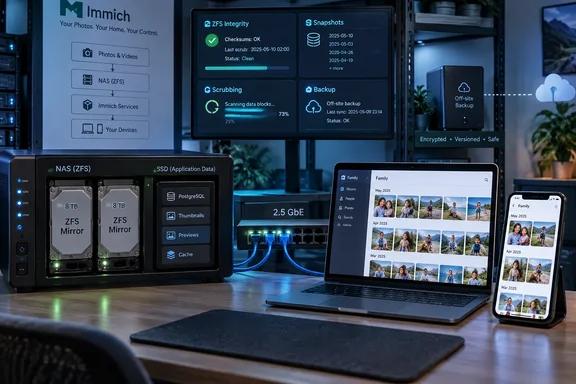
The useful takeaway for Windows and home-lab administrators is narrower and more practical. Immich does not spend most timeline browsing repeatedly reading original 20 MB JPEGs, RAW files, or multi-gigabyte videos. Its own documentation says it creates separate small thumbnails for the timeline and larger previews for the asset viewer, while generated thumbnail and preview files live in a dedicated thumbs area. The originals remain important, but they are not necessarily the files determining whether somebody’s phone scrolls smoothly through a family album.
That changes the storage question. A pair of 7,200 RPM disks can feel fast enough for a few simultaneous Immich users because the routine workload is a mix of database queries and comparatively small preview reads, rather than sustained sequential reads from originals. The original author’s reported 220–230 MB/s over 2.5GbE is also close to the practical ceiling of that network link once protocol overhead is included. Installing a PCIe 5.0 SSD behind the same 2.5GbE connection would improve neither a large remote copy nor a client downloading at the link limit.
The part worth challenging is the implication that fast storage is broadly “wasted.” It can be wasted for the original-photo tier in a lightly used library. It is much less wasted for the database, thumbnail cache, upload staging area, or a machine asked to ingest and process a large historical archive. Immich’s TrueNAS guidance specifically recommends SSDs for its database, a distinction that gets lost when a NAS is treated as one undifferentiated pile of files.
Immich’s visible performance path is built around derivatives
Immich’s architecture explains why storage benchmarks often fail to predict gallery responsiveness. The project documents separate workers for the web/API service and background work such as thumbnail generation, metadata extraction, video transcoding, Smart Search, and facial recognition. A newly uploaded asset enters a chain of jobs rather than becoming instantly ready in every sense.
The main timeline uses thumbnails, and opening an individual image normally uses a preview. Immich’s current settings describe three generated image derivatives: a blurred thumbhash, a small thumbnail, and a larger preview. The application can also use previews as inputs to machine-learning work. That design avoids repeatedly shipping a camera-original image to a browser simply to draw a grid of tiny squares.
For routine browsing, then, storage latency still exists, but it is one contributor among several:
- The browser or mobile app needs a response from Immich’s API and PostgreSQL before it knows which assets to request.
- The server must read thumbnail files, which may be cached in RAM by the operating system after repeated use.
- The network connection caps the rate at which a remote device can receive data.
- Preview generation, video transcoding, face detection, and semantic search occur outside the ordinary browsing request path and can compete for CPU, GPU, memory, and disk I/O during heavy ingestion.
Immich’s own job documentation identifies thumbnail generation and video encoding as background work, while its architecture separates machine-learning processing into a dedicated service that can run elsewhere. Hardware acceleration can help particular machine-learning and video workloads. A faster array alone cannot make an overloaded CPU or a saturated ML worker finish indexing a backlog sooner.
This is why a new NAS can feel “slow” just after importing years of photos even if the disks benchmark well. The library is waiting for derivative generation, metadata extraction, vector indexing, face recognition, and possibly video transcoding. Benchmarking raw sequential throughput does not measure that queue.
ZFS provides the protection ext4 and NTFS do not provide for file data
The strongest part of the XDA report is the decision to use ZFS for primary storage. OpenZFS stores a checksum for every data block and verifies blocks when they are read. If a checksum fails on a redundant pool, such as a mirror, ZFS can retrieve a good copy, return that data to the application, and repair the damaged copy. A scrub extends that verification across the entire pool so damage in rarely accessed photos is found proactively rather than only when somebody opens an old video.
That is a concrete advantage for a long-lived personal archive. The problem in an old photo collection is rarely that a single image takes an extra fraction of a second to open. It is discovering, years later, that a file has become unreadable—or worse, that it still opens but has accumulated corruption without an obvious alert.
Still, the source overstates the comparison with ext4 and NTFS. Modern ext4 does use checksums for substantial filesystem metadata when the metadata_csum feature is enabled; Linux kernel documentation describes checksums for structures including superblocks, directories, extents, bitmaps, and inodes. What ext4 generally does not offer is ZFS-style end-to-end checksumming and automatic repair of ordinary file contents from a second verified copy.
NTFS is likewise more complicated than “it writes and trusts.” NTFS has its own reliability mechanisms, but it does not give administrators the ordinary, volume-wide end-to-end user-data verification and repair model that makes ZFS attractive for an archive. On Windows Server, Microsoft’s ReFS offers a closer comparison: ReFS checksums metadata and can optionally checksum file data through Integrity Streams. When used with a resilient Storage Spaces mirror or parity configuration, ReFS can repair detected corruption using an alternate copy, and its background scrubber can check infrequently accessed data.
For a Windows-centric administrator, ReFS plus Storage Spaces is therefore the relevant alternative to investigate—not NTFS alone. It has deployment and performance tradeoffs, and Microsoft notes that Integrity Streams add write overhead and can increase read latency through fragmentation. But it disproves any claim that a Windows storage stack cannot offer checksum-based integrity checks and repair.
A mirror makes repair possible, but it does not preserve history
A ZFS checksum can detect corruption on a single disk. It cannot reconstruct the correct block without another trustworthy copy. The author’s two-disk mirror supplies that second copy, which is why the configuration can self-heal some block-level failures. A single-disk ZFS pool would still provide valuable detection and reporting, but no automatic recovery of damaged data.
There is a second, more important boundary: mirroring is redundancy, not backup. A mirror replicates a mistaken deletion, ransomware encryption, accidental overwrite, bad application behavior, and many forms of operator error immediately. Snapshots can provide a recovery window for some of those events, but snapshots on the same pool do not protect against total pool loss, theft, fire, or a destructive administrative command.
Immich’s backup documentation makes the operational requirement explicit. It recommends a 3-2-1 strategy and says administrators need copies of both the uploaded photos and videos and the Immich database. The database contains asset paths, user data, albums, sharing configuration, and other information that Immich does not simply reconstruct by scanning the photo directories. Its automatic database dumps also do not contain the original media files.
For a ZFS-based Immich host, the sound design is therefore layered:
- Store the primary photo and video files on a checksummed, redundant pool.
- Schedule and review ZFS scrubs rather than assuming they occur on every installation automatically.
- Take snapshots to create a short-term rollback point before updates, imports, or major library changes.
- Replicate or back up both the original asset directories and a database-consistent Immich dump to separate storage, preferably with an off-site copy.
- Periodically test restoration, including a database restore and confirmation that the recovered Immich instance can locate its corresponding media.
The last point is not paperwork. A copied directory tree without the right database state can leave a recovered Immich installation full of entries that reference files it cannot find.
Put SSDs where they remove a real bottleneck
A two-tier design often provides a better return than converting every terabyte of original media to flash. Keep original photos and cold video on large mirrored disks, then place PostgreSQL, Redis, thumbnails, previews, and perhaps the upload staging area on SSD storage. Whether that complexity is worthwhile depends on library size, upload volume, users, and hardware resources, but it targets the portions of the stack that see frequent small reads and writes.
The split is particularly sensible when importing a backlog or operating a bigger household library. Thumbnail files and encoded videos can consume a meaningful amount of capacity, and Immich warns that thumbnail and transcoded-video generation can increase the total library footprint. Those derived files can usually be recreated from originals, unlike a missing original photograph. That makes them a natural candidate for faster but smaller storage, provided the administrator understands the recovery procedure.
It is also worth separating network limits from disk limits before buying hardware. A 2.5GbE client connection tops out at roughly 312.5 MB/s before overhead, so the XDA author’s 220–230 MB/s bulk-transfer result is plausible for a hard-drive mirror and leaves little headroom for a flash upgrade to show its value across that network. Multiple clients, a 10GbE backbone, direct local editing, and high-bitrate video workflows produce a different answer.
For the submitted three-person Immich use case, spinning disks plus ZFS are a defensible primary-media choice. The better lesson is not “HDDs are fast enough” or “ZFS solves photo storage.” It is to measure the workload that actually hurts: gallery browsing, bulk import, machine-learning backlog, database responsiveness, video editing, network transfer, or archive recovery. The answer determines whether the next purchase should be SSDs, RAM, a GPU, faster Ethernet, another backup target—or simply a tested restore plan.