

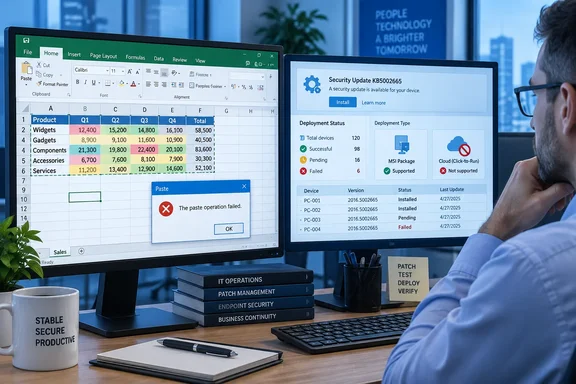
The Register first reported the partial rollout on September 18. Microsoft’s own support record confirms the essential details: KB5002665 was released September 16, fixes “certain paste operations” broken by KB5002914, and does not apply to Click-to-Run Office 2016 installations. BleepingComputer separately reported that Microsoft confirmed the same limitation directly to the outlet.
For administrators, the key point is simple: do not treat this as a fleet-wide resolution for the September Excel regression. It is a targeted patch for one servicing model of one perpetual Office release, while Microsoft’s broader known-issue page still marks the Excel paste problem as under investigation.
KB5002665 fixes MSI Excel 2016, not every Office 2016 install
The update’s official title is “September 16, 2026, update for Excel 2016,” and the correct identifier is KB5002665. That matters because early reporting and discussion around the issue have produced a confusing mix of similarly named KB numbers. The broken security update is KB5002914; the corrective update is KB5002665.
Microsoft’s documentation says KB5002665 is for the Microsoft Installer, or MSI, edition of Office 2016. These are the traditional volume-license and perpetually installed Office packages common in managed environments. The standalone patch can be obtained through Microsoft’s normal update mechanisms and Microsoft Download Center.
It explicitly does not service Click-to-Run Office 2016, the streaming installation architecture Microsoft uses for Microsoft 365 Apps and many retail Office installations. In other words, an IT team can deploy KB5002665 successfully to affected MSI endpoints and still have users on Click-to-Run builds reporting the same failed Ctrl+V behavior.
That distinction is much more important than the product name “Excel 2016” suggests. Two PCs can both display Excel 2016 branding yet receive patches through different channels, use different update technology, and have different remediation options. Before scheduling an emergency deployment, admins should identify whether the affected machines actually carry MSI Office rather than assuming the hotfix will apply.
The silent failure creates a data-integrity problem
Microsoft described the original symptom plainly: a user attempts to paste, the copied source range remains selected, and nothing changes at the destination. There is no error dialog, warning sound, or other direct indication that the command failed.
That makes this more serious than an obvious Excel crash or an operation that returns an error. A visible failure stops work; a silent failure can allow work to proceed on a spreadsheet that never received the expected data, formulas, values, or links. In finance, inventory, reporting, and operational workbooks, that can create a false sense that a routine update was completed when it was not.
Microsoft’s known-issues documentation lists Excel 2024, Excel 2021, Excel 2019, and Excel 2016 as affected products. BleepingComputer reported that user reports also involved autofill and formula-dragging behavior after the September update, although Microsoft’s public known-issue text focuses specifically on paste operations.
Windows Central’s earlier report correctly flagged the awkward timing: the Excel problem landed in the same September servicing cycle as several Windows issues. But Excel’s regression should not be treated as a Windows 11 defect. The official records tie KB5002914 to Excel 2016, and Microsoft lists Excel versions spanning 2016 through 2024 in the broader paste investigation. The affected component is Office, even when the user first notices it after a general Patch Tuesday maintenance window.
Conditional formatting remains the hole in the hotfix
Microsoft has not said KB5002665 resolves every scenario even on the Office 2016 MSI systems it supports. Its support article carries a known issue of its own: paste operations “might continue to fail” if the workbook contains conditional formatting.
That warning sharply limits the confidence administrators can place in a simple “install the hotfix and close the ticket” response. Conditional formatting is common in business workbooks that use color scales, threshold alerts, duplicate-value highlighting, exception reporting, or formula-driven status indicators. Those are precisely the kinds of sheets where copy-and-paste workflows are often central to daily work.
Microsoft recommends using Paste Special if a normal paste fails. The documented alternatives include pasting formulas, formulas with number formatting, values, values with number formatting, or a link. These choices can preserve the immediate workflow, but they are not interchangeable with a normal paste. A user who selects Values instead of a regular paste can strip formulas; a user who selects Formulas can omit source formatting. A workaround can therefore change workbook behavior unless users understand which paste mode their process requires.
For a managed environment, that means support desks should avoid advising users simply to “use Paste Special” without qualification. Give affected staff a short, tested instruction matched to the workbook type they use, and ask them to verify the target range after pasting. For templates with conditional formatting, validate the workaround against a copy of the production workbook before standardizing it.
KB5002914 is a security update, so removal has a cost
The regression began with KB5002914, the September 8 Excel 2016 security update. Microsoft says that package addresses remote-code-execution and information-disclosure vulnerabilities, listing a substantial group of CVEs in its bulletin. The security patch is not an optional feature update that organizations can casually discard.
BleepingComputer noted that some users reported restoring paste behavior by removing KB5002914 or by rolling affected Click-to-Run installations back to earlier builds. Those reports are useful as troubleshooting evidence, but rollback should remain a temporary, risk-managed measure—not the default remedy—because it leaves the security fixes in KB5002914 absent.
The better sequence for most organizations is:
- Confirm the installed Office servicing type and Excel version on a small sample of affected PCs.
- Deploy KB5002665 where the device runs the MSI edition of Excel 2016.
- Test normal paste and the relevant Paste Special modes against representative workbooks, including ones with conditional formatting.
- Record and isolate Click-to-Run, Excel 2019, Excel 2021, and Excel 2024 cases as still awaiting Microsoft’s broader fix.
- Avoid removing KB5002914 unless the business impact is immediate, compensating controls are understood, and the rollback has been approved through the organization’s security process.
This incident also exposes a documentation gap. Microsoft’s main Excel issue tracker continues to classify the multi-version paste problem as investigating, while the separate KB5002665 article documents a corrective patch only for MSI Excel 2016. Microsoft has not published a corresponding fix identifier, build number, or release date for Click-to-Run Office 2016, Office 2019, Office 2021, or Office 2024.
What remains unresolved for newer Excel releases
The partial fix leaves a large group of users in limbo: those using Click-to-Run Office 2016 and the newer perpetual desktop releases that Microsoft itself includes in the affected-products list. The absence of a published delivery schedule means administrators cannot yet plan a definitive change window for those systems.
There is also a mismatch worth watching in the public record. Microsoft’s KB5002665 page says the patch corrects the known issue tied to KB5002914, but it only claims applicability to Excel 2016 MSI. Meanwhile, Microsoft’s broader issue page still presents the paste failure as an active investigation across Excel 2016, 2019, 2021, and 2024. The practical reading is that the code path fixed in KB5002665 is not the whole problem, or at least not the whole distribution problem.
Until Microsoft posts a Click-to-Run build or additional hotfixes, organizations should keep the incident open for every Excel deployment outside MSI Office 2016—and for any conditional-formatting-heavy workbook where KB5002665 has already been installed.
Update: Microsoft publishes fixes for Excel 2019, 2021, and 2024 (September 21, 2026)
Microsoft has now expanded remediation beyond MSI-based Excel 2016. According to BleepingComputer, the company’s updated known-issue documentation directs affected users to manually install Office LTSC updates for the newer perpetual releases: Build 10417.20208 for Office LTSC 2019, Build 14334.20918 for Office LTSC 2021, and Build 17932.21000 for Office LTSC 2024. KB5002665 remains the required package for Excel 2016.
This supersedes the earlier position that no published fix identifier or release information existed for Excel 2019, 2021, and 2024. Administrators should validate the installed Office edition and build before deployment, particularly because the newly listed remediation applies to LTSC servicing channels rather than automatically establishing coverage for every Click-to-Run retail or Microsoft 365 Apps installation.
Microsoft still warns that paste failures can persist in workbooks containing conditional formatting. Paste Special remains the documented temporary workaround for those cases, pending a permanent correction for that scenario.
Update: Microsoft reportedly distinguishes full fixes from mitigations by Office LTSC release (September 21, 2026)
TechRadar reports that Microsoft now characterizes the rollout more narrowly: Office LTSC 2021 and Office LTSC 2024 are officially fixed, while Office LTSC 2019 and Excel 2016 have mitigations that may not eliminate every paste failure.
That clarification reinforces the need to test the listed 2019 build rather than treating its availability as confirmation of a complete resolution. Excel 2016 MSI deployments remain dependent on KB5002665 and retain the documented conditional-formatting limitation.
For administrators, the practical split is now clearer: validate normal paste behavior after updating LTSC 2021 and 2024, but keep incident tracking and user workarounds in place for LTSC 2019 and Excel 2016—especially where affected workbooks use conditional formatting.
References
- Microsoft fixes broken Excel copy and paste for all Office users BleepingComputer · 2026-09-21T10:42:37-04:00
- Microsoft fixes the fix that broke Excel paste – partly The Register · 2026-09-18T13:22:00+00:00