

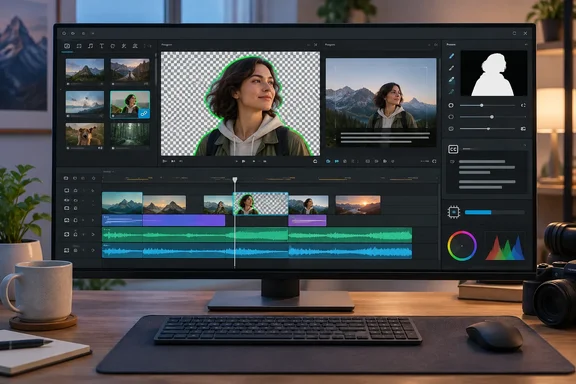
Kdenlive 26.08.1 gives Windows users a zero-fee editor with no Pro tier
The licensing terms explain why Kdenlive keeps turning up in "ditch your subscription" roundups. The project is Free Software under the GNU General Public License. Its About page says there are no license fees, no registrations or subscriptions, and no premium features that you have to pay to unlock. Kdenlive belongs to the KDE Community, and the legal entity behind that community is KDE e.V., a German non-profit.
How-To Geek compares it to Adobe Premiere, which it says costs "at least $20 per month, usually more". Over a year that adds up to what the outlet calls "a few hundred dollars." Kdenlive costs nothing to license. Your real costs are hardware, storage and your own time.
It is also a mature, actively maintained project. Jason Wood started it in 2003. Jean-Baptiste Mardelle took over as the main developer in the mid-2000s and still maintains it today. Kdenlive became an official KDE application in 2015, and a Windows version was announced in 2016. The project describes itself as "developed by a small, mostly volunteer team from all over the world."
Releases are frequent. Kdenlive 26.08.0 arrived in late August as a summer release focused on stability. According to the project, this release comes with 11 crash fixes as well as improvements to the undo/redo stack for compositions and sequence creation. The editing changes include a long awaited ability to reorder tracks and automatic creation of audio tracks when you drop a clip on a timeline that doesn't have enough. Independent coverage on Linux Compatible described drag-and-drop track reordering and automatic audio track creation as the headline changes. Two weeks ago the first maintenance release, 26.08.1, added fixes for crashes when changing Timeline Preview settings, deleting sequences, stopping audio recordings, and using ripple editing when the Project Monitor is hidden. It also has a Windows-specific fix: tabs are now readable on theme changes on Windows.
The official download page lists 26.08.1 as the current stable build. It offers a standalone Windows installer that requires Windows 10 or newer. macOS users need macOS 13 Ventura or later, and Linux users can choose AppImage, Flatpak or their distribution's repositories.
The .kdenlive XML project format keeps work portable, with two catches
How-To Geek points out that Kdenlive stores projects as plain XML instead of a proprietary format. That's true, and the official manual explains how it works. A .kdenlive file uses an XML format based on the MLT multimedia framework, which Kdenlive uses to render. The file records the project's target video and audio settings, references to every source file and its proxy, and the position, duration and edits of each clip on the timeline. It also stores applied effects with their parameters and keyframes.
Because it's text, you can open a project in any editor and read it, and MLT can render a Kdenlive project file directly. The format won't trap your work inside one vendor's software. Two practical details matter before you rely on it.
First, the project file mostly doesn't contain your footage. The manual says that for video, audio and images, Kdenlive stores only a reference to the media, not the media itself. Titles and color clips are the main things embedded in the file. If you copy only the .kdenlive file to another PC, the timeline arrives without its media. To move or hand off a project, use the Archive Project command, which copies every file the project needs into a folder you choose. If you move the project file yourself, the manual says to update the directory change in the project properties.
Second, the format is not backwards compatible. The manual warns that projects saved in newer versions can't be opened in older ones. For example, nested sequences arrived in 23.04 and bumped the document version from 1.04 to 1.1, so projects created in 23.04 or later won't open in 22.12.8. Kdenlive does protect you when it upgrades a file. It saves a copy of the original as myproject_backup.kdenlive in the project folder, so you can install an older Kdenlive and reopen the backup if the new version causes trouble. On shared machines or small teams, everyone should run the same release.
Premiere habits carry over to Kdenlive's Project Bin and Clip Monitor
The How-To Geek reviewer came to Kdenlive after moving away from Premiere Pro and says the default layout felt familiar. By their account, the Project Bin works like Premiere's Project panel, the Clip Monitor like the Source monitor, and the Effect Stack like Effect Controls. The basic edit is the same too: set in and out points in the Clip Monitor, then insert or overwrite the clip on the timeline. The reviewer found switching "pretty painless" and says the learning curve was "significantly smaller" than learning DaVinci Resolve for the first time. That's one editor's experience, but it matches Kdenlive's documented interface of project bin, clip and project monitors, effect stack and multitrack timeline.
Keyboard shortcuts are the one claim to be careful with. How-To Geek says you can "literally import your Premiere hotkeys." Kdenlive's manual confirms that every shortcut can be remapped under Settings → Configure Keyboard Shortcuts. The documentation we checked says nothing about importing a Premiere shortcut preset, though. If Premiere muscle memory is your main reason to switch, assume you may have to remap your most-used keys by hand.
The core editing features are in the manual. These are the ones working editors will look for:
- Nested sequences (timelines inside timelines) arrived in version 23.04 and are what forced the 1.1 project format change.
- Proxy clips are lower-resolution working copies you enable in project settings so 4K footage edits smoothly. The final render still uses the original media.
- A multicam tool lets you switch between camera tracks during playback.
- The color tools include correction and grading, LUT support, and histogram, vectorscope, RGB parade and waveform scopes.
- The KDE project lists a title editor and a subtitling tool as built-in features.
Proxies are important on Windows laptops and older desktops. Kdenlive generates proxies and thumbnails in a working directory tied to each project. That uses disk space, but it's the documented way to keep high-resolution timelines responsive without new hardware.
Kdenlive's SAM2 Object Mask and Whisper subtitles run locally, after real setup
The AI tools are the most distinctive part of Kdenlive, and the setup is where How-To Geek's account needs the most detail.
The Object Mask effect is built on SAM2, a segmentation model from Meta Research. The manual says it isolates an object in an image or video, much like rotoscoping. You can then remove the background or apply an effect, such as a color grade, only inside the masked area. The workflow goes like this: select a clip, define a zone, create a mask, mark the object with a rectangle and/or clicks, and generate the mask. The manual lists the effect for Linux, AppImage, Windows and Apple builds, so Windows users get it. It also lists the effect as working at 8-bit color depth. It won't work out of the box either: you have to configure object detection and install the models first.
Speech recognition works the same way. Kdenlive supports two engines, VOSK and Whisper, and both need Python plus downloaded speech models. According to the manual, Whisper is slower than VOSK on a CPU but more accurate. Once it's set up, you can generate subtitles automatically from a selected timeline zone or clip, and create transcripts from media in the Project Bin. This isn't new. The 24.08 release notes, as AlternativeTo reported, said Whisper support has been enhanced for both Windows and macOS.
How-To Geek says the one-time setup "takes a few minutes and a few gigabytes of space." That's roughly right for a basic setup, but it depends on what you install. The manual recommends a 1.4 GB Whisper "turbo" model. Adding multilingual translation through SeamlessM4T takes about 10 GB of model data, and VOSK model archives can run to several gigabytes. Flatpak users on Linux may hit extra problems, because the sandbox can stop Kdenlive from running pip. The manual offers a workaround but warns that results vary. Windows users don't have that sandbox issue, but they still need the Python environment and the model downloads.
The local design is the main advantage. The models run on your machine, so the AI features don't need a subscription or a cloud account. The project itself says it has built an intuitive open source video editor that does not track you, does not use your data, and respects your privacy. That fits with installed models processing footage offline. It's a statement of the project's intent, though, not an audit of every network call made by every Python dependency. Organizations with strict data-handling rules should check the network activity themselves.
CPU-bound effects and 8-bit color are where Kdenlive trails DaVinci Resolve
Even How-To Geek, which likes Kdenlive a lot, says it isn't a drop-in replacement for every setup. The reviewer's main complaint is performance: effects are "functionally CPU-limited," and stacking several on 4K footage causes a noticeable slowdown. That's one reviewer's observation on their own hardware, not a benchmark. Kdenlive's roadmap supports it, though. It lists GPU effects and transitions as future work, and describes GPU decoding as implemented but still needing work in MLT. Until GPU effects arrive, proxies and timeline preview rendering are the practical ways to handle heavy effect stacks.
Color depth is the second limit. The reviewer calls Kdenlive's color tools good but no match for DaVinci Resolve, which they describe as "superb." The official roadmap lists 10-bit and 12-bit color support for version 26.12. That's a plan, not a finished feature, and the roadmap says priorities and timing can change. Kdenlive follows a year.month version scheme with releases around April, August and December, so 26.12 would be the next major release after the current 26.08 series. Anyone grading HDR or log footage who needs a high-bit-depth pipeline today should use Resolve or another tool for now.
Plugins are the third gap. How-To Geek notes that Kdenlive's third-party plugin catalog is much smaller than Adobe's, so you rely more on built-in tools. Kdenlive does pull in effects through MLT, including Frei0r for video and LADSPA for audio. OpenFX support, the plugin standard used by many commercial effects packages, is still on the roadmap. The reviewer also suggests "vibe-coding" your own plugin with local AI models. Treat that as the reviewer's suggestion, not a supported extension route.
What this means for you
If you pay for Premiere mainly to cut, title, caption and lightly grade 1080p or 4K footage, install Kdenlive 26.08.1 alongside it and run a real project through both before cancelling. If your work depends on 10-bit or 12-bit grading, OpenFX plugins or heavy GPU-accelerated effect stacks, keep your current tool for now and look again when 26.12 ships.
- Get the Windows installer from Kdenlive's official download page. It requires Windows 10 or newer and asks for no account, license key or payment.
- Turn on proxy clips in project settings before editing 4K footage, and budget disk space for the proxies and thumbnails in the project's working directory.
- Leave room for the AI features if you want them: about 1.4 GB for the recommended Whisper turbo model, roughly 10 GB more for SeamlessM4T translation, plus a Python environment.
- Use Archive Project to move or hand off work. A
.kdenlivefile only references your media and won't carry the footage with it. - Keep collaborators on the same Kdenlive version, and don't delete the
_backup.kdenlivefile Kdenlive creates when it upgrades an older project. - Expect to remap Premiere shortcuts by hand under Settings → Configure Keyboard Shortcuts, since direct import of a Premiere preset isn't documented.
Kdenlive has been in development for more than two decades, and the 26.08 cycle shows a project spending its effort on stability and everyday editing features. For Windows users who edit video occasionally or on a budget, it's already a strong alternative to a Premiere subscription. For professionals, the deciding release is 26.12, the version the roadmap targets for 10-bit and 12-bit color.
References
- FOSS app of the week: Kdenlive unlocks professional video editing without a subscription How-To Geek · 2026-09-25T11:00:13+00:00
- Project File Details — Kdenlive 26.08 Manual 26.08 documentation docs.kdenlive.org