

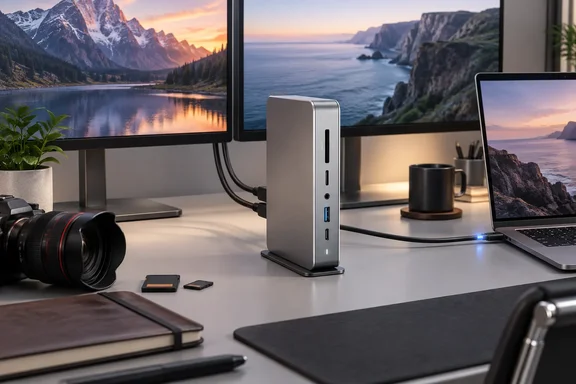
Keychron's TB5D-1 Thunderbolt 5 Dock bets on dual HDMI
Keychron sums up the product as a way to expand one Thunderbolt 5 port into 14 high-speed connections, with up to 80Gbps bidirectional bandwidth, Bandwidth Boost up to 120Gbps, dual 8K display support, and up to 140W laptop charging. The US store lists SKU: TB5D-1 · Regular price $349.99. The dock launched in mid-June, when Forbes reported that it is powered by an Intel-certified Thunderbolt 5 controller and backwards compatible with Thunderbolt 4 and USB4, supporting both Windows and macOS.
Engadget reviewer James Trew listed three strengths: build quality, broad connectivity and strong HDMI support. His two main complaints were the lack of an internal SSD bay and the lack of DisplayPort. His conclusion was that no single feature beats the competition, but a string of practical decisions adds up to a well-priced dock. He singled out creatives and anyone running complex display setups as the best fit.
The HDMI emphasis stands out because many premium Thunderbolt 5 docks leave it off. Trew's reasoning is simple. You can always give a display one of the downstream Thunderbolt ports, but then you have one fewer Thunderbolt port for fast SSDs and other high-bandwidth devices. Two native HDMI outputs keep both of those ports free.
Fourteen ports on the Keychron Thunderbolt 5 Dock and where they sit
Engadget's port list matches the independent inventory in Tom's Hardware's July roundup of Thunderbolt 5 docks under $400. The layout looks like this:
| Location | Ports |
|---|---|
| Front | 2x USB-A and 1x USB-C (USB 3.2 Gen 2, 10Gbps), UHS-II SD slot, UHS-II microSD slot, 3.5mm audio combo jack |
| Rear | 1x Thunderbolt 5 upstream (140W to host), 2x Thunderbolt 5 downstream, 2x USB-A 10Gbps, 2x HDMI 2.1, 2.5GbE Ethernet, Kensington lock slot |
That adds up to five general-purpose USB ports, which fits Newsshooter's launch report that the dock features five USB ports with up to 10Gbps transfer speeds. Newsshooter also says the headline 120Gbps figure applies only to the upstream link: Bandwidth Boost, which is claimed to reach up to 120Gbps (Thunderbolt 5 upstream only) for video-intensive workflows. Thunderbolt 5 reserves that asymmetric boost mode mainly for display-heavy traffic. Don't treat 120Gbps as a general storage speed.
Trew called the single front USB-C port "an okay start" and said he would have preferred two. He was glad the card readers are on the front. The 3.5mm jack connects to a small internal audio interface. Engadget says it handles inline microphones for calls and basic audio input, though it is less capable than the audio built into his computers.
Power is where the spec sheet needs a closer read. Thunderbolt 5 allows more host charging than this dock provides. Birchtree, an independent reviewer, notes that Thunderbolt 5 supports up to 240W of power delivery, but Keychron's dock maxes out at 140W due to the included power adapter, which is 180W. Keychron's product documentation says the dock needs that external adapter plugged in for full functionality and lists downstream Thunderbolt power output of up to 30W and 15W. The box includes a 1-meter Thunderbolt 5 cable. The adapter takes a universal 100–240V AC input, supporting both region-specific IEC C7 power cords and compatible travel adapters. In practice, 140W covers most thin-and-light and midrange Windows laptops. A high-wattage gaming or workstation laptop will charge more slowly, or drain under load, if its own charger is rated well above 140W.
Dual HDMI on the Keychron dock behaves differently on Windows and macOS
Keychron's advertising suggests four monitors, and Forbes reported at launch that the dock can drive up to four external displays. Engadget explains why the real answer depends on your computer and operating system.
On a Mac, the problem is macOS itself. Engadget says macOS doesn't natively support multiple independent displays through HDMI hubs or splitters. Connect two monitors to the dock's HDMI ports and the Mac shows the same image on both. For a real multi-monitor setup on a Mac, Trew suggests one dock HDMI output, one display connected directly to the Mac, and a Thunderbolt display on the dock. Keychron also tells Mac owners to check Apple's display limits for their specific model. How many displays a Mac can drive depends on the chip.
Engadget says Windows is more flexible, and dual-HDMI setups are more common there. That is a real advantage for Windows laptop owners, but it isn't guaranteed. The laptop's GPU, its Thunderbolt implementation and whether the host port is Thunderbolt 5, Thunderbolt 4 or USB4 all affect how many independent monitors you get. Keychron says bandwidth, display support and overall performance over Thunderbolt 4 and USB4 depend on the host. It recommends a Thunderbolt 5 laptop for full functionality.
The second catch is resolution. Engadget reports that both HDMI outputs top out at 4K/60Hz in every configuration, even though Tom's Hardware lists them as HDMI 2.1 ports. The "dual 8K" claim therefore applies to Thunderbolt display outputs, not HDMI. Anyone planning a high-refresh gaming monitor or an 8K panel will need one of the downstream Thunderbolt 5 ports, provided the laptop, cable and display all support that mode. That uses up the Thunderbolt port the HDMI outputs were supposed to save, so pure 4K/60 office and creative setups get the most from this design.
Engadget's tests of the TB5D-1 focus on reliability, not speed records
Engadget ran two tests. The first was a media-transfer workload: moving large video files between cameras, SD cards and several hard drives using both a Mac and a Windows laptop. Trew says the dock recognized every storage device he connected, every time. He also got maximum or close-to-maximum transfer speeds, even when copying from several sources at once. Engadget didn't publish throughput numbers or list every drive it used, so read this as a qualitative reliability result, not a benchmark.
Trew also compared it with an older and much cheaper Ugreen dock he'd used before. That dock slid around on his desk even with a Mac mini on top. It also sometimes missed an SD card that was inserted before the computer woke. The Keychron is heavy enough that he could push a microSD card in with one finger without the dock moving, and he joked that this alone was nearly worth $350. It's one reviewer's experience, not a controlled comparison. Still, flaky card detection after sleep is a common complaint about cheap docks, and it's good to see a positive report on it.
The second test is more relevant to Windows users. Trew connected a 13-inch Asus foldable laptop and turned it into a podcast and video workstation. It drove a Rodecaster, a mirrorless camera with a capture card and several displays, and charged the laptop, all over one cable. Engadget didn't name the exact laptop or list the display modes. The takeaway is the typical premium-dock use case: a small Windows machine becomes a full desk setup when docked and stays portable otherwise.
The physical design gets similar praise. Engadget calls the brushed-aluminum enclosure Apple-inspired, and says it still looks at home next to a Windows laptop. Keychron describes it as crafted from premium CNC-machined aluminum. The CNC-cut side panels also work as heatsinks, so the dock has no fan and runs silently. Newsshooter's launch coverage likewise describes a fanless all-aluminum design. Rubber feet on two faces let you stand the dock upright or lay it flat. Tom's Hardware found the same, noting that Keychron includes rubber feet on the bottom and one side of the dock. Trew points out that many rivals only support one orientation, which is a problem on a crowded desk.
The $349.99 Keychron against the CalDigit TS5, Razer, Anker, UGREEN and Plugable docks
Most of the price case comes from the comparisons. Engadget lists the CalDigit TS5 at $399, Razer's Thunderbolt 5 Dock Chroma at $379 and the Anker Prime TB5 at $399. Neither CalDigit nor Razer has HDMI. Razer adds an SSD bay, RGB lighting and more USB-C ports. Anker's port selection is closest to Keychron's, but it swaps the second HDMI for DisplayPort, has two front USB-C ports and puts its card slots on the side.
Tom's Hardware compared the Keychron with cheaper rivals. It found that the UGREEN Revodok Maxidok has a street price of $389.99 after coupon, while the Plugable TBT-UDH2 and Keychron TB5D-1 are both available for around $350. The Plugable also has dual HDMI 2.1, but Tom's Hardware noted that the Keychron dock features two downstream Thunderbolt 5 ports, while the Plugable only has one. The UGREEN took first place in that roundup because of a feature Keychron doesn't have: a cover that's held in with one screw. Remove the screw, and you'll find an M.2 slot for adding an internal SSD (up to 8TB in capacity). The UGREEN also has DisplayPort 2.1.
That leaves a clear set of trade-offs:
- Choose the Keychron if you want two HDMI outputs and two free downstream Thunderbolt 5 ports on the same dock.
- The Plugable TBT-UDH2 costs the same and has dual HDMI, plus more USB-C ports, but only one downstream Thunderbolt 5 port.
- The UGREEN Revodok Maxidok costs about $40 more and adds DisplayPort and internal NVMe storage.
- CalDigit and Razer cost more and drop HDMI completely, which makes them a better fit for DisplayPort or Thunderbolt monitors.
Engadget's prices come from its review and Tom's Hardware's from July, so check current retail prices. Regional pricing also varies. Keychron's German store listed the dock at €325,99 and noted that this product uses a US standard interface; for use in Europe, you will need to provide your own US to European standard adapter. Both the German and US store pages showed the US-plug model as backordered when we checked.
What this means for you: check your laptop's Thunderbolt 5 port and your monitors first
Whether this dock fits depends on your laptop's host port and your monitors, not on Keychron's headline numbers. If you have a Thunderbolt 5 Windows laptop and two 4K/60 monitors that use HDMI, the TB5D-1 fits well at this price. Owners of Thunderbolt 4 or USB4 laptops can use it, but should expect lower bandwidth and possibly fewer display options. Mac users can plan multi-monitor setups with it as long as they avoid relying on both HDMI ports for separate displays.
Trew's closing wish list is a useful gut check. If you need 10Gb Ethernet, more than one front USB-C port, DisplayPort or internal SSD storage, look at the rivals above.
- Confirm your laptop has a Thunderbolt 5 port for full performance, since Keychron says Thunderbolt 4 and USB4 hosts limit bandwidth and display support.
- Plan on 4K/60Hz as the ceiling for both HDMI outputs, and use a downstream Thunderbolt 5 port for 8K or high-refresh monitors.
- On a Mac, expect the two HDMI ports to mirror each other, and combine one HDMI output with a Thunderbolt or directly connected display.
- Check your laptop's charger rating, because the dock supplies at most 140W to the host and needs its included 180W adapter for full operation.
- Pick the UGREEN Revodok Maxidok or a DisplayPort-equipped rival instead if internal NVMe storage or DisplayPort matters more than dual HDMI.
Keychron's first dock earns its recommendation by avoiding weaknesses rather than winning on any one spec. It has two HDMI ports and two free Thunderbolt 5 ports, the card readers are where you can reach them, and the enclosure runs silently and works upright or flat. Pricing is close to its rivals, and the omissions are clearly stated. The price only really undercuts the CalDigit TS5 and Razer, and the 4K/60 HDMI limit rules it out for high-refresh setups. For a Thunderbolt 5 Windows laptop running 4K office or creative work, it is a strong choice once US stock returns from backorder.
References
- Keychron Thunderbolt 5 Dock review: Unusually sensible Engadget · 2026-09-25T17:00:00+00:00