

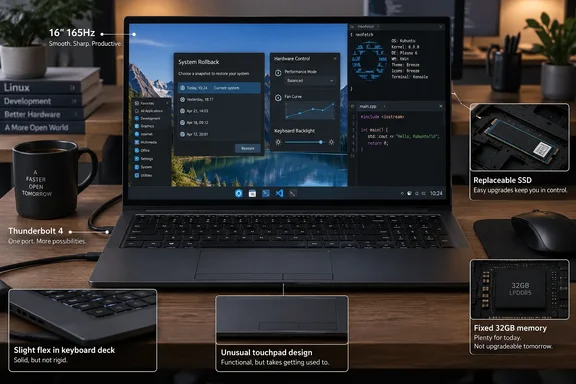
Published September 21, Patrick Campanale’s review gives the laptop 5/10 and declines to recommend the $2,125 “AWESOME: Dev” configuration at full price. Kubuntu Focus’s own specifications and ordering information establish a more substantial software offering than a simple preinstalled operating system, though: model-specific configuration, system rollback tools, and ongoing validation of important updates.
What the price buys
The Ar Gen 1 combines an Intel Core Ultra X7 358H processor with integrated Arc B390 graphics, a 16-inch display, and a manufacturer-listed weight of 3.13 pounds, including its battery. Liliputing also reported the Panther Lake processor and Arc B390 combination in its June 24 launch coverage, corroborating the core hardware configuration independently of the review.
Kubuntu Focus’s specifications establish these practical boundaries:
| Component | Documented configuration | Buying implication |
|---|---|---|
| Display | 2560×1600 matte IPS, 16:10, up to 165Hz | A tall workspace with a high refresh rate. |
| Memory | 32GB built-in LPDDR5X | Memory capacity cannot grow with the workload. |
| Storage | One M.2 2280 PCIe 4.0 NVMe slot | The SSD is replaceable, but there is no second internal storage slot. |
| Battery and power | 73Wh battery, 65W USB-C adapter | Monitor-based charging needs attention to the monitor’s power output. |
| USB-C | One 40Gbps Thunderbolt 4 port and one 10Gbps USB-C port | The two connectors do not provide equivalent capabilities. |
| HDMI | HDMI 2.0, documented at 4K/60Hz | The HDMI connection does not offer the 4K/144Hz output the reviewer wanted. |
The official configurator lists a 500GB SSD as the base option and offers larger drives up to 4TB. There is a configuration ambiguity worth preserving: How-To Geek identifies its review machine as the $2,125 Dev preset, but its specification table lists 500GB storage. The ordering page lists a 1TB P310 upgrade at $175 above the $1,950 base price. Those figures alone do not establish which SSD was actually tested, so buyers should compare the selected drive rather than assume every specification in the review describes the Dev preset.
The Linux integration has substance
Campanale reports that Kubuntu 26.04 LTS was easy to get started with, including guided encryption-password setup and optional software installation. He also found the Focus utilities useful during his limited time with them.
Kubuntu Focus describes a hardware-specific layer built around that operating system. Its Focus Hardware System applies configurations for components such as integrated graphics, sound, the keyboard, and the touchpad. Its Welcome Wizard and curated applications help with initial setup, while Power and Fan exposes CPU power, brightness, frequency, and fan controls.
The company also provides System Rollback. Its ordering page says the system partition uses Btrfs by default to enable snapshots and rollback; on disks larger than 1TB, it allocates 500GB to the system and places the remaining capacity in a separate EXT4-formatted /home partition. Buyers should therefore understand rollback as a system-recovery feature, rather than assume every file on every partition is covered by the same snapshot.
The longer-term service is particularly relevant to developers who want a working machine without personally qualifying each major software change. Kubuntu Focus says it tests important kernel, graphics-driver, and desktop updates on supported hardware before distributing them. Its ordering page promises that validation for a minimum of three years after purchase.
Software validation and hardware warranty are separate commitments. The base order includes a one-year limited warranty; the configurator lists two-year coverage for an additional $250 and three-year coverage for $400.
This changes the comparison with buying a conventional Windows laptop and installing Kubuntu. Installing the distribution yourself does not, by itself, recreate Kubuntu Focus’s model-specific configuration or update-testing service. The review’s smooth setup supports the immediate benefit; the manufacturer’s ongoing validation remains a service commitment, not something a few weeks of testing can establish over its full duration.
The physical complaints are about daily use
According to Campanale, the Ar Gen 1’s keyboard deck flexed noticeably, its display assembly also felt flexible, and the chassis did not feel appropriate for the price. That directly conflicts with Kubuntu Focus’s “no-flex” keyboard description.
These are How-To Geek’s hands-on observations, not independently established durability failures. Flex and perceived flimsiness do not demonstrate that a hinge or keyboard will break. They do, however, bear directly on whether someone will enjoy using an expensive laptop without external peripherals.
The touchpad criticism is similarly specific. Campanale describes a tilt-based mechanism and says he could reliably produce a physical right-click only near its bottom-right corner. Kubuntu Focus advertises multitouch gestures and model-specific sensitivity configuration, but those software features do not answer his complaint about the clicking mechanism.
The Copilot key is a smaller oddity. Campanale reports that it did not launch AI functionality under the supplied Linux installation, while using it with the function key opened a context menu. Its presence should not be read as evidence of Microsoft Copilot integration.
The display earned a much more favorable assessment. Campanale praised the matte finish, smooth refresh rate, and 16:10 proportions. Kubuntu Focus says adaptive sync starts at 60Hz and adjusts up to 165Hz according to the task, so “165Hz display” does not mean the panel must run at its maximum continuously.
For color-sensitive work, the evidence is narrower. The manufacturer advertises 100% sRGB coverage, while the reviewer found colors satisfactory for ordinary use but did not report measured color accuracy. That supports its appeal as a productivity display, without establishing it as a calibrated editing monitor.
Benchmark differences need matched conditions
Campanale reports responsive everyday operation, but his benchmark results fell below Kubuntu Focus’s published figures:
- His Geekbench 6 single-core result was 12.9% lower.
- His Geekbench 6 multicore result was 16.6% lower.
- His Unigine Superposition average frame rate was 24.4% lower.
- His Superposition score was 23.7% lower.
Those shortfalls remain single-review findings; the other reporting available here does not independently reproduce them.
There is also an important qualification in the manufacturer’s benchmark methodology. Kubuntu Focus says its tests run on AC power and, unless otherwise noted, use the CPU’s high-performance mode with the default fan curve. Its graphics benchmark section specifies the Focus Panther Lake GameMode application and claims that this increases frame rates by around 40%. Superposition was run at 1080p with the Medium preset.
The review says it used the same benchmarks, but does not establish that power mode, GameMode, and the remaining conditions matched. Running the same benchmark application is insufficient to isolate the cause of a performance gap. The evidence supports reporting the discrepancy, not attributing it to defective hardware, an inaccurate vendor claim, or a particular software setting.
The manufacturer itself recommends other systems or an external Nvidia GPU for demanding graphics work. Campanale was also disappointed with gaming performance, but the review does not provide enough game-by-game measurements to turn that impression into a broad verdict on Arc B390 gaming.
Repairability helps, but memory remains the ceiling
Kubuntu Focus lists the SSD, Wi-Fi module, battery, and fans as user-accessible, and says the chassis opens with a standard Phillips screwdriver. Campanale likewise identifies those components as replaceable.
That provides useful maintenance options without making the entire machine upgradeable. The two M.2 slots serve different purposes: one holds the SSD, and the other holds the wireless card. The built-in 32GB memory cannot be replaced with a larger kit.
For development buyers, the sensible capacity check is therefore the actual workload—especially concurrent virtual machines, containers, and memory-heavy tools—rather than the operating system’s reputation for efficiency. The evidence does not establish that 32GB will suit every Linux development environment.
Desk connectivity has a similar boundary. Kubuntu Focus documents support for two external 4K displays through USB-C and HDMI, but only one USB-C port has Thunderbolt 4 capabilities. Campanale also reports that both USB-C ports sit on the same side. The manufacturer cautions about charging from monitors delivering less than 65W, a relevant detail for anyone expecting a single-cable desk setup.
Who should consider it?
The Ar Gen 1 has a defensible role for buyers who value a lightweight 16-inch Linux machine, accessible service components, and vendor-tested software updates. Its strongest documented differentiator is the continuing Linux integration work.
For buyers prioritizing keyboard rigidity, touchpad feel, expandable memory, or graphics performance, How-To Geek’s findings make the full-price proposition less attractive. Installing Linux on another laptop remains an alternative, but this evidence does not establish that a specific competing model would deliver the same compatibility or support.
The practical choice is to decide whether the Focus software service is something worth paying for. If it is not, the reported physical compromises are difficult to overlook at $1,950 and above.
References
- Kubuntu Focus Ar Gen 1 review: Smooth Linux, disappointing hardware How-To Geek · 2026-09-21T15:30:13+00:00
- Kubuntu Focus: Order Ar GEN 1 Laptop kfocus.org
- Kubuntu Focus: Ar GEN 1 Laptop kfocus.org