

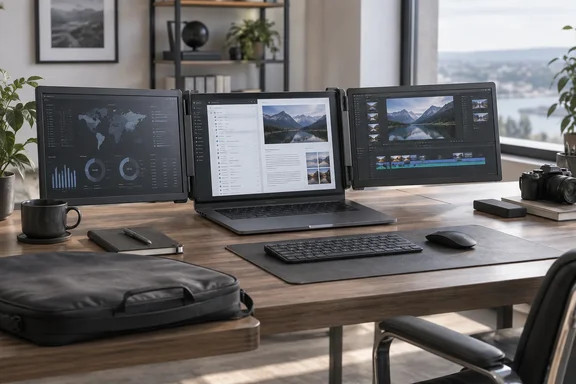
What the X90G actually is
KYY markets the X90G as a "quad" monitor. The X90G adds three external displays to a laptop, creating a four-screen environment in total. The Neowin reviewer objects to that naming because the laptop's own display is counted as one of the four. What you buy is three screens.
The reviewer's reported specifications for each panel are:
- 15.6 inches, 1920 x 1080 IPS, 60 Hz, with a matte surface
- 400 nits of brightness and 80% NTSC coverage, as listed
- 16:9 or 4:3 aspect ratio
- Two USB-C ports, one full-function and one for power
- Folded size of 15.25 x 9 x 1.5 inches
- Extended width of about 44 inches
- Weight of roughly 6.5 lb (3 kg)
- MSRP of $699.99 and general retail of $479.99
The reviewer had no equipment to verify the brightness or color-gamut figures. Treat those as manufacturer claims. The reviewer did say the panels looked uniform and stayed readable from many angles.
KYY's January 2026 press release describes an integrated all-aluminum structure that supports the screens independently rather than clipping onto the laptop lid. That is the vendor's own framing.
Setup on Windows 11
The reviewer used a Lenovo IdeaPad 3 running Windows 11. It has a Core i5-125U, 12 GB of RAM and Intel Iris Xe graphics. The review reports these results:
- One USB-C cable from the laptop to the X90G was enough. The reviewer powered up the unit, the screens blinked for a few seconds, and all three became available.
- The driver in the documentation, which also ships on a USB drive, wasn't needed for Windows.
- By default, the top screen mirrored the laptop and the two side screens were independent. The reviewer changed this in Windows display settings so all four displays were independent.
- The laptop's USB-C port powered the unit in that test. A power brick is included for laptops that can't supply enough, but its cable is only about five feet long.
The reviewer measured resource use with most apps closed. CPU rose from about 2% to about 10%, and memory from 50% to 58%. That is one machine in one session, not a benchmark. It does suggest that driving three extra 1080p panels doesn't demand a powerful PC.
The "plug it in and it works" caveat
KYY's own listing for the related X90 model warns that the Type-C port on your laptop should support video output or the portable monitor will fail to be connected. A USB-C connector alone doesn't guarantee a picture. TechRadar made a similar point about KYY's X90E. It said the platform assumes the laptop has USB-C with DisplayPort Alt Mode capability, or Thunderbolt 3 or 4. Check your laptop's specifications before buying.
Other reviews found setup harder
Neowin called Windows setup easy. Another reviewer had a rougher time on other hardware. ServeTheHome said a Silicon Motion utility was needed for the MacBook to connect to all three screens. It also found the setup more than a plug-and-play experience, which was frustrating. Its notes add two points:
- An 18-inch Dell notebook ran into spacing issues because the frame is a fixed size.
- A notable screen quality gap exists between premium notebook screens and the three for $479 KYY solution.
Neowin couldn't test a Mac and said so. The Pixel 8 phone test took extra effort. The reviewer first used the wrong cable, then had to install the driver from the documentation before the phone's display mirrored across all three screens.
Using it day to day
The reviewer's findings on usage were:
- Command-center layout: With all three panels facing you, you can keep dashboards, email, chat and a browser visible while something streams.
- Compact layout: Unused panels fold behind the laptop screen. You can fold both side panels in and keep only the top one.
- Presenting: The top screen rotates 360 degrees to face someone across the table. A sensor flips the image upright. You still have to set up mirroring in Windows yourself.
- Per-screen controls: Each screen has its own on-screen menu for brightness, contrast, hue and saturation.
- Not for gaming: The reviewer called it a productivity tool because it is 1080p and 60 Hz.
A note on the reviewer's scratch test: fingernail marks on the alloy rubbed off. That is anecdotal and not a standardized durability test.
Where it falls short
The review lists these drawbacks:
- No triangle mode. The documentation says the side panels rotate 360 degrees. The review unit's side panels opened 180 degrees, from folded to straight out, and wouldn't bend backward.
- Paired power buttons. Only two of the screens have power buttons. The top screen switches off on its own, but the side screens go on and off together. The reviewer suggests this could become a thermal concern if you can only unfold one side.
- Battery drain. Running three backlit panels from the laptop's battery will drain it much faster.
- Bulk. At about 6.5 lb, the reviewer says it adds more than a typical 16-inch productivity laptop weighs, which they put at about 4.5 lb.
These are observations from one review sample. They aren't confirmed defects across all units.
Wired, as summarized on a syndication site, reported a similar weight of 6.4 lb and a width near 46 inches. It said the reviewer faced flickering screens when turning up the brightness on a single-cable connection. That suggests power delivery is worth watching. Neowin didn't see the problem, but its laptop was also drawing power over one cable.
Price and the tradeoff
Neowin gives a $479.99 retail price and says it was told the price would drop $100 on October 7 for Prime Day. That is a reported, anticipated offer, so confirm it before you buy. Prices change. The reviewer also points to the smaller KYY X90D at $212.49 as a likelier fit for most people. They haven't tested it, so its build quality is unverified.
Neowin disclosed that KYY supplied the sample and had no editorial input. It also says it earns commissions on qualifying Amazon purchases. The review scores the X90G 8 out of 10.
Who should buy it
The X90G suits a narrow group: people who travel often, need lots of screen space, can carry the weight, and regularly work at big tables. If you'd only use the top screen, the reviewer says you'd be carrying extra weight for nothing. For occasional travelers, a lighter dual-screen extender or a single portable monitor is probably the saner choice.
Before buying, check three things:
- Does your laptop's USB-C port support video output (DisplayPort Alt Mode or Thunderbolt)?
- Does your laptop's size fit the fixed frame? ServeTheHome had trouble with an 18-inch machine, and KYY's listing targets laptops of roughly 12 to 17 inches.
- Will you have an outlet and a table wide enough for a roughly 44-inch spread?
If all three answers are yes, the X90G is a credible way to turn a laptop into a multi-screen desk. Just don't plan on using it on a plane.
References
- KYY X90G review: Four-screen productivity comes with a portability tradeoff Neowin · 2026-10-04T14:00:01+00:00
- This is a Thing KYY X90G "Quad" Portable Monitor Review - ServeTheHome servethehome.com
- This is a Thing KYY X90G "Quad" Portable Monitor Review - Page 2 of 2 - ServeTheHome servethehome.com