

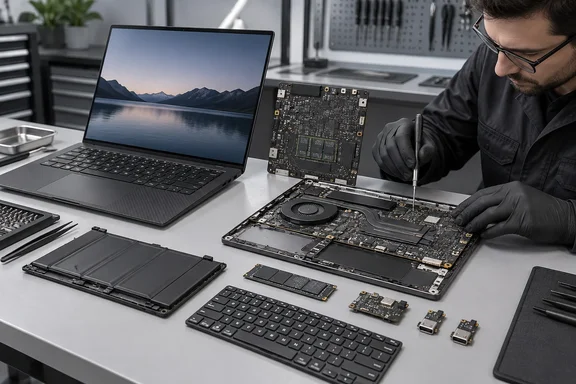
What Space Frame actually changes
Per the IT Guides analysis, Space Frame makes the battery, keyboard, SSD, daughter I/O board and USB-C ports customer-replaceable, and Lenovo lists a 9/10 iFixit repairability score. Lenovo's own CES announcement describes the idea as a new layout that lets components sit on both sides of the motherboard. It says this brings better cooling and faster, simpler repairs, with replaceable USB ports, battery, keyboard, speakers and fans. It also makes room for a larger haptic touchpad.
ZDNET describes it as a double-sided motherboard with individual components that can be swapped using the standard screws on the bottom of the device. The review says that makes the laptop attractive for IT teams as well as individual owners.
Lenovo also credits the iFixit score to specific design choices:
- Modular USB-C ports.
- A daughterboard that isolates selected I/O components.
- A keyboard assembly built for faster technician access.
One footnote matters. Lenovo's disclosure says the iFixit score is based on the evaluation of the ThinkPad X1 2-in-1 Gen 11, the sibling model. Lenovo applies it to the X1 Carbon as well. A 9/10 does not mean every part is swappable, and it says nothing about what repairs cost.
The catch: who is allowed to repair it?
This is where the "faith in repairable laptops" headline needs some seasoning. PCWorld reported that Lenovo staff at CES said replacement parts would not be sold to end users, and that repairs were meant for authorized technicians. PCWorld said Lenovo told it that attempting most repairs would void the warranty, and that only the battery is meant to be replaced by owners. That is PCWorld's account from early in the product's life. Check Lenovo's current warranty and parts policy before you plan any self-service.
PCWorld's takeaway is that the design mainly helps corporate technicians who handle field repairs. Lenovo hopes it makes small repairs easier for qualified technicians and reduces the time a laptop is out of service. For fleets, that is arguably the real prize. A laptop that needs 10 minutes of bench time is cheaper than one that needs a motherboard swap or a trip to depot.
TechFinitive is also cautious. It says buyers must wait to see whether Lenovo backs the design with parts availability, which hasn't been a strength so far. Lenovo's support site lists serviceable assemblies for these models. They include the battery, M.2 SSD, keyboard, trackpad, USB module, I/O cable and board, speakers and fans. No source I have seen establishes repair prices, stock levels or turnaround.
What you can't upgrade: memory
The soldered RAM is the sore spot. ZDNET notes the memory is not upgradeable, though Lenovo told the reviewer this could change on other models in the future. Lenovo's specification sheet, as relayed in the research material, lists 16GB, 24GB, 32GB and 64GB configurations with no slots and no upgrade path. ZDNET says the 64GB option runs at LPDDR5X-9600 and the 32GB option at 8533 MT/s. Capacity is decided at checkout.
Storage is more forgiving. Lenovo lists one M.2 2280 SSD slot and support up to 2TB. That is a single slot, so it is a swap rather than an expansion.
If you buy for longevity, ZDNET suggests the 64GB option, at a higher price. That is the reviewer's judgment, not a guarantee. In a fleet, though, a RAM-related refresh is the one failure that repairability will not fix. Size the memory to the machine's expected lifetime and workloads.
Review findings and trade-offs
- Weight and build: carbon fiber, under 1kg (about two pounds), and 0.6 inches at its thickest point at the rear. The Gadgeteer measured 2.15 lb. Thurrott also reports the weight as 2.15 pounds.
- Display: options run from a 60Hz WUXGA IPS panel to a 2.8K OLED touchscreen at 500 nits with 120Hz variable refresh. ZDNET's unit had the 500-nit IPS panel, which it found perfectly fine.
- Processors and graphics: configurations go up to Core Ultra 7 355, according to ZDNET. The review also mentions the Core Ultra X7 368H, with a big GPU jump over the standard integrated graphics. In ZDNET's testing, the integrated graphics struggled to make mid-tier games feel playable. CPU availability varies by market.
- Performance: ZDNET found it broadly in line with premium business peers. The Asus ExpertBook Ultra B9 with the Core Ultra X7 358H pulled ahead substantially.
- Battery: the 58Wh pack lasted about seven hours of web and office work on Wi-Fi, with no video calls. ZDNET called that average and slightly below expectations, and speculated that the Space Frame forced a design trade-off. Lenovo's own maximum figures are lab claims and are not comparable to ZDNET's usage test.
- Input and ports: a 1.5mm-travel keyboard that ZDNET praised. Thunderbolt 4 ports are on both sides, and Wi-Fi 7 is standard. 5G with eSIM is optional. Haptic and classic three-button trackpads are available.
- Cooling: Lenovo claims up to 20 percent better heat dissipation and 30W sustained power. Lenovo's footnote says this comes from internal testing of pre-production systems. Notebookcheck reports the TDP increase is from 22.5W on the predecessor.
ZDNET also labels the laptop its lab winner for the fastest Wi-Fi in a business laptop. The material supplied does not include the methodology or results, so treat that as a badge until the lab article is read.
Price: the elephant in the chassis
ZDNET lists a starting price of $2,199 for the Core Ultra 5 model with 32GB of RAM and a 256GB SSD. The page also showed $3,644 at Best Buy when captured. Lenovo's CES estimate was $1,999, so prices and configurations have clearly varied. Treat all of these as time-of-review snapshots.
For buyers without an enterprise budget, ZDNET suggests the Gen 13 X1 Carbon at about half the price, without Space Frame.
Is it a Framework in a ThinkPad suit?
Not quite, and the reviews say so. Thurrott found it among the most sustainable laptops it has tested and noted ideas that seem inspired by Framework. Apart from the soldered RAM, he calls it a new high for repairability among mainstream makers. IT Guides is blunter: it's more serviceable, but not a Framework-style modular laptop.
TechFinitive adds a caution about first-generation designs. It says the Space Frame has not been proven in the field. It would expect many years of service, but not with quite the confidence it has in the Gen 13.
Bottom line for IT and buyers
- Fleet buyers: this is the strongest case. Technician-friendly access to the battery, keyboard, fans, speakers and ports can reduce downtime. Confirm parts supply and service terms with your Lenovo rep first.
- Individual buyers: be realistic. Self-repair may be limited to the battery and may affect warranty coverage. Memory is fixed at purchase.
- Cost-sensitive buyers: the previous generation, or a different line, is likely better value.
- Environmental claims: Lenovo says the chassis contains up to 75 percent recycled aluminum and 90 percent recycled magnesium, and that primary packaging is plastic-free. Lenovo's footnote says recycled-content percentages refer to specific components. These are company-reported figures, not lifecycle results.
Space Frame is a genuine step, and ZDNET is right that it is welcome on a flagship. It is a step toward repairable laptops from a major vendor, not the end of the journey. The real test is parts, pricing and policy over the next few years, and nobody has data on those yet.
References
- I tested Lenovo’s new modular ThinkPad, and it renewed my faith in repairable laptops - ZDNET ZDNET · 2026-10-03T05:04:39+00:00
- First look review: Lenovo ThinkPad X1 Carbon Gen 14 complete with Space Frame! techfinitive.com
- Lenovo's new ThinkPad X1 Carbon is 'more repairable' — with a catch pcworld.com