

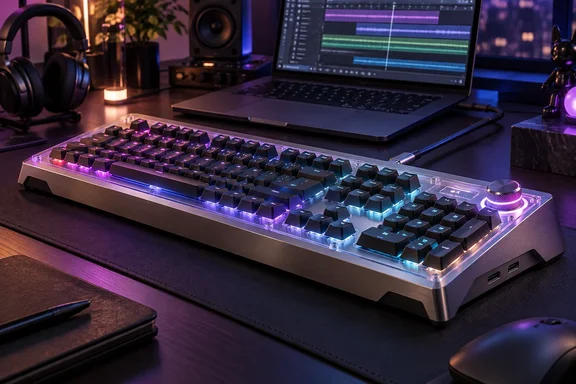
What Lenovo Built, and Who AngryMiao Is
The keyboard came out of a partnership with AngryMiao, a Chinese peripheral brand. According to Ubergizmo's launch coverage, it debuted at MWC 2026 and is modeled after the Angry Miao ATM 98, with extra features for Lenovo's Yoga ecosystem. In its MWC announcement, Lenovo called it the newest member of its Yoga Ecosystem lineup, aimed at mechanical keyboard enthusiasts who want a keyboard that anchors their main workspace. Miniman describes AngryMiao as a boutique design studio known in China for cyberpunk-inspired, high-end desk accessories. He says that influence shows in the keyboard's design.
Here are the build basics:
- Chassis: a CNC aluminum body with a semi-transparent acrylic cover, an 18.8mm (0.74 in) front height and an 8-degree typing angle
- Weight: Lenovo's MWC announcement and the review both say 2.6 kg. Miniman puts that at 5.73 lbs and notes it's more than double the weight of some laptops.
- Mounting: an 8-layer gasket-mounted structure that helps soften vibration for a smoother, cleaner typing experience
- Switches: custom Bsun Light Sakura Silent Linear switches with an S-shaped damping stem for a quieter but crisp keystroke, plus a hot-swappable design
- Lighting: per-key RGB that shows through the translucent top cover, according to Lenovo's announcement
The 8-degree angle is fixed. There are no flip-out feet. Miniman thinks that's fine because he considers flatter keyboards better for wrist comfort. If you like a steeper rake, you'll need a riser or have to live without it.
Section summary: This is an AngryMiao-style premium board with a Lenovo badge. You get an aluminum and acrylic build, gasket mounting, hot-swap sockets and a fixed low slope.
The Typing Feel: One Reviewer's Take
Most of the review's enthusiasm is subjective, so treat it as one person's opinion. Miniman has used a Logitech MX Mechanical with brown switches all year. He paid about $170 for it. He found the Lenovo's silent linears nearly silent next to the Logitech, with very stable, precise keys. He says light typing feels cushioned and makes almost no sound, while harder, faster typing brings out more of the keyboard's voice. He calls it the most satisfying typing he has ever done.
Keep that "Rolls-Royce" praise in perspective. Linear switches with damping stems, inside a heavy gasket-mounted case, are a well-known recipe for a quiet, rattle-free keyboard. That's general knowledge from the mechanical keyboard world, not anything special to this model. Miniman himself also says his cheaper Logitech sounds better. He just finds the Lenovo more solid. Whether sound or solidity matters more to you is a personal call.
Hot-swap sockets are the real long-term selling point. If the Sakura switches turn out too soft for you, you can replace them key by key without soldering. Miniman mentions mixing switch colors as an option.
The Star Ring Dial: The "Creative" Part
The big illuminated knob in the upper-right corner is what makes this a "creator" keyboard. Retailer listings say the dial can be configured three different ways, and a 3-position physical switch lets users change between them instantly. In Miniman's testing, those three modes were:
- Volume control
- Left/right navigation: useful for moving a text cursor or scrubbing a video timeline
- Page up/down: vertical scrolling through long documents or web pages
Lenovo's announcement says the knob is mainly for audio and video creators to control playheads in their editing software, with more tactile feedback than a mouse. Miniman says the dial has a notchy, precise feel. His main complaint is where it sits. He wishes it were in a spot that felt more natural to reach.
Lenovo also mentions a Yoga key. It only matters if you own both a Yoga Pro 9i Aura Edition (16-inch, Gen 11) and a Yoga Pro 27UD-10 monitor. With that combination, the key sends audio to the laptop, to the monitor, or to all twelve speakers across both at once. On any other PC, expect it to do nothing special.
Connectivity: Wired Only, but It Doubles as a Hub
The keyboard is wired only. Miniman says it comes with a good braided USB-C cable, but he also counts the lack of wireless as a drawback for anyone chasing a clean desk. Your PC needs a USB-C port for the included cable.
There's an upside: the unit works as a hub with two USB-C ports for data transfer between connected devices. Miniman found them on the back and reports USB 3.2 Gen 1 (5Gbps) speeds. Ubergizmo's launch coverage described the ports as front-facing, so check photos before planning your cable layout. At 5Gbps, these ports handle flash drives, dongles and other basic peripherals. They won't replace a Thunderbolt or USB4 dock, and nothing in Lenovo's materials suggests display output.
Windows, Mac and Software
The review describes the keyboard as built for Windows, so Windows 11 users are the main audience. Miniman also tried it on a Mac. Basic typing worked, and the Windows key acted as Command. That's one reviewer's test, not a promise from Lenovo, so Mac users shouldn't expect every lighting or dial feature to work.
You can change the RGB with function-key shortcuts or Lenovo's software, according to the review. The default effect, "Dynamic Spectrum," cycles through soft rainbow colors every few seconds. The dial's own ring lights up red with an animation when you use it.
Price and Who It's For
Lenovo announced an estimated European starting price of €259 with June 2026 availability. Ubergizmo listed it at €259/$299. The review quotes $299.99 at both Lenovo and Amazon US, and gives it 8/10.
| Consideration | What you get | What it costs you |
|---|---|---|
| Typing feel | Gasket mount, silent linears, hot-swap | Quieter sound, which some prefer less than louder switches |
| Build | CNC aluminum, acrylic top | About 2.6 kg, not portable |
| Creator tools | Three-mode Star Ring dial | Placement the reviewer found awkward |
| Connectivity | Two 5Gbps USB-C hub ports | Wired only, USB-C host needed |
| Ergonomics | Fixed 8-degree slope | No adjustable feet |
Should you buy one? If you edit video or audio, work in a shared or quiet space, and want a heavy desk keyboard that won't move, the combination is hard to find in one box from a major PC maker. If you just want a good mechanical keyboard, enthusiast brands offer gasket mounts, hot-swap sockets and knobs for much less, and Miniman agrees that most alternatives cost a fraction as much. Wireless fans and frequent travelers should skip it.
Bottom line: Lenovo and AngryMiao made a quiet, premium keyboard with some creator-focused extras. It's heavy, wired, expensive and quiet, and if you're fine with all four of those, the review suggests it's a very nice keyboard to type on.
References
- I was not prepared for Lenovo's latest mechanical keyboard MakeUseOf · 2026-09-26T17:30:14+00:00
- Lenovo Yoga Creative Keyboard AngryMiao Edition: Features, Price, And Release Date | Ubergizmo ubergizmo.com
- Lenovo Yoga Creative Keyboard AngryMiao Edition | GY41W44886 | Lenovo US lenovo.com