

What LocalStack announced
On October 7, 2026, LocalStack announced the public beta of LocalStack for Azure, a local cloud development platform for developers and AI agents building Microsoft Azure applications. The company calls it its third offering, after AWS and Snowflake. It also claims more than 1,500 organizations and more than 18 million weekly active user sessions. Those figures are company-supplied and not independently verified.
LocalStack's own blog says the preview is open to everyone, self-serve, and free for its duration. The product page says pricing will be announced at general availability. It currently expects GA in early 2027.
The product page is explicit that this is not a production tool. It is a development and testing aid meant to speed up cycles before deployment to real Azure infrastructure, not to replace it.
How it works
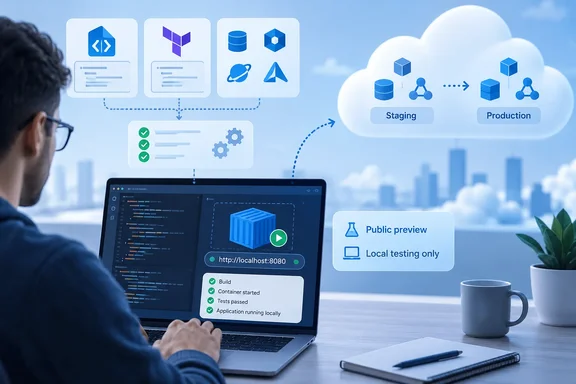
The emulator runs as a lightweight container on your own infrastructure. LocalStack says teams can keep their existing application code and Infrastructure as Code files and point dev and test workloads at the container endpoint. Once the code validates locally, it goes to real Azure for staging or production.
LocalStack's product page lists these supported provisioning paths:
- ARM and Bicep templates
- Terraform modules
- Pulumi programs
- Azure CLI scripts
- Azure Developer CLI (
azd)
Service coverage
LocalStack's documentation groups the preview into 23 resource providers. The main areas are:
- Containers: AKS, Container Apps, Container Instances, Container Registry
- Compute: Azure Functions and App Service (Web Apps)
- Databases: Cosmos DB (NoSQL and MongoDB APIs), Azure SQL Database, Azure Database for PostgreSQL flexible servers
- Storage: Blob, Queue and Table
- Messaging: Service Bus, Event Hubs, Event Grid
- Security and identity: Key Vault, App Configuration, Managed Identity, Azure RBAC
- Networking: virtual networks, private endpoints, private DNS, NAT gateways, Front Door/CDN, API Management
- Monitoring and management: Azure Monitor, Application Insights, Log Analytics, Resource Graph, Azure Resource Manager
LocalStack says every supported service has documented limitations and workarounds. Category coverage is not proof that your specific workload will run, so check the per-service pages.
Getting started
LocalStack's installation documentation says you need Docker and a LocalStack Auth Token.
- Install the
lstkCLI with Homebrew, npm (npm install -g @localstack/lstk), or a binary download. - Run
lstk doctor. It checks DNS and HTTPS access to LocalStack's API, corporate proxies and TLS interception, the container engine, and available memory and disk. - Run
lstk start. The first run opens a browser login and, in an interactive terminal, asks which emulator to use. Pick Azure. - If your global default is AWS, add a project-local
.lstk/config.tomlwith a container of typeazureon port 4566. - Alternatively, run the
localstack/localstack-azureimage directly with Docker or Docker Compose and passLOCALSTACK_AUTH_TOKEN.
For Windows users, the documentation gives a PowerShell health check: Invoke-WebRequest -Uri [url]http://localhost:4566/_localstack/info[/url] | ConvertFrom-Json. A successful activation returns "is_license_activated": true.
Common failure points
- Missing or invalid token: the container exits with a license-activation error. Use
lstk login, or setLOCALSTACK_AUTH_TOKENin CI. - License server unreachable: LocalStack falls back to offline activation that must be repeated every 24 hours. The docs suggest checking DNS resolution of
api.localstack.cloudand asking a network admin to safelist thelocalstack.clouddomain if corporate DNS filters it. - CI tokens: CI needs a CI Auth Token, because Developer tokens cannot be used there. Keep tokens out of source control and rotate any that are exposed.
- Image names: the
latesttag tracks tagged releases, whiledevtracks every merged commit on main. Release tags use calendar versioning, for example 2026.03.0.
CI/CD and AI agents
The documented CI flow is: expose a CI token, install lstk, start the emulator, deploy resources, run tests, and collect logs. Each job gets a fresh emulator, and tests need no Azure subscription. GitHub Actions is the only CI provider tested with the Azure emulator so far.
For AI agents, LocalStack documents an MCP server. It lets compatible agents start and stop the emulator, run Azure CLI commands and Bicep deployments, and read logs. The documentation says it needs Node.js 20 or later and Azure CLI 2.85 or later.
The guardrails matter here. According to the docs, the Azure tool runs in its own CLI profile logged into the emulator only. It blocks logins and cloud or config changes, and an egress guard refuses hosts other than the emulator. That is a useful containment design for agents. Treat it as the vendor's documented behavior, not as an audited guarantee.
Where the press release and the docs diverge
- Snapshots: the release says containerized environments are easier to snapshot and reproduce. The product FAQ says App Inspector, snapshots and chaos APIs are not included at preview launch. Resources vanish when the container stops. A container image is reproducible, but emulator state is not yet saveable.
- Speed claims: the release says updates validate "instantly" and that many clouds take 15 minutes or longer to provision. It gives no workload, service or method, so treat these as marketing claims.
- Fidelity: LocalStack calls the emulation "high-fidelity". Its own docs also admit parity gaps, and an emulator implements a subset of Azure's behavior. Validate anything security- or networking-critical against real Azure.
- Stale docs: the Auth Token page still describes a private preview with manually enabled access, which contradicts the public-preview launch. Follow the current product page and installation guide.
- GA terms: the FAQ contains unresolved placeholder text about what users must do at GA. Do not assume a settled conversion policy.
- Analyst quote: the HyperFRAME Research quote frames local simulation as a safety layer for agent-generated code. That is commentary in a vendor release, not a test result.
Practical take
Local emulation suits the early loop: Bicep or Terraform syntax checks, integration tests in CI, and sandboxes for each developer or agent. It does not remove the need for staging runs on real Azure. Microsoft also offers its own emulators for individual services, so check whether you need a multi-service emulator at all. LocalStack's pitch is breadth across services and IaC tools.
Before adopting it, check your specific services against the limitations pages. Plan for token handling in CI, and don't build on emulator state persistence until it ships. Preview terms and GA pricing can still change.
References
- LocalStack Expands Its Local Cloud Development Offerings With Launch of LocalStack for Azure - The Manila Times The Manila Times · 2026-10-07T16:14:32+00:00
- Local Azure Services | Docs docs.localstack.cloud
- LocalStack for Azure localstack.cloud