

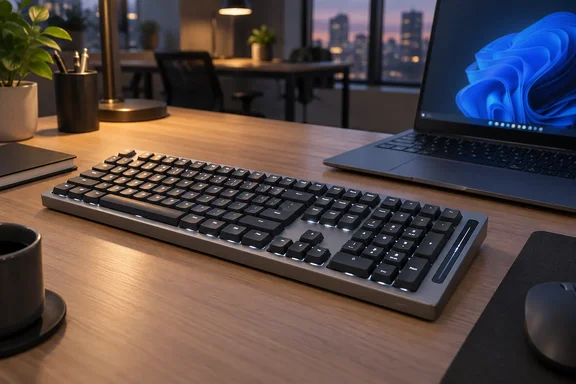
Lofree Flow 2 100: a 96% board that fits a numpad by giving up spacing
The "100" in the name is the key count. You get the main QWERTY block, F1 to F12 along the top and a numeric keypad. It is a 96% layout, not a true full-size board, so the numpad sits tight against the Enter and arrow keys. Lofree's product page lists 100 keys in a 96% layout, an anodized aluminum body, white backlighting, and 2.4GHz, Bluetooth 5.3 and wired USB-C connections. The listed dimensions are 398.2 × 126 × 21.5 mm and the weight is 870 g.
The unit PCWorld tested used a Nordic layout, carried a "Silent Edition" sticker and had Kailh Void switches. The review first ran in PCWorld's Swedish sister publication PC för Alla, and the testing was done in August 2026. The Flow 2 also comes in smaller sizes. According to Inspiration Grid, you can get it in 68-key or 100-key versions as well as the 84-key (75%) layout. The spacing complaint below is about the 100-key model only.
The Flow 2's extra width buys a blank strip instead of arrow-key room
Many 96% keyboards leave a small gap around the arrow keys so your fingers can find them by feel. The original Lofree Flow didn't, and Inghe complained about that in his earlier review. The Flow 2 is wider than its predecessor, but the extra space went into a strip about 3 cm wide to the right of the numpad. Inghe says the strip doesn't seem to do anything. In practice he kept hitting the left arrow when he meant Ctrl, and he says it takes time to unlearn that.
Buyers have reported the same thing, so it isn't one reviewer's quirk. Reviews on Lofree's own store include someone asking for the numpad to sit further from the arrow keys to avoid accidental presses. Another buyer says the arrow cluster is shifted one column left and they keep pressing 1 instead of Up. Other outlets haven't said much about the spacing. PC Gamer, Inspiration Grid and Digital Chumps focused on build, switches and connectivity, and PC Gamer and Inspiration Grid tested the 84-key model, which has no numpad.
One clarification may help. The strip holds the capacitive touch bar on the right-hand edge of the case. So the space isn't completely empty, but it does nothing to separate the arrow keys from the rest of the layout.
Quiet Kailh Void switches, and a disagreement about the sound
The Silent Edition's quiet typing comes from its switches. Lofree sells three low-profile Cloud Series switches made with Kailh: Surfer (linear), Void (silent linear) and Pulse (tactile). Lofree lists the same 40 ± 10 gf operating force and 2.8 ± 0.25 mm total travel for all three. Actuation is 1.3 mm for Surfer and Void and 1.6 mm for Pulse. Digital Chumps sums up the choice: the key differences lie in their volume (if you want a silent switch, you have to get the linear Void switch) and tactility.
PCWorld's description of the Void switches is inconsistent. It calls them linear and clickless, then says they give "a tactile feedback signal roughly halfway to the bottom." Lofree calls Void a silent linear switch with "firm feedback." Linear switches don't have the bump a tactile switch has, so the "tactile" wording most likely means a cushioned feel, not a real bump. If you want an actual bump, Pulse is the tactile option.
On noise, Inghe says the board stays quiet unless you pound the keys, and even heavy strokes make little clatter. He credits the damping layers, the solid aluminum chassis and the rubber feet. Lofree says the gasket mount uses five damping layers. Other reviewers heard something different. Tom's Guide says the Flow 2 sounds pretty darn awful thanks to stabilizer issues and the board's unique internal acoustics, and lists heavy keystrokes ricochet among its cons. Tom's Guide doesn't say which switch it tested, and PC Gamer also noted "somewhat inconsistent typing sound." So the quiet result is well supported for the Void-switch Silent Edition and less certain for the other switches.
The board can lie flat, where Inghe measured it at just under 2 cm thick, or it can be raised on fold-out feet at the back. Lofree lists angles of 0° and 7° and a flat height of 21.5 mm. According to PC Gamer, the original Flow had no adjustable feet, so this is a real upgrade.
Backlit legends are the Flow 2's clearest fix over the original Flow
Inghe's biggest complaint about the first Flow was the backlight. It lit the area around the keys but not the characters, which made it useless in a dark room. On the Flow 2, the characters on every key are clearly lit. Lofree says the redesigned switches have light windows more than 3.2 times larger than the previous generation. The keycaps are double-shot PBT with a clear polycarbonate legend layer, which lets the light through the characters.
PC Gamer agrees that the backlight is very crisp in low light. It adds that the thin legends are harder to read in daylight and that white is the only backlight color. If you type in dim rooms, this is the improvement that matters most.
Setting up the Flow 2 on Windows takes extra steps
Windows users should know the board ships as a Mac keyboard. PCWorld found it set up for Mac, iPad and iPhone, with macOS command keys on the bottom row. You switch it to the Windows/Android profile with a keyboard shortcut that is printed only in the quick-start guide. The Fn combinations for switching between wireless connections are documented there too. Lofree includes extra keycaps with Windows symbols, and Inspiration Grid also found extra keycaps for PC users in the box. There is no keycap puller, so you'll need to buy one to swap the caps.
For connections, a switch hidden under one of the feet chooses between off, wireless and USB-C. In wireless mode you can use the included 2.4GHz nano-receiver or up to three Bluetooth pairings, and Fn combinations switch between them. Inspiration Grid points out a downside of hiding the switch: it does mean flipping the board to access it if you're running it flat. Lofree lists a 1,000Hz polling rate for wired and 2.4GHz. PC Gamer says Bluetooth runs at 125Hz, so gamers should use the dongle or the cable.
Remapping and settings are where the reviews split most. Lofree advertises VIA support for key remapping and macros, and its product page links a "Lofree Flow 2 VIA Configurator" download for Windows. Inspiration Grid treats VIA as one of the biggest upgrades this time around. Inghe had a very different experience. His quick-start guide told him to email Lofree customer service for a configuration file and then upload it to VIA's web tool, and he found that absurdly awkward. The difference may come down to documentation: his printed guide describes the email route even though the store page offers a download. Check the store page before you contact support.
Touch bar and battery: small complaints that add up
The capacitive strip on the right edge got little praise. Inghe says it only adjusts volume, and he wanted to assign it other functions. Lofree says it controls volume and screen brightness, and PC Gamer found brightness works when you hold Fn, so PCWorld's "that's all it can do" is probably too narrow. The other reviews didn't like it either. PC Gamer called it gimmicky and fiddly, and Tom's Guide says you'll find yourself disabling it before long.
For battery, the 100-key model has a 3,000mAh cell that charges over USB-C. Lofree rates it at up to 120 hours with the lights off and up to 14 hours with all lights on. In PCWorld's three-day test the charge dropped 20%. Inghe could only see the battery level over Bluetooth, not through the 2.4GHz receiver. PC Gamer tested the 84-key model and got 22 hours from 90% to empty in Bluetooth with the backlight at maximum, which beat Lofree's rating for that model. That's a different size and configuration, so it doesn't tell you how the 100-key Silent Edition will last. Tom's Guide, by contrast, lists battery life among the board's strengths.
Who should buy the Lofree Flow 2 100, and who should look elsewhere
Your decision depends on how you use the right side of a keyboard. If you mostly type text and want a quiet, solid board with a numpad on a narrow footprint, the Flow 2 100 with Void switches fits well, especially in shared spaces. If spreadsheets, code navigation or games keep your right hand moving between the arrows and the numpad, expect a stretch of mis-presses. Several buyers still complain about it after daily use.
- The cramped arrow-and-numpad corner affects the 100-key, 96% model only. The 84-key and 68-key versions have no numpad.
- The quiet typing is well supported for the Void-switch Silent Edition. Tom's Guide and PC Gamer reported less consistent sound in their testing.
- On Windows, switch the profile using the shortcut in the quick-start guide, swap in the included Windows keycaps, and have a keycap puller ready.
- Use the 2.4GHz receiver or USB-C cable for 1,000Hz polling. Use Bluetooth only if you need to see the battery level.
- For remapping, try the VIA configurator download on Lofree's store page before asking support for a configuration file.
- Treat the 120-hour battery rating as a best case with the backlight off. With the lights on, expect to charge within days.
The Flow 2 fixes the original Flow's biggest problems: the unlit legends, the missing feet and the lack of remapping. What's left is a layout decision Lofree could have made differently. The board got wider, and none of that width went into spacing out the arrow keys. At $169, a buyer who types in the dark or shares an office gets a solid, quiet keyboard. A buyer who uses the arrows and numpad heavily is paying for a spacing problem they'll feel every day.