

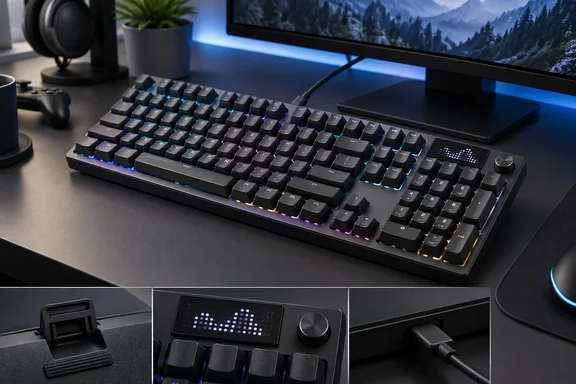
What Logitech is selling
The G316 X 98 is part of Logitech's G3 Series. Gizmochina reported at launch that it arrived alongside the new G305 X Superlight wireless mouse and that the keyboard would cost $119.99, with release scheduled for June 30, 2026. TechRadar lists it at $119.99, £109.99 and AU$199.95, in black or white. Logitech's U.S. store also lists $119.99 and describes the model as a 98% Wired Gaming Keyboard.
TechRadar tested the tactile version, but you can also buy it with linear switches. According to Gizmochina, Logitech offers two switch options at checkout: a tactile switch with a 2.2mm actuation distance and 55g of force, and a linear switch with a 1.9mm actuation distance and 40g of force. TechReview site Alktech tested the other version: its review unit came with linear switches.
Key specifications from Logitech and launch coverage:
| Item | Detail |
|---|---|
| Layout | 98% (number pad kept, some keys dropped) |
| Connection | Wired only; USB-C on the keyboard |
| Maximum report rate | 8 kHz |
| Switches | Hot-swappable; tactile or linear stock options |
| Keycaps | PBT, cross-hatch stem compatible |
| Lighting | Per-key RGB plus a 30-zone light bar |
| Weight | 880 g without cable (per Gizmochina) |
| OS support | Windows 10 or newer, macOS 12 or newer (per Gizmochina) |
Gizmochina says the board measures about 15.1 inches wide by 5.5 inches deep, which matches TechRadar's 384 x 140 x 40mm figure. Windows 11 users are covered: Gizmochina reports compatibility with systems running Windows 10 or newer, as well as macOS 12 or newer.
Section summary: a $120 wired 98% board with an 8 kHz report rate, a choice of tactile or linear switches, and hot-swap sockets.
The good part: switches, build and feet
TechRadar calls the tactile switches the highlight. Maddison describes a solid, "thocky" press with a quick rebound, so the keys feel fast. There's enough damping to avoid a harsh bottom-out, but less than on many gaming keyboards, so the board gets loud when you type hard. Logitech credits the sound to a gasket-mounted structure with sound-dampening layers, according to its product page. The spacebar felt more heavily damped than the other keys, which the reviewer liked.
The chassis is plastic, but TechRadar calls it solid and light. The PBT keycaps have a slight texture and fit firmly. PBT is a practical choice: as Gizmochina points out, PBT keycaps generally resist the oily shine that develops on cheaper plastic keycaps over time.
The feet are the unusual part. There are no fold-out plastic kickstands. Instead you get removable rubber blocks that you flip over to change the tilt from four to eight degrees. The reviewer thinks this works better than it sounds: the blocks can't fold shut when you move the board, and the large rubber surface grips the desk well. His only complaint is that eight degrees still isn't quite steep enough for him. He sometimes hit the back edge of the spacebar, though its curved shape made that less of a problem. Even so, he found the board comfortable without a wrist rest, which he says isn't true of every gaming keyboard.
Maddison tested it over a few days of gaming, typing and web browsing. He played Counter-Strike 2 to judge responsiveness and S.T.A.L.K.E.R. 2: Heart of Chornobyl to test reaching keys outside WASD. Those are subjective, hands-on impressions, not latency measurements or a long-term durability test.
Section summary: the feel, build and feet are the main reasons to buy it. The tilt range is a little short.
The screen: a light show, not an information panel
Logitech describes the display this way: a dot-matrix LED display animates as you adjust settings on the dial, with animations and quick control of volume, media, brightness, and report rate. TechRadar says it looks sharp but mostly plays simple animations when you change the volume or play media, and none of them helped. Keyboards with more useful screens show settings menus or game information.
The dial itself is more useful. Logitech's setup guide, as reproduced by Manuals.plus, says the media knob supports four adjustment modes: volume, keyboard brightness, report rate, and music control. To change mode:
- Press and hold the knob for 1.5 seconds to start mode selection.
- Rotate to select a desired mode, and then press to confirm the selection.
- In volume mode, rotate to adjust volume, and press to mute or unmute.
So the screen mostly confirms what the knob is doing. The knob does the actual work.
Section summary: the dial is useful, the screen mostly isn't, and neither changes how the board types.
Software, layout and the 8 kHz catch
G HUB does most of the customization. TechRadar notes you can map up to five inputs to a single key, use three mapping layers, and set the Game Mode button to disable more keys than just the Windows key. Gizmochina adds that you also use G Hub to enable the 8 kHz polling rate, set up custom macros, remap keys, and configure game mode settings. Lighting is set up there too: per-key RGB and a light bar with 30 customizable zones.
The layout keeps the number pad but drops some navigation keys that the reviewer missed, and few Fn shortcuts are printed on the keycaps. You can build your own shortcuts in G HUB. Plan to spend a few minutes there before assuming a function doesn't exist.
The 8 kHz report rate comes with a condition. Logitech's own setup guide says to achieve an 8 kHz reporting rate, it is recommended to use the data cable included in the product packaging to directly connect the keyboard to your computer. If a USB adapter is required, please ensure it supports USB 2.0 High-Speed (480 Mbps) or USB 3.0 and above (5 Gbps or higher) transfer rates. If the adapter doesn't meet that, it may result in insufficient support for 8K Hz data transmission, which could affect the user experience.
For Windows users with a front-panel hub, a monitor USB hub or a cheap dongle in the way, try this before blaming the keyboard:
- Connect the included cable straight to a port on the motherboard or laptop.
- Only use a USB adapter or hub rated USB 2.0 High-Speed or USB 3.0 and above.
- Check the report rate in G HUB, or with the knob's report-rate mode, after reconnecting.
To be clear, an 8 kHz report rate is a specification, not a guaranteed advantage. TechRadar notes that apart from the polling rate, the board has few performance settings. Nobody has shown that 8 kHz makes a difference you can notice in play.
Section summary: G HUB is capable, the layout gives up a few keys, and 8 kHz depends on a direct connection or a fast enough adapter.
Is the price right?
TechRadar calls it fairly expensive for a wired keyboard but cheaper than some premium rivals. It costs less than the HyperX Origins 2 1800 and much less than the Razer BlackWidow V4 Pro 75%, which the reviewer calls one of the best-made and best-performing boards in the category. For tighter budgets, he suggests the MonsGeek FUN60 Ultra, which has wireless options and analog switches.
The counterargument is simple. At $120, not having wireless is a real drawback, and there are cheaper boards with more features. On the other hand, a wired board doesn't need charging and has no receiver to lose, and at 8 kHz the cable is also the connection Logitech recommends.
| Buy it if you want… | Skip it if you want… |
|---|---|
| A solid, thocky tactile feel (or the linear option) | Wireless connectivity |
| Stable, grippy flip-over feet | A screen that shows useful information |
| Hot-swappable switches and PBT caps | The most features for the lowest price |
| Deep G HUB remapping and layers | A steeper tilt angle |
The bottom line
The G316 X 98 is a well-built, good-feeling keyboard at a reasonable price. The screen is mostly decoration, but the switches and build are solid. If your PC runs Windows 10 or 11 and a wired connection doesn't bother you, it's worth considering. Just plug it straight into the PC if you want the full 8 kHz, and ignore the animations.
References
- Logitech G316 X 98 review: a super-thocky keyboard with a useless screen TechRadar · 2026-09-30T10:47:14+00:00
- Logitech launches G316 X 98 gaming keyboard with 8,000Hz polling and hot-swappable switches - Gizmochina gizmochina.com
- G316 X 8k Wired Mechanical Gaming Keyboard - 98 SETUP GUIDE logitech.com