

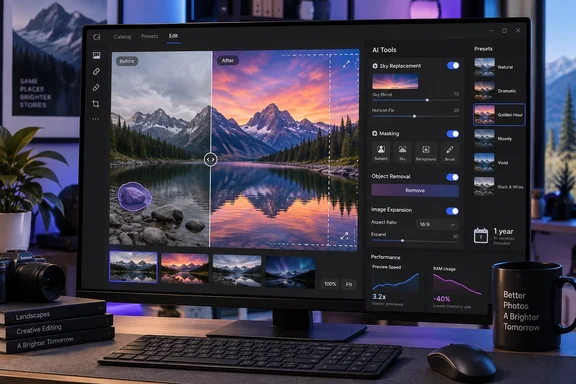
WindowsReport’s review presents Luminar as an accessible AI-first alternative to a manual Photoshop-style workflow, and that is broadly accurate. Luminar retains conventional RAW-development controls, layers, masking, and local adjustments, while adding one-click tools for sky replacement, relighting, portrait retouching, noise reduction, object removal, and image expansion. The 1.28 release is less about adding another marquee effect than reducing the friction between those tools.
Skylum announced the two-stage rollout in August, while DPReview independently confirmed that version 1.28.0 shipped on August 5. Skylum has subsequently issued version 1.28.1, so Windows users installing today should not assume the original 1.28.0 build is the current maintenance release.
One workspace replaces Luminar’s old mode switching
The largest practical change in Luminar 1.28 is the merger of the old Catalog and Edit modes into a single workspace. Presets, adjustment tools, and the list of edits now sit in the right-hand area rather than requiring photographers to jump among separate parts of the application.
That may sound like a cosmetic revision, but it addresses a real workflow problem in AI-heavy photo editors. Luminar’s tools encourage experimentation: apply a preset, run Enhance AI, mask the foreground, adjust a sky, then revisit the earlier edit when the result becomes too aggressive. A workflow that separates browsing, editing, and edit history makes that iteration slower than it needs to be.
The new layout makes Luminar more usable as a standalone editor on a Windows PC, particularly for photographers who import folders, make quick culls, and apply similar starting edits across a shoot. It also makes the application a more credible companion to Lightroom or Photoshop, where Luminar is used for a narrow task such as relighting, object removal, or a stylized landscape edit.
The update also appears to mark a quiet product-name change. Skylum’s earlier release notes referred to Luminar Neo, but the 1.28 materials use simply Luminar. DPReview first called attention to the discrepancy, noting that Skylum’s own pages had not fully standardized the name. Existing Windows users should therefore expect to encounter both names in installers, account pages, plug-in listings, and older support articles for a while.
Skylum’s speed numbers are maxima, not a benchmark result
Skylum says Luminar 1.28 can export photos up to 27% faster, show Preset previews up to 3.8 times faster, and use up to 33% less RAM during masking. Those specific figures are repeated in Skylum’s release material and have been reported by DPReview and French photography publication L’Art de la Photo.
The wording deserves attention: “up to” is not an average performance result. Skylum has not published the source files, PC specifications, export formats, image counts, or comparison methodology behind those numbers. A fast JPEG export from a modest-resolution image and a batch export of large RAW files with several AI masks do not impose remotely similar loads on a Windows system.
Still, the masking claim is potentially the most useful one for Windows users with 16GB of RAM or large RAW catalogs. Automatic subject and object masks can be expensive because the software must analyze the image, construct selections, and preserve editable mask information while the user continues working. Lower memory use will not make a low-powered laptop behave like a workstation, but it can reduce pauses, cache pressure, and the tendency for a photo editor to compete with other open applications.
The interface revision may be equally important on midrange hardware. Faster Preset previews make it easier to compare looks without waiting for each thumbnail or full-screen preview to refresh. That is a quality-of-life change rather than a new capability, but it is exactly the kind of improvement that determines whether users reach for a tool regularly or avoid it until they have a single dramatic image to process.
Generative edits remain useful only when the image gives them room
Luminar 1.28 also revises GenErase, GenSwap, and GenExpand, its generative AI tools for removing an object, replacing a selected area, and extending an image beyond its original frame. Skylum says it rebuilt the underlying generative model to blend results more naturally into the source photograph.
These tools can save time on straightforward cleanup jobs. GenErase is suited to removing a person in the background, a small sign, an unwanted cable, or another distraction when the application can infer a repetitive background. GenExpand is useful when a composition needs additional space for a different aspect ratio, especially for social-media crops, banner images, or print layouts.
They are less dependable where the missing area contains meaningful, unique detail. Removing a person from in front of intricate architecture, extending a landscape across a detailed shoreline, or replacing a product in a commercial photograph requires the model to invent pixels that did not exist in the original file. The result may look acceptable at a glance but fail under closer inspection through repeated patterns, broken perspective, or implausible textures.
For photographers who need evidentiary accuracy, including editorial, real-estate disclosure, documentary, competition, and archival work, generative features should be treated as content creation rather than ordinary retouching. Luminar also includes a conventional Erase brush, which is often the safer choice when a small repair can be made without synthesizing an entirely new background.
The Fall upgrade is a roadmap, not a feature available today
The Fall phase is the more ambitious half of Skylum’s plan. It includes an improved Enhance model, a new fog treatment in Atmosphere, composition recommendations through Smarter Crop, an AI Assistant that can recommend and apply combinations of tools, and Luminar Web.
Skylum says the improved AI Assistant will let a user describe an intended outcome and have the application carry out a multi-tool edit. The current assistant already helps users find appropriate tools and suggests edits; the promised version would shift it closer to a task-oriented editing agent. That could be useful for newcomers who know the result they want—brighter subject, softer background, richer sky—but do not know whether to start with Develop, Relight, Enhance, Structure, or masking.
The risk is that the assistant’s convenience could make heavy-handed defaults easier to apply at scale. AI enhancement tools often make a strong first impression by increasing contrast, color separation, texture, and local brightness. The better test is whether the image still looks natural after zooming in, comparing it to the original, and viewing it on another display. Luminar’s non-destructive workflow helps here: users can reduce the strength of an edit, alter a mask, or remove an effect without restarting the image.
Luminar Web is the roadmap item with the broadest workflow implications. A browser editor could make it easier to continue a job away from a primary Windows workstation, but Skylum has not yet published the final feature limits, supported browsers, file-size constraints, offline behavior, synchronization model, or whether all desktop AI tools will be available in the web version. Until those details are released, it should be viewed as an announced cross-device option rather than a replacement for the desktop application.
The perpetual-license label has an annual AI-services condition
Skylum’s pricing page lists a $129 Desktop Only plan, a $159 All Platforms tier, and a $199 Max package. The pricing is presented as a one-time purchase, with the Fall 2026 upgrade included for eligible buyers. That makes Luminar attractive to users trying to avoid Adobe’s recurring Creative Cloud subscription.
But the product is not permanently identical after a one-time purchase. Skylum’s own terms say generative AI tools, Restoration, AI Assistant, Spaces galleries, and the Creative Library are provided for 365 days and are subject to fair-use limits. The Max package includes a year of Luminar Prime; renewal is required to retain the yearly-access services after that period.
That distinction is easy to miss because the desktop application itself is described as lifetime access. Buyers will keep the core software and the Fall upgrade features covered by their license, but perpetual ownership of Luminar does not mean permanent access to every AI-backed service. Anyone buying primarily for GenErase, GenSwap, GenExpand, Restoration, or AI Assistant should price the software as a one-year bundle plus a possible future Prime renewal, rather than comparing its upfront cost only with a one-time conventional editor.
For Windows photographers, Luminar 1.28 is a credible usability update with a meaningful chance of improving daily work on large catalogs and mask-heavy edits. The Fall package may be the bigger release, but it remains a promise until Skylum ships it—and the software’s long-term cost will depend less on the $129 entry price than on how much a buyer relies on AI services that expire after the first year.
References
- Luminar Review: Improved AI, Faster Editing, and a Major Fall Upgrade Windows Report · 2026-09-18T15:18:29+00:00