

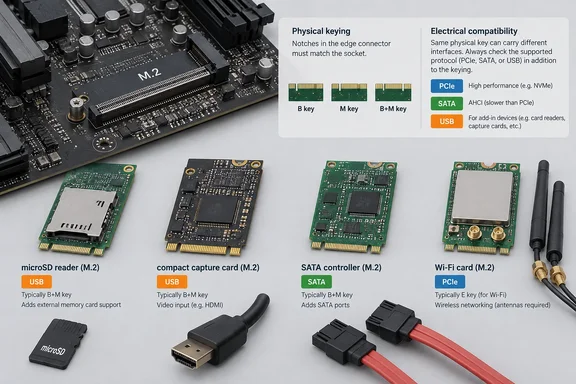
What M.2 actually is
PCI-SIG, the body behind the standard, describes M.2 as a family of form factors. The family allows expansion, contraction and higher integration of functions on a single module. The M.2 specification covers internally mounted expansion cards and connectors. The slot is also not tied to one bus. Depending on the socket, M.2 can connect to the host through PCIe, SATA 3.0 or USB 3.0.
PCI-SIG's listing shows the current approved specification is Revision 5.1, dated May 20, 2024. That is why you see so many different kinds of modules sharing a single connector.
The compatibility rule that matters most
The XDA article tells readers to match the key to their motherboard. That is necessary advice, but it is only half the check.
A key only checks physical insertion. The socket must also route the protocol the card uses, and the firmware and software must support the device. A Hackaday explainer on M.2 makes a similar point. A B+M-key SATA SSD will not work in some NVMe-only M-key sockets, and proprietary standards like CNVi undermine the idea that any M.2 Wi-Fi card will work.
In practice, check four things before buying:
- Key and length. Read the manual for the slot's key, supported module length and mounting standoff position.
- Signals. Confirm the slot provides what the card needs: PCIe, SATA, USB, or a mix.
- Lane sharing. Boards often share resources between slots. MSI's motherboard specifications, for example, show an M.2 slot sharing lanes with a PCIe slot and another M.2 socket affecting SATA-port availability. The details are board-specific.
- Drivers, cables and power. Check OS and driver support, and any antennas, breakout cables or drive power the device needs.
microSD readers
XDA's first example is a microSD reader, a useful fix for creative workflows on machines that lack a card slot. Delock documents one such product, an M.2 Key A+E adapter in the 2242 size. It uses a Realtek AU6601 chipset and a PCIe interface, according to the research notes for this story. The datasheet lists microSDHC and microSDXC support and compatibility with an A- or E-key slot "based on PCIe".
Two cautions apply. XDA says both A+E and B+M versions exist for under $20, but I could only confirm the A+E variant. I could not verify the price. Delock's page also lists Windows 7, 8.1 and 10, so don't assume Windows 11 support without checking the maker's current driver notes for the exact model.
Capture cards
M.2 capture cards are real, but they are specialist hardware. Magewell's Eco Capture family measures 22x80mm and is aimed at small or portable systems where full-size PCIe slots aren't available. Magewell says the M.2 models come with Windows and Linux drivers and support x86, x64 and ARM.
XDA describes these cards as using a PCIe 2.0 x4 configuration. Magewell's own listings show the interface varies by model:
| Model | Host interface | Input |
|---|---|---|
| Eco Capture AIO M.2 | M.2 2280 Type M, PCIe Gen2 x2 | HDMI and SDI, up to 2048 x 1080 |
| Eco Capture HDMI 4K Plus M.2 | M.2 2280 Type M, PCIe Gen3 x4 | HDMI up to 4096 x 2160 at 60 fps |
Magewell's HDMI 4K Plus specification page adds that actual capture frame rates can be limited by PCIe bandwidth and internal working frequency. The same page lists drivers for Windows 10, Windows 11 and several Windows Server versions, and support for software such as OBS, XSplit and vMix. Magewell lists the Dual HDMI M.2 as Gen2 x4, but I couldn't retrieve that datasheet to confirm it.
Magewell frames these cards for systems integrators and OEM developers, not for gamers. XDA's claim that an M.2 capture card beats a USB one is plausible for some setups, but I found no independent benchmark. Treat it as unproven.
More SATA ports
For a hoarder of drives, a SATA adapter is the most obviously useful of these cards. Radxa's M.2 to Hexa SATA Adapter uses an ASMedia ASM1166 PCIe-to-SATA controller. It offers six SATA Gen3 ports at 6 Gbps each, in a standard 2280 size.
Keep three limits in mind:
- Bandwidth is shared. Six ports rated at 6 Gbps do not mean six drives can each run at that speed at once. The card's own PCIe link is the ceiling.
- Power is separate. The card supplies data connections. Each drive still needs power from your power supply, and you need case room for the cables.
- Radxa's compatibility list is narrow. Its page names specific Radxa systems. It does not promise the card works in every PC.
A generic adapter also can't convert protocols on its own. Adapters cannot translate SATA to PCIe or CNVio to PCIe unless they contain an active bridge designed for it.
Wi-Fi and Ethernet
Wi-Fi is where the trap is most common. Intel's AX210 is a good example of a standard module. Intel lists it as an M.2 2230 card with Wi-Fi over PCIe and Bluetooth over USB, and with Windows 11, Windows 10 and Linux support.
Because Wi-Fi and Bluetooth use different interfaces, if the host routes PCIe but not USB 2.0, Wi-Fi may enumerate while Bluetooth remains unavailable.
CNVi adds another wrinkle. CNVi requires chipset and Intel CPU support. Otherwise the module has to be the traditional PCIe form factor. In Intel's naming, model numbers ending in 0, such as the AX200 and AX210, are PCIe M.2 cards. Numbers ending in 1, such as the AX201 and AX211, are CNVio2 cards. Intel's community forum adds that it also depends on what cards the system manufacturer accepts and which slot is present.
Laptops from some makers also restrict which wireless cards they will accept. One seller's listing warns that HP, Dell and Lenovo ThinkPad machines have whitelist restrictions. I treat that as a seller's claim, not a verified rule. Check your model's documentation before swapping.
If the only free slot is M-keyed, XDA suggests an M-to-E adapter. Those exist, but one seller notes its adapter does not support CNVi wireless cards.
For wired networking, M.2 Ethernet modules exist. DFRobot lists an A+E-key module for a specific LattePanda board, built on an Intel I225-V controller with speeds up to 2,500 Mbps and Windows 10/11 and Linux support. I confirmed the category but not XDA's price claims or universal fit.
Verdict
M.2 is flexible, but that flexibility comes from what the motherboard wires up, not from the connector's shape. The ideas in the XDA article hold up as real product categories. Its prices and its blanket claims that M.2 doesn't limit performance and that capture cards use a single PCIe configuration need qualifying.
Before buying, find your slot's key, length and signals in the manual. Check lane sharing, then check drivers and any extra cables or power. A $20 card that doesn't work in your slot is just a decoration.
References
- Your M.2 slot does more than SSDs, but nobody talks about the boring cards that prove it XDA · 2026-10-03T20:30:17+00:00
- Eco Capture - Ultra Compact & Lower Power Consumption - Magewell magewell.com
- Eco Capture AIO M.2 - Magewell magewell.com