

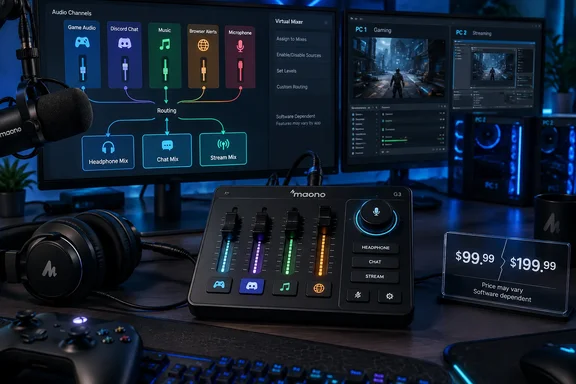
Notebookcheck first reported the G3’s launch as a $99.99 mixer for single- and dual-PC broadcasters. Maono’s September 18 launch announcement makes the same $99.99 claim and describes black and white models. Yet Maono’s live G3 product page listed the unit at $199.99 when checked on September 19. That is not a minor detail for buyers comparing it with entry-level streaming controllers: the company has published two conflicting prices on its own properties, so prospective purchasers should verify the checkout price before treating $99.99 as the actual cost.
Arena is the G3’s real control surface
The G3 is not a conventional stand-alone analog mixer with a few USB conveniences. Its main selling point is application-aware routing: Maono Arena creates virtual audio channels on the Windows PC, lets the user assign programs to them, then maps those channels onto the G3’s four hardware faders.
Maono describes six potential virtual destinations or source categories in its support material: system sound, chat, game, music, browser, and a general virtual channel. Four physical faders therefore do not mean four fixed inputs. A streamer has to decide which four sources deserve immediate hardware control and configure the rest in Arena.
That can be useful for a typical OBS setup. A creator can put a game on one fader, Discord on another, music or alerts on a third, and the microphone on the fourth. When someone says the game is too loud, there is no need to leave a full-screen game and search through Windows’ Volume Mixer. But it also means the promised workflow depends on Windows audio endpoints, per-app output assignments, and Arena remaining connected to the device.
Maono’s own G3 FAQ is explicit about the dependency. Arena is required for the product’s full workflow, including virtual channels, app routing, submixes, device settings, and synchronization with the hardware controls. The mixer can still act as an audio interface, but the feature that differentiates it from less expensive USB interfaces is software routing rather than the XLR socket or the faders alone.
For Windows users, that is a meaningful distinction. The G3 is best understood as a dedicated controller for Maono’s virtual mixer, with microphone I/O attached—not as a universal mixer that can reproduce its advertised routing on every operating system or with every audio application.
The three mixes solve a real livestream problem
The most useful part of Maono’s design is the separation of Headphone, Chat, and Stream mixes. These are three versions of the same pool of sources, each with its own level and mute decisions.
The Stream mix is intended for OBS or another broadcast destination. The Chat mix is for in-game voice chat and services such as Discord. The Headphone mix is the streamer’s private monitoring feed. A creator could, for example, keep a music track in their headphones, exclude it from team chat, and lower it in the broadcast while retaining game and microphone audio in all three places.
That capability is more practical than the phrase “independent mixes” initially sounds. It can prevent common livestream mistakes: teammates accidentally hearing a stream alert, viewers hearing a private Discord discussion, or the streamer losing their own game monitoring while changing the audience mix. Maono’s setup guide even describes muting non-microphone channels in Chat mode to ensure teammates receive only the broadcaster’s voice rather than stream audio.
The limitation is that this separation does not happen automatically. Streamers will still need to set individual applications to the correct Arena output in Windows and configure their broadcast and chat applications to listen to the intended virtual devices. A game left on the default Windows output, or Discord pointed to the wrong Arena input, will defeat the carefully designed mix plan.
This makes the G3 more appealing to streamers who already understand OBS audio sources and Windows app routing than to somebody seeking a plug-and-play way to improve a headset microphone. Maono’s physical controls can reduce mid-stream adjustments, but initial setup remains a software-routing job.
Dual-PC streaming is a mix handoff, not unlimited audio capture
Maono markets the G3 for dual-PC streaming through its USB-C and PC-2 connectivity. Its support documentation provides the important operational detail omitted by the simplified marketing language: the second PC—or a phone connected through the PC-2 port—receives one selected composite mix. The user can choose the Stream, Chat, or Headphone mix for that output.
That should be enough for many two-computer setups. A gaming PC can run the game and voice chat while a second machine handles OBS, recording, or the actual broadcast. Sending the Stream mix to the second PC means the streaming machine receives a prepared audio feed alongside the captured video.
It is not the same as delivering every source to the second PC as isolated tracks. If an editor or broadcaster needs separate game, chat, microphone, music, and alert tracks on the streaming PC for later post-production, the G3’s PC-2 output is not described as a multitrack transport. It is a selected stereo-style mix destination. Users who require isolated recording should confirm their OBS and Arena configuration before buying, rather than assuming the presence of two computers produces separate stems.
There is a second operational tradeoff. Maono’s FAQ says real-time monitoring is unavailable when Arena’s monitoring device is switched to the Digital Audio Device PC2 output. In plain terms, routing sound toward the second PC can alter how the streamer monitors the setup locally. This is exactly the kind of detail that matters during a dual-PC build and is absent from the retail feature summary.
The company does provide a clear boundary for mobile use as well. A phone or secondary computer may serve as an additional audio destination, but it cannot replace the primary Windows PC running Arena. The G3 is therefore unsuitable as a self-contained smartphone streaming board for creators who do not have a Windows machine in the signal chain.
Hardware controls and microphone support
On the hardware side, Maono lists one XLR microphone input, a 3.5 mm input, headphone and monitor-speaker outputs, USB-C connections, and 48V phantom power for condenser microphones. The company rates the preamp at up to 57 dB of gain and includes AI noise reduction, though it has not published enough technical detail to establish how that processing compares with noise suppression offered by OBS filters, Discord, NVIDIA Broadcast, or dedicated plug-ins.
The 48V option matters because it expands the G3 beyond USB microphones and toward traditional XLR condensers. The 57 dB gain figure is useful but should not be mistaken for a complete preamp-quality measurement; Maono has not made equivalent specifications such as equivalent input noise or maximum input level prominent in its launch material. Users selecting a microphone should avoid treating a gain number alone as proof of how quietly or cleanly every XLR mic will perform.
The four sound pads are customizable through Arena and can play clips or effects of unrestricted duration, according to Maono. That makes them suitable for longer intro music, scene transitions, or recurring alerts rather than only short meme effects. But there is another setup consideration: Maono’s G3 guide says the first two pads can be used to toggle noise reduction and monitoring. A streamer who assigns those operational controls gives up part of the four-pad bank for convenience.
The launch price needs clarification before this becomes a bargain
The G3 arrives into a crowded category full of compact USB interfaces, software mixers, and stream controllers. Its pitch is coherent for a Windows creator who needs a physical way to manage several app-based audio feeds and wants audience, teammate, and headphone audio kept separate.
The pricing record is less coherent. Maono’s news post, Notebookcheck’s report, and several launch summaries say the MSRP is $99.99, while Maono’s retail product listing displayed $199.99. Until Maono corrects one of those pages or explains whether the lower amount is a launch promotion, regional figure, or listing error, the supposed value proposition cannot be judged reliably.
For now, the decisive question is not whether the G3 has enough buttons. It is whether a buyer is prepared to make Maono Arena a permanent part of a Windows streaming setup. If the answer is yes, its mix separation and selected PC-2 output address a genuine dual-PC audio-routing problem. If the answer is no—or if the setup includes macOS as the main production machine—the G3’s headline features largely remain out of reach.
References
- Maono G3 gaming audio mixer launches with dual-PC streaming, programmable sound pads, and live streaming mixes Notebookcheck · 2026-09-19T22:48:00+00:00