

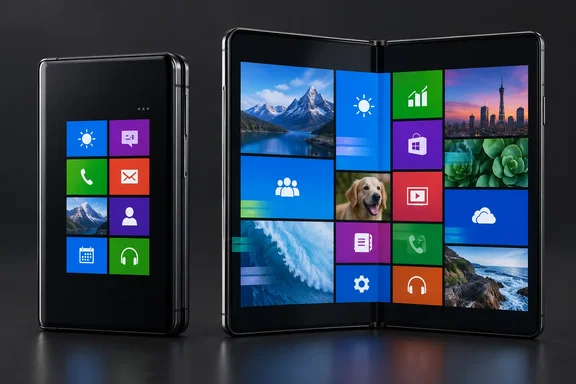
There is an important boundary, however: METROV recreates the interface, not the operating system. Boddy’s experience describes a home-screen transformation, not Windows applications or PC-style multitasking. Think Metro revival, not a Windows installation hiding behind the hinge.
A foldable gives Metro room to breathe
The most distinctive feature in Boddy’s account is METROV’s “desktop mode.” On the Fold 7’s inner display, it presents a layout reminiscent of the Windows 8 Start Screen rather than merely enlarging the cover-screen arrangement.
That distinction makes the experiment interesting. A compact, vertically oriented tile interface suits the closed phone; opening it provides space for a broader composition. As an interface concept, this gives the two displays different jobs instead of treating one as an oversized copy of the other.
Boddy particularly praised the animations and transitions, describing them as convincing reminders of Microsoft’s Metro design. Their account also describes themes drawing on Windows Phone 7, Windows Phone 8.1, Windows 8, and Windows 10 Mobile, along with controls for tile labels, backgrounds, colors, icons, and spacing.
The developer’s Google Play listing independently confirms the broader foundation: dynamic tiles, Android widget support, folders, resizable tiles, icon packs, fonts, accent colors, and Classic and Modern layouts. It also explicitly identifies METROV as an independent project with no Microsoft affiliation. That listing does not establish that Boddy’s particular folded/unfolded experience works identically on every foldable.
The attraction is screen-aware nostalgia—not a promise of universal foldable compatibility.
How live are the Live Tiles?
Boddy’s report describes several ways METROV makes its home screen feel active:
- Built-in Metro-styled tools, including Gallery, Calculator, Agenda, Forecast, and Music Player.
- Android widgets embedded into the tile layout.
- An optional Action Center presenting notifications.
- Notification-driven tiles that can display information from other apps.
One example was a Google Messages tile flipping to show recent messages and a response prompt. That is more informative than an unread-count badge, but it should not be confused with native Windows Phone application integration.
The developer’s GitHub page corroborates the presence of live tiles, notification support through an Action Center, animations, and themes. It also clarifies something useful for readers: the repository is a feedback tracker, not the application’s source-code repository. A GitHub presence alone does not make this an open-source launcher.
Why some widgets struggle inside tiles
The weaknesses in How-To Geek’s account are concrete. Boddy reported that Samsung’s Clock widget displayed incorrectly, while a TIDAL widget fitted an appropriate tile size but retained stale artwork and controls. They also encountered awkward tile rearrangement, resizing, and folder creation.
Those observations matter, but they are not universal compatibility findings. The report does not establish that every installation—or every subsequent app version—will reproduce them.
Google’s Android documentation helps explain the underlying challenge. A replacement home screen hosts widgets through AppWidgetHost; it must handle binding, configuration, and sizing. The widget provider receives information about its available dimensions, and the host must respect minimum-size requirements. Google specifically notes that foldables can require more size configurations than conventional phones.
Separately, Android’s widget documentation explains that the supplying app defines metadata such as layout and update frequency. Fitting a widget into a tile and keeping its content current are therefore different concerns. This architecture explains why compatibility needs testing, but it does not diagnose the particular Clock or TIDAL failures Boddy observed.
The practical takeaway: a handsome tile is not necessarily a dependable widget.
What to test before making it your daily launcher
For anyone drawn to the Windows Phone look, a focused trial is more useful than immediately rebuilding an elaborate home screen.
- Start with essential apps. Place the shortcuts and widgets you actually depend on before spending time matching an old Lumia color scheme.
- Exercise both displays. Fold and unfold the phone, then check readability, placement, and interaction—not just appearance.
- Test changing content. Switch music tracks, inspect calendar information, and try any scrolling controls. Boddy’s experience shows why a widget’s initial appearance is not enough.
- Complete widget setup prompts. Android requires user authorization for widget binding when permission has not already been granted, and some widgets require configuration before displaying correctly.
- Judge the transitions outside the launcher. Boddy found the return to ordinary apps, multitasking, and system settings could interrupt the Metro illusion.
Google Play identifies METROV as offering in-app purchases and carries the developer’s claim that it contains no ads. Its privacy declarations are developer-provided disclosures, not an independent security audit.
For reproducible problems, the project’s feedback guidance asks for the METROV version, phone model, Android version, and preferably a screen recording. Those details are considerably more useful than “my tile is broken.”
A compelling interface experiment, with Android underneath
Boddy ultimately liked METROV enough to keep using it despite the compromises. Their comparison with Square Home favored that alternative’s additional organizational features while finding METROV especially appealing for its fidelity to the older Microsoft interface.
That is the fairest way to frame this launcher: not as a definitive productivity upgrade, but as a distinctive option for people who still enjoy Metro’s visual character.
The foldable arrangement makes the idea more than a wallpaper-deep throwback. Yet the reported widget problems and customization friction deserve equal billing with the nostalgia. METROV can evoke the Windows foldable of someone’s imagination; whether it deserves the daily-driver job depends on the less glamorous question of whether your essential tiles actually work.
References
- This Android launcher turned my phone into the Windows 8 foldable Microsoft never made How-To Geek · 2026-10-01T13:00:14+00:00
- METROV Launcher play.google.com
- GitHub - metrov-wp-launcher/metrov-app: Metrov: WP Launcher · GitHub github.com