

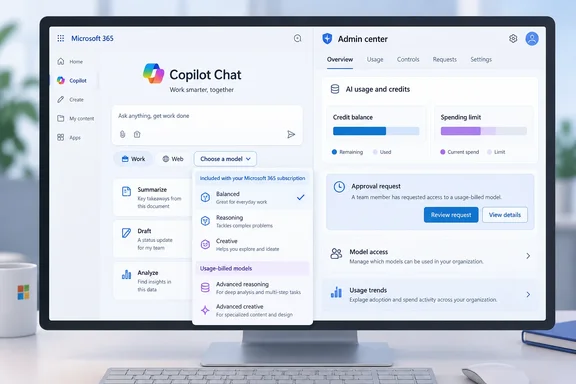
The item is listed as in development, with general availability targeted for October 2026. It covers desktop and web in the Worldwide (Standard Multi-Tenant) cloud. The roadmap gives a target month, not a launch date, so admins shouldn't assume the feature is live in their tenant yet.
What the roadmap item says
| Detail | What Microsoft lists |
|---|---|
| Roadmap ID | 571400 |
| Product | Microsoft Copilot (Microsoft 365) – Chat |
| Change | Usage-billed models selectable in Chat's model selector |
| Prerequisite | Tenant admins allocate credits to users |
| When credits run out | Users can request more credits from tenant admins |
| Status | In development |
| GA target | October 2026 |
| Platforms | Desktop, Web |
| Cloud | Worldwide (Standard Multi-Tenant) |
The roadmap entry does not say:
- which models will appear in the selector
- what each model costs per interaction
- whether access is on or off by default
- what the credit request looks like for users
- what happens to a conversation already in progress when the credits run out
None of the Microsoft documentation reviewed here answers those questions either.
Section summary: Paid models are coming to the Chat model selector, controlled by admin-managed credits. The pricing and user-interface details haven't been published.
Why this matters: Copilot now has two ways to pay
This roadmap item follows a pricing change Microsoft announced in late September. In the Microsoft Tech Community post "Evolution of the Copilot pricing model," Microsoft says everyday AI stays at a fixed price per user while advanced AI runs on Copilot Credits. The same post lists what runs on the paid side: Cowork, Code, Autopilot, new advanced experiences in apps like SharePoint, and frontier models like Fable and Astra.
Jared Spataro, Microsoft's Chief Marketing Officer for AI at Work, described the same split in his September 25 post introducing Copilot's new Home, Code and Autopilot features:
- The user subscription license (USL) covers Copilot in Chat and in Word, Excel, PowerPoint, Outlook and Teams. It includes model selection and an Auto option that weighs accuracy, speed and cost to route each request.
- UBB is aimed at agentic work and the most advanced models, so customers can choose models and match cost to value.
Until now, the Chat selector has mostly offered models covered by the subscription. This roadmap item adds metered models to that same selector. A user could switch from an included model to a paid one with a single click, and an admin's credit allocation would decide whether that click works.
Section summary: The model selector becomes the point where fixed-price Copilot and paid Copilot meet, which makes credit policy part of the everyday Chat experience.
What admins can configure today
Admins shouldn't treat the following as the confirmed setup steps for item 571400, because Microsoft hasn't documented the Chat feature yet. It is, though, the cost-management system Microsoft already offers for UBB, and it is the most likely starting point.
According to Microsoft Learn, UBB is measured in Copilot Credits and sits alongside fixed subscription licensing. Depending on the service, organizations can pay through the Copilot Credit Pre-purchase Plan (P3), pay-as-you-go, prepaid capacity packs, or supported combinations.
Spending policies live in Microsoft 365 admin center > Copilot > Cost Management > Configuration > + Add spending policy. The setup steps are:
- Define the policy scope: all users, or specific groups. Individual users are added through security groups.
- Select agents and services: the "Auto-apply new services" toggle is on by default, so newly supported services are added to existing policies automatically.
- Set limits and alerts: choose an unlimited or limited monthly budget, an optional per-user monthly cap, admin alerts at a usage threshold, and user notifications as people approach their cap.
- Model profiles: reusable sets of providers and models that control which models are available.
- Select a billing method: Global and Billing administrators can override the default, for example to bill different departments to different Azure subscriptions.
- Review and create: the policy applies to the users in scope immediately.
Microsoft Learn documents several behaviors that affect planning:
- Hitting a limited monthly budget cuts off access to the covered services for the rest of the month. Credits reset on the first of the month.
- Prepaid credits are used first, whether capacity packs or pre-purchase plans, before pay-as-you-go charges start.
- A user in several policies gets only one. Microsoft picks the policy with the highest per-user limit, then the largest overall limit, then the most recently created. A user who reaches that limit doesn't move to another policy and has to request more credits instead.
- Moving between groups doesn't reset usage. Credits already used count against the new policy's limit.
Section summary: Policies, caps, alerts and credit requests already exist for UBB services. Whether Chat's paid models will use the same controls hasn't been confirmed.
Three points where the documentation and the roadmap don't line up
1. "Allocate credits" vs. spending limits. The roadmap says admins will "allocate credits" and that users have "allotted credits." Microsoft Learn says spending policies are limit-based controls that do not reserve or allocate Copilot Credits to users or groups. That could just be loose roadmap wording, or Chat could get a per-user allowance that works differently. Until Microsoft publishes Chat-specific documentation, read "allotted credits" as "per-user limit" with caution.
2. Model profiles currently work only with Cowork. Microsoft Learn says model profiles are available only for Copilot Cowork, and the model-profile step appears in policy setup only when Cowork is selected. Spataro's announcement says admins will be able to set which model families are available to different groups, and that these settings also shape which models Auto can choose from. If that control reaches Chat, it would let admins restrict which paid models appear in the selector. Microsoft hasn't said that it will.
3. Chat billing is documented somewhere else. Microsoft's Learn pages on UBB cost management point readers to a separate "Microsoft Copilot pay-as-you-go service overview" for Copilot Chat, SharePoint agents and the Copilot Retrieval API. It isn't clear whether Chat's paid models will be managed through Copilot Cost Management, the existing Chat pay-as-you-go setup, or both.
How GitHub's switch to usage billing compares
GitHub made a similar move this summer. Its blog says GitHub Copilot now uses credits that are consumed based on token usage, including input, output, and cached tokens, according to the published API rates for each model. GitHub also removed the option to fall back to a cheaper model. Previously, users who ran out of premium requests could keep working on a lower-cost model. Under the new model, usage will instead be governed by available credits and admin budget controls.
The reaction is worth noting. Visual Studio Magazine reported developer concerns about predictability, model access, monthly credit limits and whether unchanged plan prices will translate into less included usage. Microsoft 365 admins can expect similar questions from their own users.
Microsoft 365 Copilot is set up differently. Chat keeps a subscription-covered tier, including Auto, so running out of UBB credits should affect the paid models rather than all of Chat. That is a reasonable reading of Microsoft's description of the two tiers, but Microsoft hasn't spelled out what users will see when it happens.
A preparation checklist for admins
These steps are based on the roadmap item and the controls Microsoft has already documented. They are not an official setup guide for the new feature.
- Decide whether Chat users should have paid models at all. If not, plan to keep them out of UBB policies once Chat is supported.
- Check the Auto-apply new services setting on every existing policy. It is on by default, so a policy created for Cowork could automatically cover new services Microsoft adds. Turn it off on any policy where new services should be reviewed first.
- Set per-user caps. Microsoft describes these as a way to stop one person from using all available credits.
- Decide who handles credit requests. Spataro's announcement says credit requests can be routed into existing approval and automation workflows. Set this up before users start asking.
- Tell users what's changing. Spataro says users will be able to see their credit usage, remaining balance and usage history in Copilot. Explain that some models in the selector will use credits and that Auto stays covered by the license.
- Give finance read-only access. Microsoft Learn says some reader roles can view consumption reports without being able to change policies.
The bottom line
Roadmap item 571400 is a short entry, but it puts the cost of model choice in front of every Chat user. Admins will control access to the paid models through credits, and users will need to know which choices cost money. Per-model prices, the list of models, and how the request flow works are still unknown. Admins can spend October reviewing their existing spending policies and deciding who approves credit requests before the feature reaches their tenant.
Update: Preview targeted for November, general availability for December (November 5, 2026)
Microsoft’s roadmap now lists a November 2026 preview and a December 2026 general availability target for usage-billed models in Copilot Chat. The December target replaces the previously listed October target.
The feature remains in development. Admins should treat both dates as targets, not confirmation that it has reached their tenants.
References
- Microsoft Copilot (Microsoft 365): Chat: Access to UBB models via the model selector Microsoft AI at Work Roadmap · 2026-11-04T23:59:50.756190Z
- GitHub Copilot is moving to usage-based billing - The GitHub Blog github.blog
- Usage-Based Billing and Cost Management for Copilot Credits | Microsoft Learn learn.microsoft.com