

Microsoft 365's X Account Points Followers to @MSFTCopilot
Windows Latest spotted the social change first. It reports that the Microsoft 365 account on X, followed by more than 61,000 people, has now changed its bio to "Looking for Copilot or Microsoft 365? Follow us on @msftcopilot for everything AI at work." The outlet also notes that the Microsoft 365 profile still shows Word, Excel, PowerPoint, Teams, and OneDrive in its banner image.
The September 24 post from the Microsoft 365 account, as quoted by Windows Latest, said that as Microsoft 365 Copilot and Copilot come together, "so are our social channels." It said @MSFTCopilot would carry Copilot content, AI-at-work material, productivity tips and product updates from now on. Windows Latest also reports that the dedicated Copilot X account is now locked, with its earlier posts removed. No other outlet has reported the social-account details. Microsoft hasn't published a separate announcement about which accounts will stay active.
Windows Latest quotes some of the replies. They include a user asking whether Microsoft 365 is "now microsoft copilot tools," another asking whether this is a new app and what happens to their existing tasks and library, and a third asking why Microsoft built two separate Copilot apps at all. These are a few individual replies, not a survey of customers. Still, the questions are reasonable, and Microsoft's own support pages answer most of them.
The Microsoft Copilot App Rename Is the Real Change
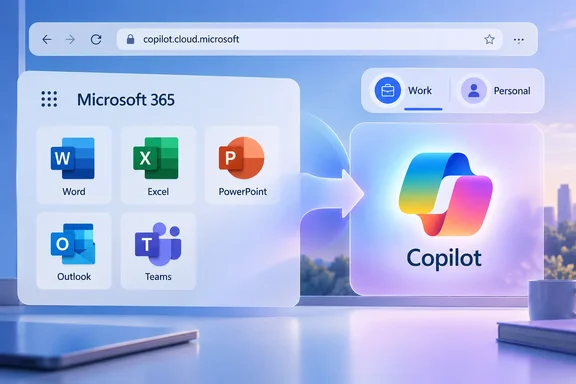
Microsoft's support document states the change directly: "The Microsoft 365 (Office) app is now called the Microsoft Copilot app across web, mobile (iOS, Android), and Windows. The new app name and icon reflects the integration of Copilot within Microsoft 365." It adds that the Copilot app has a simpler name and icon, and web app URLs will be consolidated into a single URL: copilot.cloud.microsoft.
This is the hub app: the launcher people used to reach through office.com, where you open recent files and start Word or Excel. It isn't Word or Excel itself. Microsoft's getting-started page describes a left navigation pane that can show Chat, Library, Agents, Search and Cowork, depending on your account and licence. A menu at the top of that pane launches Outlook, Word, Excel, PowerPoint and Teams. For anyone who used the Microsoft 365 Copilot app, Microsoft says the experience inside the app is the same. Only the name and icon are new.
The rollout came in stages. Consultant Marcel Broschk's futurework.blog explains that Microsoft is bringing the Microsoft 365 Copilot app and the personal Copilot experience together into a single app, with a simpler name, a new icon and a new web address: copilot.cloud.microsoft. It adds that the rollout starts mid-August 2026 (MC1454108), citing the Microsoft 365 Message Center notice. A Microsoft partner post dated August 13 gave August 18 as the date mobile and web users would start seeing the new name, icon and URL. An archived copy of the Message Center notice sets out the order: mobile and web from mid-August, early access on Windows and Mac, a worldwide Windows and Mac rollout from mid-September, and URL redirects starting in early September.
So not every device will show the new branding yet. If you're signed in and still see the old name, Microsoft's support page says to connect to the internet and restart the app.
Four Names for One Hub App: Office, Microsoft 365, Microsoft 365 Copilot, Microsoft Copilot
The frustration makes more sense once you lay out the history. Windows Latest summarizes it as Office app > Microsoft 365 > Microsoft 365 Copilot > Microsoft Copilot. In November 2022, the Office app became Microsoft 365. Next came the Copilot rename. Microsoft's support page says the app icon and name, "Microsoft 365 Copilot" began rolling out on January 15, 2025. At that time, the web URL was changed to m365.cloud.microsoft to align with Microsoft's broader unified cloud.microsoft domain for all Microsoft 365 apps. Both office.com and microsoft365.com URLs were automatically redirected. The August 2026 rename is the latest step.
The January 2025 rename caused confusion for a simple reason. There was already a separate consumer Copilot assistant on Windows 11, with a similar name. Windows Latest points out that for months, we had "Microsoft 365 Copilot" and "Copilot" with almost similar icons, differentiated by an M365 badge. University IT departments had to explain the difference to their users. The University of Michigan's help desk told staff that the January 2025 rename is in name and icon only. Access to Microsoft Copilot AI services is still restricted for U-M accounts.
This time Microsoft has gone the other way. Instead of two apps with nearly identical names, there is now one app with a single name. You can argue it's the most coherent step in the series, because the two-Copilot problem is gone. The cost is that the word "Office" has disappeared from the thing people open to get to Office. The X bio is the clearest example of that trade.
One Copilot App, Separate Work and Personal Accounts
"One app" doesn't mean your accounts or data get merged. Microsoft's support pages say you can sign in to the updated Copilot app with a personal account, a work or school account, or both. Work and personal accounts stay separate, and your organization's security, privacy, compliance and admin controls still apply when you use your work account. Microsoft goes further: data entered in the work (Microsoft Entra) experience doesn't flow into the personal (Microsoft account) experience, and data from the personal side doesn't flow into work. Commercial data boundaries and tenant controls aren't changing either.
To make the separation easier to see, the app now shows clearer visual cues for whichever account is active. According to futurework.blog, you will keep switching between your Microsoft Entra ID (work or school) account and your Microsoft account (personal) with the same account switcher in the navigation pane you use today. Microsoft's getting-started page says a "Work" or "Personal" label appears next to your profile in the navigation pane.
The Copilot branding doesn't mean everyone gets Copilot. Microsoft's transition page sets out these limits:
| Account type | Copilot Chat availability in the Microsoft Copilot app |
|---|---|
| Work or school (Microsoft Entra ID) | Included at no additional cost with a Microsoft 365 licence, and available to users with a Microsoft Copilot licence |
| Personal (Microsoft account) | Available to Microsoft 365 Personal, Family, Premium and Pro subscribers, primary account holders only |
| Regions where Copilot isn't offered | The Copilot tab is removed from Home, but the app is still called Microsoft Copilot |
That last row is telling. In markets where Copilot isn't available, people will open an app called Copilot that has no Copilot tab.
What Consumers Lose in the Standalone Copilot App Merge
Personal users who had both the standalone Copilot assistant and the Microsoft 365 hub app see bigger changes than work users. Microsoft's personal-account change page says chats and content from the two experiences are merged into one updated Copilot app. Content still stays separate between account types. Files shared with or generated by the standalone Copilot app move to OneDrive.
Some features were cut along the way. Microsoft says Group Chat content won't carry forward after August 18, 2026, Podcasts stopped being available after that date, and Deep Research is being retired from the consumer Copilot app from the same day. Copilot Tasks users with a personal account are moving to Copilot Cowork, which is still in preview. Microsoft lists Cowork as a Premium or Pro feature, so Personal and Family subscribers lose the ability to run tasks. They can still open and view their earlier Tasks conversations. Scheduled tasks move over but are switched off by default, and existing shared links to Tasks content stop working.
For work and school accounts, Microsoft describes the change as small: a new icon and name if Copilot is installed on Windows, Mac or mobile, and otherwise very little difference. The partial answer to the X reply about "existing tasks and library" is that it depends on the account. Work users should notice little beyond the icon. Personal users who relied on Tasks, Group Chat or Podcasts lose something real.
copilot.cloud.microsoft Needs to Be Reachable Through Corporate Networks
For administrators, the practical issue is the domain change. An archived copy of a separate Message Center notice, MC1462915, says organizations should make sure network and security controls allow connections to *.cloud.microsoft. Users may be redirected from m365.cloud.microsoft to copilot.cloud.microsoft, and the notice warns that access can be disrupted where that destination is blocked. This applies to tenants that filter by exact hostname. It isn't a general outage. If your proxy or web filter already allows the wider cloud.microsoft domain, which Microsoft introduced as a unified domain for Microsoft 365 apps in 2025, the redirect should just work.
The other job is documentation. Broschk puts it plainly: every screenshot in your adoption material, every "click the Copilot icon here" instruction in your training deck, and every intranet page is suddenly a little bit out of date. Help-desk scripts that tell users to "open the Microsoft 365 app" now describe an app that no longer exists under that name. Bookmarks to office.com and microsoft365.com have been redirected since 2025. The redirect chain now ends at copilot.cloud.microsoft.
The archived Message Center text also says the update covers Microsoft 365 Copilot and Copilot Chat users, and that security, compliance, privacy and enterprise controls don't change. That matches Microsoft's public support pages. Nothing here requires a new policy decision. It's a change of name and address.
Copilot Is Being Toned Down on Windows Hardware
The X handoff looks odd partly because Microsoft is using Copilot branding less in other places. These examples come from Windows Latest's reporting. The outlet notes that the Copilot key Microsoft pushed on Windows PCs in 2024 can now be remapped to Right Ctrl or the Context Menu key. It also reports that Microsoft didn't mention Copilot+ PC branding when it announced the Surface Laptop Ultra with Nvidia RTX Spark, or the Snapdragon X2 Plus Surface Pro 12-inch and Surface Laptop 13-inch. And it says Microsoft has lifted its ban on the word "Microslop" in the official Copilot Discord server.
Taken together, and this is inference, Microsoft seems to be dropping Copilot as a label on hardware and buttons while making it the one name for its AI app. The support documentation backs up the app side of that. Microsoft's getting-started page now calls the Microsoft Copilot app "your AI app for work," connected to Microsoft 365 content, Cowork and agents. Retiring the Microsoft 365 X account in favour of @MSFTCopilot fits that direction. It just moves the social channel before most people have understood the new name.
What This Means for You
Most people need to do nothing except recognize the new icon. Admins with strict web filtering, and personal subscribers who used the retired consumer features, should check a few things.
- If you're looking for the app you used to reach through office.com, look for Microsoft Copilot on Windows, Mac, iOS and Android. The web version lives at copilot.cloud.microsoft.
- Your Microsoft 365 subscription, and Word, Excel, PowerPoint, Outlook and Teams, haven't been renamed. Only the hub app and its web address changed.
- Before you paste anything sensitive into chat, check the "Work" or "Personal" label next to your profile. The two accounts stay separate by design, but they now live in one app.
- Admins should confirm that
*.cloud.microsoft, or at least copilot.cloud.microsoft, is allowed through proxies and web filters. Then update training material, screenshots and help-desk scripts that mention the Microsoft 365 app. - Personal Microsoft 365 Personal or Family subscribers who used Copilot Tasks should know that running tasks in Cowork requires Premium or Pro. Anything left in Group Chat or Podcasts after August 18, 2026 won't carry over.
- If you want the Copilot app off a Windows PC, Microsoft's instructions are to go to Settings > Apps > Installed apps on Windows 11, open the More options menu next to Copilot and choose Uninstall. On Windows 10, go to Settings > Apps, find Copilot and choose Uninstall.
The move of the Microsoft 365 X account to @MSFTCopilot is the most visible part of the merger and the least important in practice. What matters is that the hub app formerly known as Office now carries the Copilot name, and copilot.cloud.microsoft is now where it lives on the web. Microsoft's two Copilots have become one app, and the confusion now is mostly about names, not about which app to open. That confusion will last as long as a Microsoft 365 subscription is managed through an app named Copilot. With the worldwide Windows and Mac rollout under way since mid-September and URL redirects expanding in late September, most users should see the new name within weeks, whether or not they follow either account on X.
References
- Microsoft Copilot app – one app, new name, new icon, new URL! futurework.blog
- Get started with the Microsoft Copilot app | Microsoft Support support.microsoft.com
- The Microsoft 365 app transition to the Microsoft Copilot app | Microsoft Support support.microsoft.com