

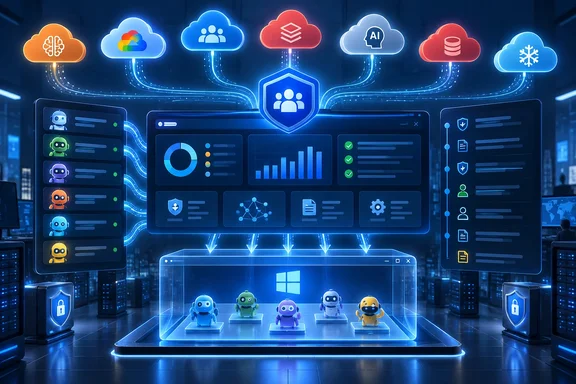
Redmond Magazine reported the expansion as centralized control for enterprise AI agents across Microsoft and non-Microsoft platforms. Microsoft’s own documentation, updated September 15, confirms the supported-platform list and gives a more precise picture of what IT teams actually receive: a Connected platforms page under the Agent 365 registry, where administrators establish external connections, authenticate, synchronize agents, review errors and monitor each synchronization.
That distinction is important for organizations treating agent governance as a security project. Registry synchronization is primarily discovery and inventory, while Microsoft’s deeper identity, telemetry, data-access and policy capabilities depend on the individual agent being integrated with Agent 365’s SDK or built through a compatible platform. Finding an external agent in the registry is valuable; it does not by itself turn every third-party agent into a fully managed Microsoft 365 workload.
The registry reaches beyond Azure and Copilot Studio
Agents created in Microsoft Foundry, Copilot Studio and Microsoft 365 Copilot’s Agent Builder are automatically brought into Agent 365, according to Microsoft Learn. The newer external-connections workflow addresses the parallel agent estates that enterprise IT departments are already accumulating in AWS, Google Cloud, Salesforce, Databricks and Anthropic.
Microsoft’s supported list currently includes seven external platforms: Amazon Bedrock, Google Vertex AI, Salesforce Agentforce, Databricks Genie, Anthropic Claude Managed Agents, Oracle Generative AI Agents and Snowflake Cortex. The breadth matters because enterprises rarely standardize on one agent framework once business units begin deploying AI-enabled customer-service, analytics, developer and internal-workflow tools.
The registry is not a passive import feed. Microsoft says the connected-platform record tracks the cloud provider, selected region, last run date, latest synchronization status, number of synchronized agents and individual results. Administrators can initiate a sync after setting up the connection, while scheduled future synchronization is described in the documentation as a future capability.
That leaves a practical operational limitation: an organization cannot assume that Agent 365 continuously discovers every new third-party agent the moment it is deployed. The current documentation describes an administrator-triggered synchronization process, not real-time detection. Teams that use the registry for compliance evidence should build a recurring review procedure around their platform connections until Microsoft delivers its scheduled-sync feature.
“Connection string” understates the access required
The submitted report describes Registry Sync as requiring little more than a connection string. Microsoft’s setup instructions show that this is too simple for most real deployments.
An Amazon Bedrock connection needs a region, access-key ID and secret access key, backed by IAM permissions to list and inspect agents and aliases. Microsoft’s example permissions can also include rights to invoke agents and models, and the documented Bedrock AgentCore option includes permissions to delete harnesses, runtimes, gateways, targets and memory objects. That is a privileged cross-cloud trust relationship that should be reviewed as carefully as any service account connecting a security platform to AWS.
Google Vertex AI requires a project ID, region and service-account credentials with permissions to enumerate, inspect and, in Microsoft’s sample, delete reasoning engines. Salesforce Agentforce requires a domain URL, consumer key and consumer secret, with OAuth scopes that include chatbot access, Salesforce API access and offline access. Databricks Genie uses a workspace URL plus a Databricks service-principal client ID and secret, with workspace administrative access.
Anthropic is the clearest case where the feature remains immature. Microsoft says that Agent 365’s connection to Claude Managed Agents relies on Anthropic APIs that are currently in beta, and Microsoft labels that connection itself as preview. It also recommends creating a separate Anthropic workspace instead of using the default workspace because the default workspace does not expose the required workspace ID.
Administrators should therefore separate the registry project into two workstreams: the Microsoft 365 configuration and the credentials it will hold or use to query external agent platforms. A lightweight proof of concept may only need read-oriented access, but the vendor examples include permissions broader than read access in several cases. Security teams should scope those credentials down where the third-party API permits it, document who owns them, and test revocation before connecting a production environment.
Visibility is not the same as enforcement
Microsoft positions Agent 365 as a control plane spanning agent observability, governance and security. Its documentation says the platform extends Entra Agent ID for identity and authentication, Purview for data protection and auditing, and Defender for threat detection and response. The company also says that agents built outside Microsoft’s own ecosystem can be extended with the Agent 365 SDK to gain identity, observability, notifications, security controls and governed access to Microsoft 365 data.
The operative phrase is “extended.” A third-party agent imported through Connected platforms can be visible in the Agent 365 registry, but Microsoft’s public guidance does not say that sync alone injects Entra identity, Purview data-loss prevention, Defender telemetry or Microsoft 365 access controls into that agent’s native runtime. Where an agent runs, how it authenticates, what data it can access and which tools it invokes remain controlled in part by the originating platform.
Microsoft’s documentation makes the division explicit. It describes external synchronization as a way to provide centralized visibility and governance, while separately directing organizations to use the Agent 365 SDK for agents that need enterprise-grade identity, observability and governed Microsoft 365 access. For administrators, that produces a three-tier model:
- Native Microsoft and compatible “agent factory” deployments can be designed to receive Agent 365 identity and management features as they are created.
- External agents connected only through the registry can be discovered and inventoried, but should be assessed individually before being treated as subject to the same protections.
- Custom agents that must work deeply with Microsoft 365 data need SDK integration and the associated application-design work.
This is still a meaningful improvement over spreadsheets, CMDB entries and separate cloud-console exports. It gives IT staff a place to ask basic questions that many organizations cannot yet answer reliably: Which agents exist? Which team owns them? Which platform runs them? Which connection last reported them? But a registry cannot repair an over-permissioned Salesforce integration or constrain a tool call that never flows through Microsoft’s enforcement points.
Tool governance needs its own review
Redmond Magazine also highlighted an Agent 365 Tools view for MCP servers, plugins and connectors. MCP, short for Model Context Protocol, has become a central security concern because it gives agents practical reach beyond their base model: access to calendars, files, mailboxes, databases, business APIs and code-execution services.
Microsoft’s public Agent 365 guidance confirms that the platform has an Agent 365 tools catalog and tooling servers, including Work IQ MCP services for Microsoft 365 workloads such as Copilot, Calendar, Mail, SharePoint, OneDrive, Teams, Word and Dataverse. It also describes CLI-based discovery, authentication, connection and validation for those services.
The broader claim that administrators can universally block risky MCP servers or approve every new third-party tool request should be treated more carefully. The public material establishes that Microsoft can govern tools within its Agent 365 integration path; it does not establish that a registry-only connection gives Agent 365 a kill switch over every MCP server configured inside AWS, Databricks, Salesforce or Anthropic. Those external platforms continue to have their own control planes and permission models.
Databricks, for example, documents its own Unity AI Gateway and Unity Catalog controls for governing MCP services, including grants, tool selection, allow-or-deny policies, approval requirements, audit logs and traces. An enterprise using both Databricks agents and Agent 365 will need to decide which system is the source of truth for each control rather than assuming Microsoft’s registry replaces Databricks’ runtime governance.
Windows adds an execution boundary, but it is a separate layer
The report connects Agent 365’s governance push to Intune and Microsoft Execution Containers. Microsoft has separately documented Microsoft Execution Containers, or MXC, as secure, policy-driven boundaries for agent applications, with containment controls over resources such as files and networks.
Windows 11 Release Preview build 28000.3079 adds process isolation for MXC and preview support for tagging agentic processes. Microsoft says the process tag can be passed to child processes and included in Web Account Manager authentication requests. This is significant for Windows-based agents because it begins creating an operating-system-level way to distinguish an agent workload from an ordinary desktop process.
But the products solve different parts of the problem. Agent 365 catalogs and governs agent identities, ownership and access across enterprise services; MXC limits what a running application can reach on a Windows system. An organization deploying local agents should not interpret an Agent 365 registry entry as proof that the executable is isolated, nor treat container isolation as proof that the agent’s cloud permissions and tool calls are properly governed.
Microsoft’s own internal IT organization says it has gained visibility into more than 500,000 agents using Agent 365, while acknowledging that lifecycle features, risk signals and large-scale automation are still evolving. That is the most realistic reading of this release: Agent 365 is becoming a useful inventory and policy hub for a fast-growing category of enterprise software, but it remains a federation layer over multiple vendor runtimes rather than a universal enforcement console.
For IT teams, the immediate payoff is straightforward. Connect the platforms that matter, scrutinize the credentials used for each connection, classify agents by the level of Agent 365 integration they actually have, and keep runtime controls in the cloud platform where those agents execute. The registry can expose the estate; it does not eliminate the work of securing it.
References
- Microsoft Agent 365 Adds Centralized Controls for Enterprise AI Agents Redmondmag.com · 2026-09-17T00:05:34