

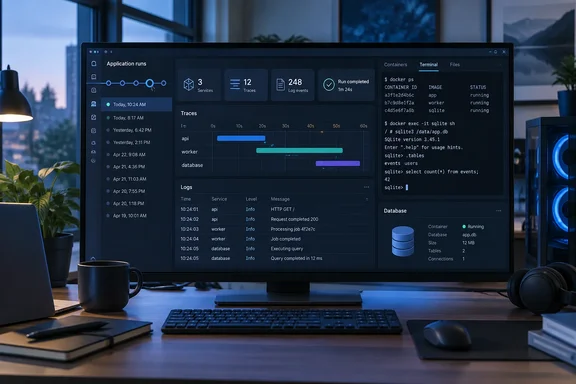
Aspire is Microsoft's code-first toolchain for defining services, databases, containers and their dependencies in one place. Plenty of developers run it on Windows with Visual Studio Code or Visual Studio, so this release matters for anyone doing distributed-app work on a PC. Here's what changed, what's still preview, and where the sharp edges are.
The dashboard finally keeps your runs
This problem is old. A GitHub feature request opened on May 22, 2024 noted that the telemetry data is held in a circular buffer in memory and asked for the option to keep it. Until now, restarting the apphost wiped the dashboard, often right after you'd finally reproduced the bug you were chasing.
According to the release post by Principal Product Manager Maddy Montaquila, 13.6 works like this:
- Automatic snapshots. When the apphost stops, the dashboard saves resource snapshots and telemetry. The next start creates a new "run."
- Run selector. You switch between the live session and earlier runs from a selector in the dashboard.
- Full tooling on old runs. Filtering, search, paging and aggregation all work on historical runs. Those runs are read-only.
- SQLite on disk. Each run is stored as a SQLite database, so you can point a coding agent at the files to compare runs.
- Retention. The dashboard keeps up to 10 runs per application and deletes the oldest as new ones start. You can pin a run to keep it.
- Bigger buffers. The default limits for console logs, structured logs and traces are now 100,000 entries each.
People running the standalone dashboard without an apphost can keep a single run across restarts by giving it a stable application name and choosing Resume persistence:
aspire dashboard run --application-name my-app --persistence Resume
The project's GitHub change log adds a storage detail the blog post leaves out. Dashboard persistence now stores all run snapshots directly under a shared runs directory instead of nesting them under an application-specific directory, and resume-mode databases move to a shared resumes directory. The same entry says no configuration changes are required, and existing retention, pinning, locking, and run-selection behavior is preserved.
There's one gap. The blog suggests pointing agents at the SQLite files, but the CLI can't read the history yet. A GitHub issue filed hours after release says that the CLI and coding agents can't reach that history, because the aspire otel commands only query the live telemetry API. For now, if you want scripted comparisons across runs, you have to open the database files yourself.
Treat those SQLite files as sensitive
Microsoft says clearly that persisted telemetry can contain sensitive values and that the on-disk database has no encryption or authorization layer of its own. The documentation update for the feature says the same thing: Persisted resources and telemetry can contain secrets and other sensitive application data. A GitHub review of the storage change also shows that some Unix directory permissions are set to 0700, while which root/file permissions remain the operator's responsibility is left to you.
In practice, on a shared Windows dev box, a jump host or a synced profile folder, those run databases could leak connection strings or personal data from test payloads. Protect them the way you'd protect a .env file.
Aspire's own "Telemetry after deployment" documentation still describes the dashboard as a tool for local development and short-term diagnostics. It says production apps should send telemetry to a durable OpenTelemetry-compatible backend and recommends Azure Monitor with Application Insights for apps hosted on Azure. It also warns that a deployed Aspire dashboard keeps telemetry in memory, so that data is lost if the container restarts. Persistence helps you on your dev machine. It doesn't make the dashboard a production observability tool.
Section summary: Local runs now survive restarts, with 10 kept per app, pinning, and a 100,000-entry default for each telemetry type. The data is stored unencrypted on disk, and the CLI can't query past runs yet.
A shell for your containers, already logged in
The second big feature fixes a familiar chore: opening Docker Desktop, finding the container, copying a password from somewhere, and hoping it's the right one. 13.6 adds a WithRepl() extension in C# (withRepl() in TypeScript) for common container integrations:
var postgres = builder.AddPostgres("postgres")
    .WithRepl();
Once that's enabled, the resource gets a REPL command in the dashboard. It opens the client bundled in the container inside a new terminal dock, already logged in. Preview support covers:
| Integration | Client |
|---|---|
| PostgreSQL | psql |
| MySQL | bundled client |
| SQL Server | sqlcmd |
| MongoDB | mongosh |
| Redis | redis-cli |
| Valkey | bundled client |
You have to opt in, and for a good reason. The REPL uses the resource's real credentials with full write access, and it only works in run mode. Aspire's WithTerminal documentation explains how the two features differ: WithRepl() opens an extra client in the terminal dock and leaves the server's main process alone, while WithTerminal(), added in 13.5, is for resources whose main process needs an interactive terminal. The terminal dock APIs are experimental and available to anyone who wants to build their own terminals for container or executable resources.
The change log shows that more work went into this than the blog lets on. The dashboard gains a persistent, resizable, tabbed terminal dock and detached terminal windows. It also gets a new rendering engine that replaces xterm.js with Kitty Graphics Protocol and Sixel support, improved copy/paste, a WebGPU renderer with WebGL2 fallback. Rebuilding a terminal emulator inside a developer dashboard is quite an undertaking.
Section summary: Six database and cache integrations get one-click, pre-authenticated shells in preview. Because those shells have full write access, the feature is opt-in and limited to run mode.
Java and Rust move in officially
Java and Rust support used to live in the Aspire Community Toolkit. It now ships as Aspire.Hosting.Java and Aspire.Hosting.Rust, reworked to match how JavaScript, Python and Go work in Aspire. The release post credits community contributors @marshalhayes and @afscrome.
- Java: Spring Boot, Quarkus, executable JARs, and Maven or Gradle wrapper tasks. Aspire detects the target Java release from your build and sets up OpenTelemetry export to the dashboard.
WithOtelAgent()turns on the Java agent's automatic instrumentation. Publishing generates a multi-stage Dockerfile. - Rust: Cargo target, argument and feature settings, plus a generated Dockerfile.
- Debugging: Both work with the Aspire VS Code extension, so you can set breakpoints in a Spring controller or a Rust handler next to the rest of the app.
Both packages are preview in 13.6. Toolkit users should follow the migration guidance before switching. Java and Rust apphost authoring is also available, behind experimental feature flags.
One volume path everywhere
Apps that write files often end up with code that checks which environment they're in: a local path on your laptop, /data in a container. 13.6 adds an env argument to executable volume mounts:
builder.AddProject<Projects.Api>("api")
    .WithVolume("data", "/data", env: "DATA_PATH");
Run locally, DATA_PATH points to a stable, workload-specific directory in the apphost's local store. Published to Docker Compose, Kubernetes or Azure Container Apps, it resolves to /data. Your app just reads the variable. It's a small change that removes a common source of "works on my machine" bugs.
Azure Container Apps Sandboxes: preview, with limits
The prerelease Aspire.Hosting.Azure.Sandboxes package adds Azure Container Apps Sandboxes as a deployment target. Each project, container and Dockerfile resource runs in its own isolated sandbox. You add a sandbox group to the apphost and run aspire deploy. Aspire then provisions the group, a container registry, and the identities and role assignments it needs. The sample picks the Small tier and sets auto-suspend to 15 minutes.
The defaults are conservative:
- Only endpoints marked external get public HTTPS URLs.
- Those URLs require Microsoft Entra ID sign-in unless you open a specific endpoint to anonymous access.
- Outbound traffic (egress) is blocked by default.
- Stale sandboxes are cleaned up on redeploy and on
aspire destroy.
The limits are significant. You need preview access in both your Azure subscription and your region. Volumes, TCP ports, private service discovery, Windows images and ARM64 images aren't supported yet. The missing Windows container support is worth noting for this audience. Separately, deployments to regular Azure Container Apps can try an experimental Express mode with AsExpress(), which promises faster provisioning and scale-to-zero. That's a different feature from Sandboxes.
A new build path for C# developers (prerelease)
AddDotnetProject, from the prerelease Aspire.Hosting.Dotnet package, points straight at a .csproj, so you no longer need a ProjectReference in the apphost. Aspire groups compatible projects, runs one shared NuGet restore, and builds them together. On a new enough .NET 11 SDK, it also turns on MSBuild's multithreaded task execution. Start and Restart reuse the combined build output, which means the dashboard and other resources can start before the whole MSBuild graph finishes.
If your apphost is full of AddProject calls, run aspire agent init and then the aspire-project-v2-migration skill. The agent suggests edits for each resource and waits for your approval before changing anything. Since this is prerelease, try it on a branch first.
Other changes
aspire runandaspire startaccept--launch-profile(-lp).aspire stop --force --volumesremoves volumes Aspire created and leaves bind mounts and pre-existing volumes alone.- Coding agents can start and stop apphosts through the VS Code extension. The Aspire pane adds Deploy and Publish next to Run.
- Deno 2 can run TypeScript apphosts, and
AddDenoApp/addDenoApphosts Deno apps. - TypeScript apphosts load
appsettings.jsonfrom the apphost directory, the same way C# apphosts do. - MongoDB gets an experimental
WithReplicaSet()for local transactions and change streams.
How to upgrade
- Update the CLI:
aspire update --self - Update your apps:
aspire update - Refresh agent skills:
aspire agent init - Run your app, restart it a couple of times, and open the run selector in the dashboard. If you see earlier runs listed, persistence is working.
Before you start, check who else can read your user profile's Aspire storage. Also make sure WithRepl() doesn't end up in a configuration anyone points at shared data.
Bottom line
Persistent runs fix one of Aspire's longest-standing complaints, and the authenticated REPLs remove a daily hassle. A large share of 13.6 is still labeled preview, experimental or prerelease: Java and Rust hosting, the REPLs, Sandboxes, and AddDotnetProject. Update for the persistence and the shells, and test the rest carefully on a branch.
Update: Microsoft details Aspire terminal attachment and automation (October 1, 2026)
Microsoft’s Aspire Blog published a deeper look at terminal support on October 1, documenting CLI attachment and scripted interaction beyond the dashboard shells covered above. Principal Software Engineer Mitch Denny explains that aspire terminal attach lets developers interact with a terminal-enabled resource from their existing terminal, rather than using the browser dashboard.
The post also documents aspire terminal tape play, which plays a reusable .tape script against an already-running resource terminal. Scripts can enter text, press keys and wait for matching screen content instead of relying on fixed delays. After playback, the command prints the final terminal screen to standard output; it does not generate a video or create .txt or .cast recordings. For developers testing interactive console applications, this provides a way to repeat terminal workflows.
For programmatic automation, Microsoft demonstrates TerminalService methods that locate a running terminal, send text or keystrokes, and wait for expected output with a timeout. These are newly documented capabilities, not a separate release announcement. Microsoft explicitly labels both the terminal APIs and aspire terminal commands experimental, so teams adopting them for development tooling should expect their interfaces or behavior to change.
Update: Microsoft details Native AOT dashboard and faster startup in Aspire 13.6 (October 6, 2026)
Microsoft’s Aspire Blog published new performance and deployment details on October 6, confirming that Aspire 13.6 ships a dashboard compiled with .NET Native AOT. Microsoft reports a 66% reduction in median time until the dashboard page becomes visible. This is newly documented information about the existing release, not a separate dashboard update.
The native executable no longer needs a separately installed .NET runtime, but there is an important qualification: the Aspire CLI still ensures a runtime is available for other Aspire components. Dashboard-only use through the CLI therefore has not yet become runtime-independent. Microsoft says developers should upgrade both the CLI and AppHost packages to 13.6 to use the native dashboard in the normal startup flow; older AppHosts retain the managed dashboard path.
The dashboard also now targets .NET 11 and bundles matching framework code and browser assets, avoiding incompatibilities caused by running against a different installed runtime. That lets Microsoft incorporate newer Blazor virtualization fixes without requiring developers to retarget their applications. However, the underlying Blazor Native AOT support remains experimental: this dashboard implementation does not establish Native AOT as a generally supported publishing option for other Blazor Web Apps.
Update: Additional details (October 8, 2026)
Microsoft’s October 8 engineering post adds performance figures behind Aspire 13.6 dashboard persistence. Moving retained telemetry into SQLite raised the default console-log, structured-log, and trace limits from 10,000 to 100,000 entries each. In Microsoft’s benchmark with the same large telemetry load, dashboard private-memory use fell from 1,007 MB in Aspire 13.5 to 241 MB in 13.6—a reported 76% reduction. Microsoft says its testing kept the dashboard responsive with millions of telemetry rows, using tuned SQLite queries through Dapper rather than loading all retained records into .NET memory.
The post also clarifies storage configuration. Persistent data defaults beneath the current user’s .aspire directory; ASPIRE_HOME changes that base location, and the dashboard supports an explicit data-directory setting. For standalone use, None creates temporary, non-retained data; Run retains separate historical runs; and Resume reopens one application database. AppHosts select Run automatically, while standalone dashboards default to None.
References
- Aspire 13.6: Your dashboard gets memory Aspire Blog · 2026-09-29T22:32:58+00:00
- Bringing Native AOT to the Aspire dashboard Aspire Blog · 2026-10-06T17:00:03+00:00
- Aspire Dashboard - Persist dashboard data · Issue #4256 · microsoft/aspire github.com