

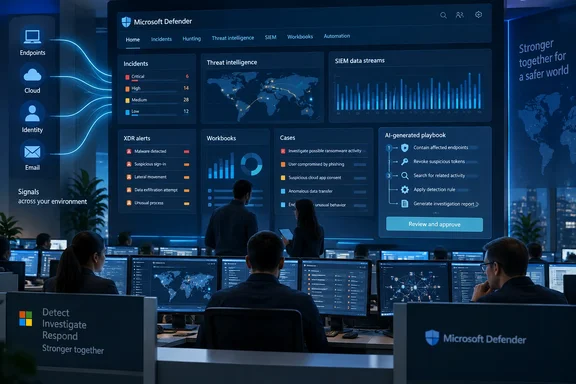
Microsoft Defender's ISOC preview puts SIEM tools in the E5 portal
Microsoft's What's new in Microsoft Defender XDR page lists the feature as a preview that brings XDR, SIEM, threat intelligence, automation, and AI capabilities together in the Microsoft Defender portal, and says that starting September 23, 2026, it's available to eligible Microsoft 365 E5 and E7 customers without an active Microsoft Sentinel workspace. The ISOC overview page is more specific about eligibility. It adds Microsoft Defender Suite to E5 and E7 and warns that capabilities and availability may change while the preview runs.
Petri first reported the launch with Microsoft's own pitch. Rob Lefferts, corporate vice president for Microsoft Threat Protection, told Petri that the tools practitioners use to investigate, hunt, automate, manage incidents and take action are now "brought together and available by default," so teams can work toward security outcomes instead of around the edges of separate tools. The overview page puts it more concretely. It says SIEM capabilities come built into Defender without the need for a traditional SIEM deployment first.
This isn't Microsoft's first attempt at a single SOC portal. It announced a private preview of a unified security operations platform in late 2023, and that effort was about bringing Microsoft Sentinel into the Defender portal, so that customers can now dramatically reduce tool switching. The platform moved to public preview in April 2024, and Microsoft's security blog said then that it brings together the capabilities of XDR and SIEM. But that project assumed you already had a Sentinel workspace and connected it to Defender. ISOC works the other way round. It is aimed at tenants that don't have Sentinel, and it starts them inside Defender.
Integrated security operations center is also the name of an analyst category. Gartner uses the term for a converged technology approach to performing threat detection, investigation, and response (TDIR) through a suite of integrated technologies from a single vendor, and says such systems trade some open extensibility for ease of use. That's useful background for understanding Microsoft's name choice. It is not a finding about how Microsoft's preview performs.
Sentinel customers are told to stay put for this ISOC preview
The most important rule for admins is eligibility. The overview says that while the preview is in this phase, organizations with an active Microsoft Sentinel workspace should keep using their existing Sentinel experience. It also says plainly that you should not disconnect a production Sentinel workspace just to qualify for ISOC.
That means two different groups need to think about this in different ways:
| Situation | Status during this preview phase |
|---|---|
| Microsoft Defender Suite, Microsoft 365 E5 or E7, and no active Sentinel workspace | Eligible for ISOC |
| Any tenant with an active Sentinel workspace | Keep using Sentinel; don't tear it down to qualify |
| Tenants without a qualifying license | Not eligible; a Defender Suite, E5 or E7 license is required |
The two Microsoft pages don't list the same licenses. The What's new entry names only E5 and E7. The ISOC overview and the data-billing page also include Microsoft Defender Suite. The overview is the more detailed of the two, but Defender Suite customers should check that ISOC actually appears in their tenant before they plan around it.
ISOC isn't free of Azure, either. A qualifying license is enough to use the parts of ISOC built into Defender. Microsoft says creating an ISOC workspace and using the features that depend on one also needs an Azure subscription with the right permissions.
What works in Defender on day one, and what needs an ISOC workspace
Microsoft divides ISOC into two tiers, and knowing which is which helps with planning. Microsoft's capability table lists these features as available without an ISOC workspace:
- Case management in the Defender portal.
- Natural-language playbook generation.
- Enhanced automation rules.
- Workbooks.
These features need an ISOC workspace:
- User and Entity Behavior Analytics (UEBA).
- Content hub.
- CI/CD, meaning deploying content as code from a repository.
- Threat intelligence.
- Ingestion of Azure and third-party security data.
Microsoft adds that the table only shows whether each ISOC feature needs a workspace during the preview. It doesn't describe licensing or availability for the same features in other Microsoft security products. A Sentinel customer should not read "UEBA requires a workspace" as a statement about their current setup.
For a tenant with E5 and no SIEM, the practical upshot is that case management, workbooks and AI-assisted automation work on Defender's native data straight away. Correlating that with firewall logs, a third-party identity provider or anything else outside Microsoft's own security stack requires a workspace, and that is where Azure resources and costs come in.
ISOC data retention and ingestion costs
The billing page explains how data is handled. Native Defender data shows up directly in the Defender experience and doesn't have to be ingested into an ISOC workspace. Microsoft lists supported sources as Defender for Endpoint, Defender for Office 365, Defender for Identity, Defender for Cloud Apps, Defender for Cloud and Microsoft Entra Identity Protection logs. Azure Activity/audit logs and Office 365 Activity/audit logs are listed as coming in through connectors.
During this phase of the preview, eligible customers get 30 days of included retention for Defender data. Microsoft calls this preview-phase terms. It hasn't said what retention will look like after the preview, so organizations with compliance rules that need longer retention should plan for that separately.
Other Microsoft and non-Microsoft data goes through an ISOC workspace, using what Microsoft describes as more than 500 data connectors. Microsoft also warns that extra ingestion charges may apply depending on what you bring in. Having a connector doesn't make ingestion free, and Microsoft hasn't published a typical cost for an ISOC workspace. Before anyone connects a high-volume source such as firewall or DNS logs, someone should check what it will cost.
Agentic security in Defender comes with a human review step
Microsoft's big idea here is "agentic" security. As Petri describes it, AI agents would investigate incidents and take defensive actions with the same context and controls human analysts have. The ISOC overview describes security teams and agents working from shared signals, context and workflows. The Defender changelog shows this has been building for a while. Over the past year it has added a Dynamic Threat Detection Agent, a natural-language Threat Hunting Assistant, a Defender Chat assistant, and automatic attack disruption that can isolate compromised devices during high-confidence incidents.
The AI tool ISOC includes at launch, natural-language playbook generation, keeps a person in charge of the decisions. An analyst describes the automation they want, and the system produces a plan and code. The analyst reviews it, tests it and then activates it. Microsoft says the generated code must be reviewed and validated by hand before use. That fits the question Petri raises about how much authority organizations should give AI-driven workflows. With this tool, the SOC team decides what ends up in production.
The wider concern about depending on one vendor is fair, and it's the trade-off Gartner describes for the whole ISOC category. For organizations already using Defender for Endpoint, Office 365, Identity and Cloud Apps, ISOC doesn't add much new dependence. The dependence grows when a team routes third-party data through a Microsoft workspace and builds its detections and playbooks there. That is a design choice to make on purpose, not an automatic result of turning on the preview.
Where independent commentary places ISOC
Coverage outside Microsoft is limited so far. In an early independent write-up, the Substack newsletter MB Cloud Teck argues that ISOC shouldn't be thought of as just "Sentinel inside the Defender portal." It says that for organisations already invested in Microsoft 365 E5/E7, the starting point for building a modern SOC is changing, and that there are implications for customers, security teams and MSSPs. It describes the core change as Microsoft bringing more of the SIEM experience directly into the Microsoft Defender portal and reducing the amount of infrastructure and configuration required before organizations can get started.
That view matches Microsoft's documentation. ISOC's main effect is on sequencing: an E5 shop can start doing SIEM-style work before it has made any decisions about a SIEM. Whether that saves effort will vary by organization, and Microsoft has published no measurements either way.
What this means for you
What you should do depends on whether you already have Sentinel. Tenants with an active Sentinel workspace have nothing to do in this phase other than keep an eye on the preview. Microsoft specifically tells them not to disconnect production workspaces to qualify. E5, E7 and Defender Suite tenants without a SIEM have the most to gain. They can try case management, workbooks and AI-generated playbooks at no extra charge, then decide whether a workspace is worth the Azure setup and the ingestion costs.
Microsoft's own Defender XDR guidance already says that putting the platform into SOC operations needs planning. That means assessing readiness, defining roles and responsibilities, testing use cases and maintaining the setup over time. A shared portal doesn't remove any of that work.
- If you run Sentinel in production, keep it in place. ISOC eligibility in this phase excludes tenants with an active Sentinel workspace.
- Check your licensing. E5 and E7 appear in every Microsoft listing, while Defender Suite eligibility appears only in the more detailed ISOC pages.
- You can start without Azure. Case management, workbooks, enhanced automation rules and natural-language playbooks don't need an ISOC workspace.
- Budget before you connect outside sources. Third-party and extra Microsoft data needs a workspace and may incur ingestion charges.
- Treat the 30-day retention for Defender data as a preview term, and plan separately for any longer compliance requirements.
- Keep humans in the automation loop. Review, test and validate AI-generated playbook code before you activate it, as Microsoft's workflow requires.
ISOC is Microsoft's clearest attempt yet to make Defender, rather than Sentinel, the starting point for a SOC, and the preview terms show whose SOC it's aimed at: E5 customers who own the telemetry but never built a SIEM. For now, the preview gives these tenants SIEM-style case management, workbooks and reviewable AI automation at no extra cost, with 30 days of retention and a clear point, the workspace, where costs start. What comes after the preview is still open: whether Sentinel customers get a path in, what retention looks like once the 30-day term ends, and how ingestion is priced at scale. Those answers will decide whether ISOC becomes the default way to run a Microsoft SOC.
References
- Microsoft Defender Gets Integrated Security Operations Center - Petri IT Knowledgebase Petri IT Knowledgebase · 2026-09-23T16:00:01+00:00
- Integrated Security Operations Center (ISOC) in Microsoft Defender - Microsoft Defender XDR | Microsoft Learn learn.microsoft.com
- Best Integrated Security Operations Center Solutions Reviews 2026 | Gartner Peer Insights gartner.com