

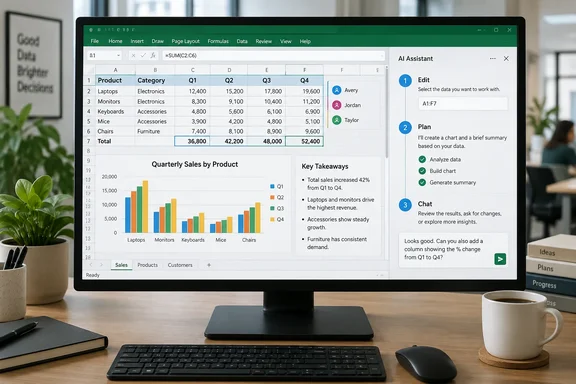
The name is where it gets confusing. If you open Excel looking for a button labelled "Excel Agent," you won't find one.
One feature, several names
Most people know this feature as Agent Mode in Excel. Microsoft's Excel team announced on January 27, 2026 that Agent Mode in Excel, part of Microsoft 365 Copilot, is now generally available on Windows, with Mac rolling out over the coming days — extending access beyond Excel for the web, which launched in December. The web release came in a December 2025 post, which said Agent Mode was rolling out to users with a commercial Microsoft 365 Copilot license or a Microsoft 365 Premium subscription.
Microsoft's current support pages use the name Copilot in Excel, which comes in three modes: edit, plan and chat. Microsoft Support describes the editing experience as the feature formerly marketed as "Agent Mode," which for some plans is now part of the normal Copilot pane. "Excel Agent" on the roadmap, "Agent Mode" in the launch posts and "edit mode" in the docs all refer to the same capability: Copilot making changes directly in your workbook.
One more date wrinkle. The roadmap's March 2026 GA date is later than the December web and January desktop announcements. That fits a staged rollout; an admin-focused summary from November had predicted that worldwide GA will begin in early December 2025 and is expected to complete by late February 2026. Microsoft's roadmap also warns that all dates are estimates and subject to change.
Summary: Excel Agent, Agent Mode and Copilot's edit mode are one feature under three names. The web version shipped first, followed by Windows and Mac.
What it actually does
Older Copilot in Excel mostly suggested a formula and left the work to you. The agent version plans the task and then does it. Microsoft's Excel team says it can take your goals, plan next steps, act directly in your workbook, iterate, and validate outcomes.
Microsoft Support lists these capabilities:
- Worksheet editing: add, rename and delete sheets; change cell values and ranges; apply conditional formatting, data validation, borders and styles.
- Data and formulas: generate data, run calculations across multiple sheets, summarize.
- Charts, PivotTables and shapes: build them with editable links to the source data, including dashboards and templates from scratch.
- Insights: show trends and outliers as charts, PivotTables or summaries.
- Web search: pull in outside information, with citations.
- Cross-workbook import: fetch data from other workbooks on OneDrive, SharePoint or your PC.
- Custom skills: define how repeatable processes should be handled.
The January update also added model choice. Microsoft said it introduced a new multi-model reasoning system that allows customers to choose between OpenAI and Anthropic models, along with better results in workbook creation, formula repair, and chart and PivotTable generation. According to Microsoft Support, the model switcher requires a commercial Copilot subscription or Microsoft 365 Premium. In enterprises, an admin must enable Anthropic as a sub-processor before anyone can pick Claude. Your model choice only lasts for the current session.
The three modes, and when to use each
Microsoft Support says Copilot in Excel opens in edit mode by default. That's worth remembering before you point it at a production workbook.
| Mode | What happens | Best for |
|---|---|---|
| Edit | Copilot makes a step-by-step plan and makes the changes directly in the workbook while you watch | Multi-step jobs: reshaping data, merging sheets, building reports |
| Plan | Copilot writes out an approach for you to review and confirm before it edits anything | Complex or risky changes where you want to approve first |
| Chat | Copilot analyzes the data and answers in the pane; the workbook is untouched | Questions, exploration, read-only analysis |
In edit mode the agent's reasoning appears in the pane and its edits appear live in the grid. A Stop button in the lower-right corner of the chat input lets you halt it at any time.
How to get started
- Open a workbook in Excel for Windows, Mac or the web. Save it as a modern
.xlsxfile first (more on that below). - Click the Copilot icon in the lower-right corner of Excel.
- Choose Edit, Plan or Chat depending on how much you want Copilot to change.
- Describe the result you want, not individual keystrokes. Microsoft's own example is a loan calculator: "Build a loan calculator that computes monthly payments based on user inputs for loan amount, annual interest rate, and term in years. Generate a schedule showing month, payment, principal, interest, and remaining balance."
- Follow the plan as it runs, then check every formula it created.
Earlier guidance told users to open Copilot and select Agent Mode from the Tools menu. If you have an older build or a plan where the editing experience hasn't been merged into the standard pane yet, you may still see that path.
Licensing: "without a Copilot license" needs a footnote
The roadmap's line about access "with or without a Microsoft 365 Copilot license" is accurate, but it doesn't mean every Microsoft 365 subscriber gets it. Microsoft Support lists four qualifying plans:
- Microsoft 365 Personal or Family with an AI credits plan
- Microsoft 365 Premium
- A commercial Microsoft Copilot subscription
- A Copilot Chat-eligible Microsoft 365 or Office 365 business or enterprise subscription
In-product labels show which tier you're on. M365 Copilot (Premium) means you have the add-on license and priority access. M365 Copilot (Basic) means standard access without the add-on. In practice, business users without the add-on can use the feature, but their access isn't guaranteed the way it is for paying add-on customers during heavy load.
Region is another limit. In January, Windows Central reported that Agent Mode is not available in the EU or UK at this time. Nothing in the evidence here confirms whether that has changed. European readers should check their own tenant.
Mobile support is partial. Microsoft's platform table shows iPad with chat and plan modes, iPhone with chat mode, and edit mode still rolling out to both. Android has chat mode only. That lines up with the roadmap listing only desktop, Mac and web.
Notes for IT admins
- You can't switch it off separately. Microsoft Support says Copilot in Excel is a Copilot Chat tool and can't be disabled independently. Your existing Copilot Chat access controls apply to it.
- No admin action was required for rollout. The November admin summary said Agent mode will be available by default for eligible users. If your users have it, it arrived automatically. Update training material and brief the helpdesk.
- Claude needs your approval. Anthropic models only show up in enterprise tenants after the sub-processor setting is enabled.
Troubleshooting common failures
- No Copilot button: Microsoft says this depends on app version, license, network and privacy settings, and in enterprises, tenant configuration.
- Editing doesn't work: Copilot editing only runs when Calculation Options is set to Automatic. Financial models set to Manual calculation for speed are a common cause.
- "Unsupported file state": The file may be checked out in SharePoint. Check it back in, then close and reopen it. If your organization requires check-out on a SharePoint site, Copilot in Excel on Windows and Mac won't work with files from that site, but Excel for the web will.
- Wrong file format: Formats such as Strict Open XML Spreadsheet can cause problems. Save as a standard Excel Workbook (
.xlsx).
The catch with financial forecasts
Microsoft's roadmap lists financial forecasts and decision-making tools as ideal uses. Microsoft's own FAQ says to avoid... more precisely, the FAQ tells users to avoid relying on Copilot for decisions in sensitive areas such as finance, legal or medical matters, and to review and verify every formula, insight and table it produces. The roadmap promotes the use case and the support docs warn against leaning on it.
Both can be true. The agent can build a forecast model in minutes. Whether the model is right is still your responsibility. Excel errors have a way of spreading: one bad SUM range throws off gross margin, and gross margin feeds everything below it. It also matters where the edits land. Microsoft notes that saved Copilot changes are visible to anyone with file access, including people co-authoring in real time. You can undo them or restore an earlier version, but it's better to catch them first.
A sensible approach:
- Test on a copy before letting it near a live shared workbook.
- Use Plan mode for anything you'd want a second person to review.
- Use Chat mode when you only need answers and want nothing edited.
- Treat the output as a draft. Trace precedents, check totals and read the formulas it wrote.
Bottom line
The roadmap's Launched status confirms what Excel users have seen over the past several months: Copilot now makes changes in the workbook instead of only suggesting them. Before you try it, check that your plan actually qualifies, check the regional situation if you're in Europe, and set calculation to Automatic. Then give it a real task, like cleaning a messy export or building a first-draft dashboard, and review the result carefully before anyone relies on it.
References
- Microsoft Copilot (Microsoft 365): Excel Agent Microsoft 365 Roadmap · 2026-09-29T23:05:21.588180Z
- Agent Mode in Excel is now generally available on desktop | Microsoft Community Hub techcommunity.microsoft.com
- Agent Mode in Excel is now generally available on desktop | Microsoft Community Hub techcommunity.microsoft.com