

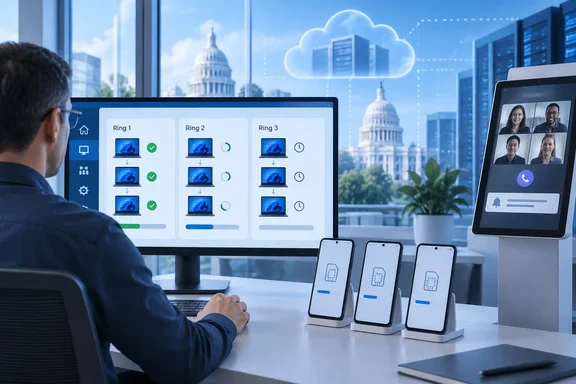
Deployments: staged rollouts for Windows apps and policies
The biggest item is Intune deployments. Microsoft's Intune blog says that Microsoft Intune deployments, now in public preview, bring this phased rollout model to support Windows apps and configuration policies so teams can validate change with smaller groups and expand with greater confidence.
Microsoft's "What's new" page dates the feature to the week of September 21. That entry says Intune "now supports" deployment plans and doesn't use the word preview. The blog does call it a public preview, so treat it as a preview.
What it does:
- Admins can stage a rollout across multiple rings, control the timing, and tie the process to Multiple Admin Approval.
- Admins can define the rings, groups, exclusions, and timing once, then reuse the plan across supported apps and policies. When a reusable plan isn't needed, they can instead configure rings for a one-time deployment.
- The supported payloads are Win32 apps, Enterprise App Catalog apps, Settings Catalog policies and Endpoint security policies, all on Windows.
- Petri reports that administrators can create deployment rings, stagger releases, monitor progress, and pause or cancel rollouts if issues arise.
Limits to know before you build ring zero:
- According to an analysis by ITECS, each deployment carries one existing app or policy, and that payload cannot already be in another scheduled or active deployment.
- The same analysis says current documented interface limits include no deployment-list sorting controls and search limited to deployment names.
- Pausing a rollout doesn't undo it. Plan your rollback before you start.
- Enterprise App Catalog auto-update is a separate feature, and Microsoft's EAM documentation says it doesn't support rollout rings or deployment plans. Auto-updated catalog apps go to all targeted devices at once. If you want staged catalog updates, auto-update won't give you that.
Rollout timing varies by tenant. MVP Andrew Taylor wrote on September 25 that the feature was a new preview release which appeared in my tenant today. Microsoft says monthly service updates roll out gradually, so some tenants see changes before others.
Summary: Windows admins finally get native, Autopatch-style ring rollouts for apps and policies. It's still a preview with gaps, and you need to build your own rollback plan.
The new single device page is now the default
Microsoft has made the redesigned single device page the default for all admins. The old device page is no longer available. Select a device under Devices > All devices and one layout shows:
- Device details and properties
- Activity monitoring
- Tools and reports
- Supported device actions, grouped by purpose, showing only actions that apply and that you have permission to run
Petri describes the redesign as bringing device details, activity history, reports, troubleshooting tools, and administrative actions into a single interface. Microsoft says all existing device-management features are still there. This is a change to the interface, not new management features.
The page isn't new to everyone. It had been a public preview for months: in May, a community write-up found that the new experience currently only appears when opening an item from Devices > All devices, and opened items from reports or other areas may still use the original view. If your help desk never turned on the preview, expect some muscle-memory complaints. For example, that write-up notes that Overview becomes Tools and reports, Hardware becomes details. Updating help desk runbooks and screenshots now will head off a lot of those tickets.
Summary: This is a forced migration with no way back to the old page. Retrain staff on where things moved.
Android: bulk eSIM activation and Managed Home Screen
Bulk eSIM activation
Microsoft says admins can now activate eSIMs on up to 100 supported corporate-owned Android Enterprise devices running Android 15 or later in one action, using a single carrier activation server URL. Microsoft's eSIM documentation sets these requirements:
- Enrollment types: corporate-owned fully managed, dedicated and corporate-owned work profile. Personally owned work-profile (BYOD) devices aren't supported.
- Hardware: the devices must support eSIM.
- Roles: Help Desk Operator, School Administrator, or a custom role with Remote tasks/Update cellular data plan plus read access to managed devices.
- Experience: bulk activation works only in the updated bulk device actions experience, not the legacy one.
Steps from Microsoft's documentation:
- In the Intune admin center, go to Devices > All devices > Bulk device actions.
- On Basics, choose Android as the OS and Activate eSIM as the action.
- Enter the carrier activation server URL. Microsoft recommends Google's literal
$url$format. Select Next. - On Devices, pick up to 100 supported corporate-owned devices. Select Next.
- On Review + create, check the action and select Create.
If it works, the eSIM downloads and activates automatically on each device. Every selected device uses the same carrier URL, so devices on different carriers need separate batches.
The documentation also covers single-device actions, which need the new device view. Single-device activation uses a carrier activation code. Intune sends the request without first checking reported eSIM slot capacity, and shows any error Google returns, so failures will show up there rather than being blocked up front.
Removing an eSIM needs its ICCID in the device's hardware inventory. Corporate work-profile devices need Android 17 or later for removal, compared with Android 15 for fully managed and dedicated devices.
One unconfirmed claim: Neowin says eSIMs are preserved by default when an admin triggers a bulk delete. Microsoft's documentation confirms that a single-device wipe keeps eSIMs by default, with an opt-in option to remove them. I couldn't find Microsoft documentation confirming the same default for bulk delete. Test with a sacrificial device before you retire a fleet.
Managed Home Screen and Teams calls
Microsoft's blog describes a frontline update for shared devices: If an incoming Microsoft Teams call arrives before Managed Home Screen authentication is complete, the user can accept or decline the call directly from the notification. After that, Managed Home Screen asks for the session PIN before the user can move into any other protected app activity.
Microsoft says the Managed Home Screen capability is generally available and applies to MAM-integrated apps that use the Intune App SDK, including non-Microsoft apps. The signed-in user must have an applicable App Protection Policy assigned for the app. Admins do not need to enable a specific setting in that policy.
Summary: Android fleet provisioning drops from 100 manual taps to one wizard. Verify how bulk delete handles eSIMs yourself.
Government clouds: what's actually confirmed
Neowin says Enterprise App Management (EAM), Cloud PKI and Remote Help are now available in GCC, and that DoD can use EAM too. Microsoft's documentation tells a more specific story. One background point helps: Microsoft says Intune has no separate GCC instance. GCC runs on the commercial service, while GCC High and DoD share a physically separate government cloud.
| Feature | What Microsoft documents |
|---|---|
| Cloud PKI | Available for GCC High tenants (entry dated week of September 28, service release 2609). Supports managed Windows, Android, iOS/iPadOS and macOS devices. Not currently supported in DoD. |
| EAM | Listed as supported in GCC High and DoD. It requires a subscription on top of Intune Plan 1 or Plan 2. I couldn't confirm from the material I reviewed that this extension happened in September. |
| Remote Help | The government service page lists it as supported in GCC High only. Microsoft's in-development page still describes GCC High support as upcoming and says the feature is already available in GCC. |
Cloud PKI in GCC High matters. It automates certificate issuance, renewal and revocation without an on-premises certification authority, NDES or the Intune Certificate Connector for device certificates. Agencies can use those certificates for certificate-based authentication to Wi-Fi, VPN and apps. Government admins should check availability in their own tenant rather than rely on any single summary.
Summary: Cloud PKI in GCC High is confirmed. DoD tenants don't get Cloud PKI yet, and Microsoft's own pages disagree about where Remote Help stands.
Other September changes not in Neowin's recap
Microsoft's "What's new" page lists several more September items:
- Faster Windows compliance checks (week of September 14): Supported Windows devices detect changes to firewall, antivirus, BitLocker, Defender status, OS build, real-time protection and Secure Boot, then request reevaluation instead of waiting for the next scheduled check-in. That speeds up remediation, reporting and Conditional Access decisions. Microsoft doesn't list a minimum Windows version or a reevaluation interval.
- In-place renewal of Cloud PKI issuing CAs (release 2609): Renewing an issuing CA used to mean creating a new one and reworking the SCEP profiles that depended on it. Now certificate issuance continues without touching existing SCEP profiles or device assignments.
- Remote Help for Windows 5.2.1040.0 (week of September 7): This updates subscription metadata for E3, E5 and E7 licenses only. Features are unchanged from 5.2.1037.0.
The same page also lists these recent entries:
- Defender for Endpoint opening automatically during Android Enterprise setup
- AI agent runtime protection settings for Windows in Defender for Endpoint, with Audit and Block modes
- Declarative Device Management for Apple VPP apps
- An Android screen timeout setting
- Expanded SIM inventory
- Inventory for personally owned Android devices
- Android XR device management
Summary: For most Windows shops, faster compliance checks may matter more day to day than anything in Neowin's list.
The verdict
This month's changes don't add much new capability, but they make large-scale changes safer. They target three common problems: pushing a bad app to everyone at once, typing the same eSIM details into 100 devices, and clicking through an old device page to find one action. My overall view, drawn from general industry practice rather than any vendor statement, is that deployment plans are worth piloting now on low-risk Settings Catalog policies. Don't put critical security baselines through them until the preview matures and you've tested your rollback.
Two practical points for your next change review:
- The old device page is gone. Help desk documentation needs updating this week.
- Microsoft's government-cloud availability claims don't all agree. Confirm Cloud PKI, Remote Help and EAM in your own tenant before you sign any change plans or purchases.
References
- Here are all the new features Microsoft added to Intune for IT admins in September 2026 Neowin · 2026-10-01T17:28:01+00:00
- Microsoft Intune Gets New Deployment and Android Features petri.com
- Intune Deployment Plans: Safer SMB App Rollouts itecsonline.com