

What the MS-03 is (and isn't)
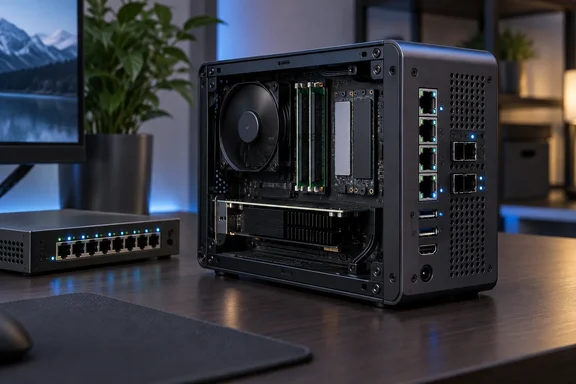
PCWorld describes it as a compact workstation built for demanding networking and computing tasks, with four LAN ports that suit NAS and virtualization work. It is a mini PC in the way a rack-mount switch is a desktop accessory: technically true, but it misses the point.
The case measures 196 × 189 × 48 mm (7.7 × 7.4 × 1.88 inches) and weighs about 1.4 kg (3 pounds) without its power supply. It can stand upright or lie flat on rubberized feet.
Minisforum's Computex 2026 showing, as reported by Claypier, presented it as the successor to the popular MS-01. Claypier also said it keeps the MS-01's two 10GbE-capable SFP+ ports and PCIe slot.
Hardware and serviceability
The case opens by unlocking it and sliding the outer shell forward. That exposes the RAM, the M.2 slots and the PCIe slot. Barebones buyers can fit their own memory and SSDs without trouble.
The main specifications:
- CPU: Intel Core Ultra 9 386H (Panther Lake). It has 16 cores and 16 threads: 4 P-cores, 8 E-cores and 4 LP-E-cores. Maximum turbo is 4.9 GHz.
- NPU: up to 50 TOPS (INT8), per Intel's specification page. That is a peak figure, not a promise for real workloads.
- Memory: two SO-DIMM slots, up to 128 GB. Minisforum quotes DDR5-7200 support.
- Storage: two M.2 slots at PCIe 5.0 x4 and one at PCIe 4.0 x1. The first slot can take a U.2 drive through the included adapter.
- Expansion slot: physically x16 but electrically PCIe 4.0 x4. It takes low-profile, single-slot cards up to 6.6 inches (170 mm) long and 75 W maximum.
- Networking: two 10-Gbit SFP ports and one 10-Gbit RJ45, all on an Intel X710. There is also a 2.5-Gbit RJ45 on an Intel i226-LM. Wi-Fi 7 and Bluetooth 6 come from an Intel BE211.
- Ports: the front has one 10-Gbit/s USB-A, two USB 2.0 and a 3.5 mm jack. The rear has two USB4 ports at 40 Gbit/s, two 10-Gbit/s USB-A ports and HDMI 2.1.
- Power: a 240 W external brick. The review says it takes up about as much space as some very small office PCs.
The front I/O is the obvious weak point. One fast USB port is thin for a workstation at this price. Cable clutter at the back is also likely once the network ports are in use.
Notes on the network ports
- SFP modules and DAC cables are not included.
- PCWorld advises checking compatibility with the X710 controller before buying modules.
- An ISP's fiber line usually can't plug straight into the SFP ports. You normally still need the provider's modem or ONT.
Windows 11 and firmware on the test unit
The review unit shipped with Windows 11 Pro. System information showed version 25H2, build 26200. The BIOS was version 0.07, dated May 13, 2026.
Hoffmann reads that low version number as an early firmware release. He says later versions may change fan control and power consumption. That is his inference. The review doesn't confirm that a specific BIOS update exists.
Setup advice, drawn from what the reviewer saw:
- Run Windows Update. Several updates were offered and installed on the test unit.
- Run Intel Driver & Support Assistant. It found newer packages for the NPU, Intel graphics, Wi-Fi and Bluetooth.
- Check Minisforum's support page. It offers a complete driver pack plus separate wireless, audio and Ethernet drivers.
- Check the BIOS version and any newer firmware before you rely on the fan behavior.
Retail units may differ from the review sample, so don't assume your driver state matches the tested machine.
About vPro
PCWorld says Intel vPro is enabled according to Minisforum. Minisforum's store page says both processor options carry vPro for BIOS-level remote management. The review describes remote reboots and BIOS access without a monitor attached through Intel AMT.
Intel's own specification page lists vPro eligibility and AMT for the 386H. It also warns that a feature may not be available on every system and tells buyers to check with the system vendor. For IT admins, the sensible step is to confirm AMT provisioning on a real unit before planning a fleet around it.
Performance results
CPU and general work
- PCMark 10: total 9,385. Essentials 11,052, Productivity 19,591, Digital Content Creation 10,360. Spreadsheets scored 25,356, rendering and visualization 8,864 and video editing 7,545.
- 3DMark CPU Profile: 10,232 at maximum threads, 10,257 at 16 threads, 6,729 at eight threads and 1,199 at one thread.
The reviewer says this suits development tools and several virtual machines running in parallel. Cooling held up in the benchmark runs. There were no sudden clock-speed drops, and multi-core performance stayed stable.
Integrated graphics
The graphics are Intel Graphics with four Xe3 cores. The numbers:
- Time Spy: 2,664 overall, with a graphics score of 2,351 and a CPU score of 10,931.
- Solar Bay: 10,068 points, 38.28 fps.
- Steel Nomad: 532 points, 5.33 fps.
- Speed Way: 269 points, 2.70 fps.
These results come from a single-channel memory configuration. The test unit had one 32 GB DDR5-5600 module. The integrated GPU shares bandwidth with the CPU, so it takes a noticeable hit. PCWorld says a second compatible module is one of the most sensible upgrades. The review gives no measured dual-channel result, so don't expect a specific improvement.
Intel's footnotes point the same way. They say Arc graphics branding on H-series chips needs at least 16 GB in a dual-channel configuration. That is general platform guidance, not an MS-03 measurement. The MS-03 is also not a gaming PC. For demanding games, GPU rendering, CUDA work or larger local AI models, PCWorld recommends a more powerful GPU. Options are limited by the 75 W low-profile single-slot rule.
AI figures
Geekbench AI with an AVX2 CPU backend gave 4,372 (FP32), 1,741 (FP16) and 7,735 (quantized). The reviewer stresses these are CPU figures and say nothing about the NPU. Many applications still lean on the CPU or GPU rather than the NPU.
Minisforum's store page advertises smooth local inference with Qwen 35B, Gemma 26B and GPT-OSS 20B. Its footnote says the test used 64 GB of memory and that Qwen 35B is supported with 48 GB or more of system memory. Those are vendor claims. PCWorld did not independently validate them. The test unit's 32 GB would fall short of that stated memory requirement.
Storage
The 1 TB YMTC PC41Q SSD reached 5,791 MB/s sequential read and 5,428 MB/s write in CrystalDiskMark. Sequential Q1T1 results were 3,883 MB/s read and 4,558 MB/s write. PCWorld calls it responsive in everyday use, though it doesn't fully exploit PCIe 4.0. The third M.2 slot has only one PCIe 4.0 lane, so use it for capacity rather than speed.
Power, heat and noise
Measured power draw:
- About 18 W at Windows idle.
- 28 to 34 W under light workloads.
- 79 to 85 W under heavy load.
- Brief peaks of 90 to 92 W in graphics-heavy benchmarks.
Running 24/7 at idle works out to roughly 158 kWh a year. At 35 cents per kWh, that is about $60. That is the reviewer's estimate from measured idle draw, not a universal running cost. PCWorld notes that efficient mini PCs often idle well below 10 W.
Cooling uses an 83 mm radial fan rated up to 5,100 rpm, two heat pipes and phase-change thermal material. Noise readings were about 34.3 dB(A) at idle and 49.4 dB(A) under heavy load. There was no standardized test chamber, so treat those as indicative.
The bigger complaint is behavior. The fan fluctuates during brief background tasks, which is more irritating than steady hum. That could matter beside a microphone or in a very quiet office. In a server room it matters much less. The reviewer wants a steadier low-load fan curve, and a future BIOS may or may not provide one.
Upgrades add heat. A 75 W card or several fast PCIe 5.0 SSDs will push temperatures and noise up in a small case. Check temperatures after filling the slots.
Pricing
PCWorld lists the tested Core Ultra 9, 32 GB, 1 TB configuration at $1,520 at the time of testing. The barebones model is €1,079 against a €1,349 list price. The review compares it with other mini PCs it has tested:
| Mini PC | Price cited by PCWorld |
|---|---|
| Minisforum AI X1 Pro | $869 |
| Geekom IT15 | $999 |
| GMKtec EVO-X2 | $1,700 |
| GMKtec EVO T2S | $1,959 |
PCWorld cautions that these machines follow different design philosophies, so price says little about performance.
Minisforum's own storefronts show different figures, and they change often. One Minisforum store listing showed the Core Ultra 9 barebone at $999 and the 32 GB plus 1 TB model at $1,519, each marked as 20% off. Minisforum's UK page listed the barebone at £919, with the 32 GB plus 1 TB model shown as out of stock. Treat these as snapshots from search results, not guaranteed current prices.
Who should buy it
A good fit:
- Homelab or Proxmox users who want a virtualization host with fast networking.
- People building a compact NAS or high-speed file server.
- Anyone who needs a software router joining several network segments.
- Admins who value remote management and plenty of CPU headroom.
A poor fit:
- Office users, since cheaper mini PCs have enough performance.
- Gamers or GPU-rendering users, given the integrated graphics and the card limits.
- Anyone who needs near-silent, always-on, ultra-low-power operation.
Verdict
This is a specialist machine with a real case for itself. The CPU is fast and the I/O is rare in a box this size. The reviewer's practical advice is clear. Buy barebones, or fill the second RAM slot at once, and keep watch for BIOS updates that could settle the fan. If you don't need the 10-Gbit ports and expansion slots, the price premium is hard to justify. The NPU also shouldn't drive the decision, because application support is what determines whether it helps.
References
- Minisforum MS-03 review: A powerful but flawed AI workstation PCWorld · 2026-10-06T11:00:00+00:00
- MINISFORUM Unveils the MS-03 Mini Workstation with Core Ultra 9 386H and a Curious 4-Slot Expansion Card claypier.com
- Minisforum MS-03 Local AI Edge Workstation | Intel Core Ultra 386H CPUs – Minisforum UK minisforum.uk