

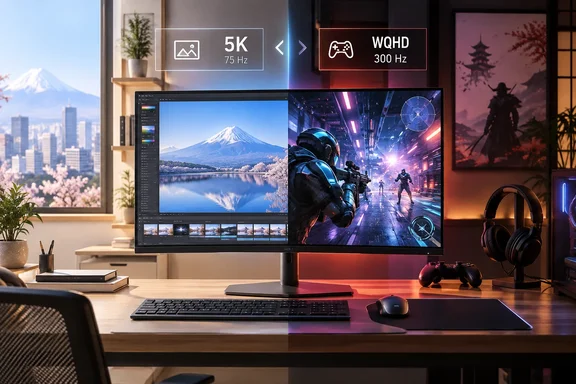
MSI MAG 271KPD7 Brings Dual Mode Ultra to Japanese Shelves
The monitor isn't new to the trade-show circuit. MSI first showed it at CES 2026 in January. There, TechPowerUp described it as a "Dual Mode" display that can switch between a high-fidelity 5K resolution at 75 Hz and a performance-focused 2K resolution at 300 Hz. TweakTown reported the same CES debut, alongside the pricier MPG 271KRAW16. That model features a 5K Mini-LED display with 165Hz refresh rate. The MAG 271KPD7 also turned up at Computex 2026. Notebookcheck later reported that MSI had put it on its global website in early August, when pricing and availability have not yet been announced.
The Japanese launch is the news. MSI Japan's web store lists the MAG-271KPD7 as a preorder with a scheduled release of October 1, 2026. As of this writing the monitor is preorder-listed, not shipping. TechPowerUp puts the Japanese price at around ¥98,800 (about $622) with a three-year warranty. Prices don't line up across sellers, though. A check of MSI's own Japanese store found ¥89,800 including tax. Retailers Bic Camera and Sofmap listed ¥98,780. Japanese buyers should compare sellers rather than treat any one figure as the launch price.
MSI Japan's listing confirms the warranty: three years of domestic coverage from the date of purchase. Pricing has also appeared elsewhere in Asia. The Gadgeteer lists the monitor at NT$16,900 (Around $520) in Taiwan.
5K at 75 Hz or WQHD at 300 Hz: How the Switch Works
MSI calls the feature Dual Mode Ultra. The panel's native resolution is 5K, so running at 5120 × 2880 means every pixel is used at 75 Hz. MSI says that mode delivers native 5K (5120 x 2880) resolution with 218 PPI. Switch to Dual Mode and the monitor accepts a 2560 × 1440 signal at up to 300 Hz. That's exactly half the resolution on each axis, so each WQHD pixel maps onto a clean 2 × 2 block of physical pixels. MSI hasn't described the scaling method; that clean mapping is simply the arithmetic of the two resolutions. MSI markets the jump from 75 Hz to 300 Hz as a "4x refresh rate boost."
Don't expect 5K at 300 Hz. MSI's specifications list separate variable refresh ranges: Normal: 48~75Hz Dual Mode: 48~300Hz. They also give per-input limits. HDMI and DisplayPort both carry Normal (5K): 5120 x 2880 (Up to 75Hz) Dual Mode (WQHD): 2560 x 1440 (Up to 300Hz). MSI Japan's listing gives the same figures for both inputs.
MSI also advertises an "AI Dual Mode" that detects resolution changes and adjusts the refresh rate automatically. In principle, a game launching at 1440p would flip the monitor into its 300 Hz mode without a trip through the on-screen menu. Notebookcheck says users can switch with a single click. Both descriptions come from MSI. No independent hands-on testing of how reliably the switch works in Windows has been published.
The listings also include a 24.5-inch mode. It shrinks the active picture to a smaller area, which some FPS and battle-royale players prefer because the whole field of view stays within their gaze. MSI lists the mode as a feature but gives no performance claim for it.
Where the 218 PPI Panel Earns Its Keep in Windows
Monitors this dense are mostly aimed at productivity. MSI says 5K gives 77% more viewing space than a standard 27" 4K display. The Gadgeteer puts it plainly: the monitor is trying to be a high-density desktop monitor when you are working and a fast QHD screen when you are playing.
For Windows users, this is our inference: at 218 PPI most people will run Windows display scaling at or near 200%. At 200%, a 5K desktop has the same layout size as a 1440p screen, with text and UI drawn at four times the pixel count. That's where the "retina-level" pitch shows up in daily use. Sharper text comes from scaling, not from extra desktop real estate at 100%, which would make UI elements tiny on a 26.9-inch panel. The 77% figure only holds at matching scaling settings.
MSI clearly has Mac users in mind too. The Gadgeteer notes that MSI includes an M-Color Mode that it says matches the monitor to a MacBook's native colors. MSI's global page says the product isn't Apple-affiliated. That matters for mixed-platform desks, because the built-in KVM switch and USB-C input make it practical to put a Windows desktop and a laptop on the same screen.
Panel Specs and HDR 400 Set Realistic Expectations
MSI Japan lists these figures for the Rapid IPS panel:
| Specification | MSI-listed value |
|---|---|
| Brightness | 350 cd/m² typical, 500 cd/m² peak |
| Contrast | 1,500:1 |
| Color gamut | 95% DCI-P3, 99.1% sRGB coverage |
| Viewing angles | 178° horizontal and vertical |
| Response time | 0.5 ms GtG (minimum) |
| Surface | Non-glare |
| Power | 21 W in use, 0.5 W standby |
| Weight / size | about 6.7 kg, 614 × 228 × 407 mm |
The sRGB figure may look inconsistent across regions. MSI's global specification page lists gamut as Adobe RGB / DCI-P3 / sRGB 92.6% / 95% / 122.9% (CIE1976 Standard). Japan's 99.1% is a coverage figure. The global 122.9% measures gamut size relative to sRGB, which can exceed 100%. They're different metrics, not contradictory claims. TechPowerUp's CES report also cited Delta E < 2 color accuracy. That's a factory claim, not an independent measurement.
HDR expectations should stop at the certification. MSI confirms VESA DisplayHDR 400 certification, DCI-P3 95%, and a built-in KVM switch. DisplayHDR 400 is the entry tier. Nothing in MSI's materials describes local dimming, so buyers who want strong HDR highlights shouldn't expect Mini-LED-class results. MSI saves that for its separate 5K Mini-LED models. The 0.5 ms response time is also labeled a minimum, so treat it as MSI's best case, not a measured average.
For variable refresh rate, MSI lists AMD FreeSync™ Premium (WQHD 300Hz) G-SYNC™ Compatible *Certifications may still be in progress. Nvidia owners should check whether the model appears on Nvidia's G-SYNC Compatible list before counting on certified behavior.
Ports, KVM and a 15 W USB-C Port
MSI Japan lists these ports:
- Two HDMI 2.1 ports and one DisplayPort 1.4a, all with HDCP 2.3.
- One USB Type-C port with DisplayPort Alt Mode.
- Two USB 3.2 Gen 1 Type-A hub ports and one USB 3.2 Gen 1 Type-B upstream port for the PC.
- One headphone output. There are no built-in speakers.
MSI's global page confirms USB Type-C with 15W power delivery. That's enough to top up a phone or keep a very light device charged. It won't sustain most laptops under load, so plan on keeping your laptop's own charger even with the single-cable video connection.
TechPowerUp reported at CES that the inputs are supported by G-SYNC compatibility and Display Stream Compression (DSC). MSI's spec page lists the DisplayPort input as 1x DisplayPort 1.4a (HBR3). Our inference: DisplayPort 1.4a's uncompressed bandwidth is tight for 5K, so DSC is likely what makes 5K at 75 Hz possible over that port. MSI doesn't say whether the 5K mode requires a DSC-capable graphics card. Owners of older GPUs should confirm DSC support before buying for 5K.
The built-in KVM switch lets one keyboard and mouse, plugged into the monitor's USB hub, control two connected PCs. Each machine needs its own video link, and each needs an upstream data path: the Type-B port for one and USB-C for the other. It's a real convenience for a work laptop plus a gaming desktop, provided the cabling matches. MSI also lists PIP and PBP for viewing both sources at once. Other listed features include Anti-Flicker, blue-light reduction, the Gaming Intelligence app and VESA 100 mounting.
The box includes a DisplayPort cable, a USB-A-to-USB-B cable, a power cable (the power supply is internal) and a quick-start guide. No HDMI or USB-C cable is listed. Buy one if your laptop or console needs it.
Console Mode Covers PS5 and Xbox
MSI's specification page lists a console mode. 1080p: 60Hz and 120Hz 1440p: 60Hz and 120Hz 2160p: 60Hz and 120Hz HDMI™ CEC: Supported VRR: PS5 and Xbox Supported. With two HDMI 2.1 inputs, an Xbox Series X or PS5 can sit on one port and a PC on the other. Consoles are listed at up to 120 Hz, so the 300 Hz mode is a PC feature.
What this means for you
If your PC use splits between detail-heavy desktop work and fast competitive games, the MAG 271KPD7 is worth a close look once reviews arrive. If you mainly want either maximum-refresh gaming or strong HDR, it probably isn't. Japanese buyers can preorder now for the October 1 release. Everyone else is waiting on regional availability that MSI hasn't announced.
- The monitor runs 5K at up to 75 Hz or WQHD at up to 300 Hz, never 5K at 300 Hz, over both HDMI 2.1 and DisplayPort 1.4a.
- Japanese pricing varies: TechPowerUp reports about ¥98,800, and MSI's own store has been seen lower, so compare sellers before preordering.
- The USB-C port carries video but only 15 W of power, so keep your laptop charger.
- HDR is DisplayHDR 400 class, and brightness, response time and color accuracy are MSI's own figures with no independent testing yet.
- The KVM switch needs a USB upstream link and a video link from each PC, and the box includes no HDMI or USB-C cable.
- For 5K on Windows, expect to use around 200% display scaling, and confirm your GPU supports DSC.
With the October 1 date, MSI's dual-mode approach moves from trade-show demo to retail product at a price below most 5K displays. Independent reviews should follow the Japanese release and settle how well the automatic mode switching and the 300 Hz WQHD mode hold up. Until then, you're buying on MSI's own figures.