

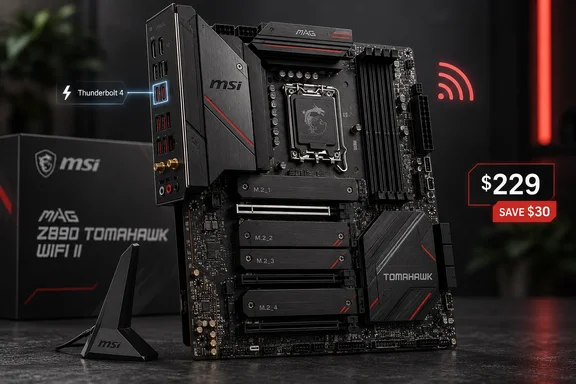
For Windows builders choosing an Intel Core Ultra system this fall, the real question is simple: is the WiFi II the smarter Tomahawk, or just the cheaper one?
What the WiFi II actually is
MSI positions the board for Intel Core Ultra Processors (Series 2) on the LGA 1851 socket with the Z890 chipset. TweakTown says it runs Arrow Lake Refresh chips, the Core Ultra 200 Plus parts, without a BIOS update. That matters because the review system used a Core Ultra 7 270K Plus.
The key point is that the WiFi II is not the original board at a lower price. Tom's Hardware reviewed it in July and said it retains the same aesthetic, core power delivery, and DIY-friendly features, but has two connectivity downgrades: a single TB4 port (down from two) and reduced Wi-Fi 7 speeds. TweakTown reports the same two cuts. The original Z890 Tomahawk WiFi costs $259 and adds a second Thunderbolt 4 port plus 320MHz Wi-Fi 7 channels. The WiFi II tops out at 160MHz channels.
TweakTown's advice on that gap is sensible: the extra $30 probably isn't worth it unless you already run a Wi-Fi 7 network that can use 320MHz channels. Most homes don't yet.
Section summary: Think of the WiFi II as a trimmed original. You get the same core board with one fewer Thunderbolt port and narrower maximum Wi-Fi channels, for $30 less.
Spec sheet at a glance
| Feature | MAG Z890 Tomahawk WiFi II |
|---|---|
| Socket / chipset | LGA 1851 / Intel Z890 |
| Memory | 4x DDR5, up to 256GB, 9200+ MT/s (OC), CUDIMM support |
| VRM | 16+1+1+1 phases, 90A smart power stages |
| PCIe slots | 1x PCIe 5.0 x16, 2x PCIe 4.0 (x4 electrical) |
| M.2 | 1x PCIe 5.0 x4, 3x PCIe 4.0 x4 |
| SATA | 4 ports |
| Ethernet | Intel Killer E5000B, 5Gbps |
| Wireless | MediaTek MT7925 Wi-Fi 7 (160MHz), Bluetooth 5.4 |
| Audio | Realtek ALC1220P, S/PDIF |
| Form factor | ATX |
| MSRP | $229 |
MSI's official store listing confirms the power design: 16+1+1+1 Duet Rail Power System 90A SPS, dual 8-pin CPU power connectors, and a 6-layer PCB with 2oz copper. One thing to watch: TweakTown's introduction describes a "16+2+1-phase" VRM, but its detailed hardware section says 16+1+1+1. That breaks down as VCore, system agent, integrated graphics and always-on voltage. MSI's figures back the detailed section, so treat the intro as a slip.
Connectivity: strong ports, one naming error to ignore
The rear I/O is generous. The FPS Review counted seven USB-A ports (4x5Gb/s, 3X10Gb/s) and two USB-C ports (one USB-4 and one 10Gb/s), plus 5GbE, HDMI, Wi-Fi antenna connectors, audio, and Clear CMOS and BIOS Flashback buttons.
The Type-C port is Thunderbolt 4, not Thunderbolt 5. TweakTown's final thoughts call it Thunderbolt 5, but the review's own spec table and MSI's documentation both say Thunderbolt 4. MSI's retail copy lists high bandwidth rates: 40Gbps, with 8K display support*, and adds that display output is available only on processors featuring integrated graphics. TweakTown also notes that USB4 devices on that port run at 20Gbps, not the full 40Gbps. That's worth knowing if you plan to use a fast USB4 enclosure rather than a true Thunderbolt device.
On the front panel you get:
- One USB 20Gbps Type-C header with up to 27W USB Power Delivery
- Two USB 5Gbps ports
- Four USB 2.0 ports
TweakTown's one I/O complaint is that there are no rear USB 2.0 ports. Keyboards, mice and printers don't need 10Gbps, and using fast ports for them is like parking a bicycle in a Ferrari's garage space.
Section summary: The port layout is excellent for this price. Just remember it has one Thunderbolt 4 port (not Thunderbolt 5) and that USB4 devices on it are limited to 20Gbps.
Expansion and storage: the board's best feature
This is where the Tomahawk stands out. There are three physical x16 slots. The top slot is a reinforced PCIe 5.0 x16 for the graphics card, and the other two are PCIe 4.0 x4 electrically. The FPS Review confirms the layout: four M.2 slots, one Gen5 and three Gen4, and three full-sized PCIe slots, one Gen5 and two Gen4.
TweakTown says MSI doesn't list any lane-sharing compromises and that all four M.2 slots and all three PCIe slots can be used at the same time. That's good news if you're moving a capture card, 10GbE NIC or older SATA controller into a new build. Before you commit to a heavily loaded setup, check the board manual's slot and heatsink notes.
Other build-friendly details:
- EZ PCIe Release: according to MSI, with just one press of a button, users can easily install or remove the graphics card with one hand.
- EZ M.2 Clip II: screwless SSD installation.
- EZConn cable: plugs into the JAF_2 header and combines a system fan, 5V ARGB and front USB 2.0 into one cable.
- Eight 4-pin fan headers, which TweakTown highlights as great for custom water cooling or fan-heavy cases.
- No onboard RGB, but three ARGB headers and one 12V RGB header.
Where it falls short: cooling for the Gen5 SSD
The review's main hardware criticism is the heatsink on the top PCIe 5.0 M.2 slot. It's a thin plate with a quick-release latch, and TweakTown says it has less surface area than rivals' heatsinks. The middle heatsink screws on, and the bottom one covers two drives. MSI also leaves out underside thermal pads, which matters if you use high-capacity double-sided SSDs.
TweakTown puts it in perspective. The 3DMark Storage test isn't especially demanding, and the SSD temperature was a weak spot rather than a disaster. If you often copy multi-terabyte files to a hot-running Gen5 drive, make sure your case has good airflow. You might also add an underside pad or an aftermarket heatsink, provided it clears MSI's M.2 heatsink restrictions.
Benchmarks: this is where motherboards all look alike
TweakTown's test system used a Core Ultra 7 270K Plus, an MSI RTX 4070 Ti Super Ventus 3X, 32GB of G.Skill DDR5-6000 CL30, a Cooler Master PL360 Flux cooler, a Teamgroup T-Force Z540 2TB system drive and Windows 11 Pro. The reviewer notes that all testing used the latest available Windows updates. Results:
- Cinebench 2024: 2,481 multi-thread, 144 single-thread, just behind the ASUS boards tested
- HandBrake (4K to 1080p): 182.1 FPS, fractionally behind the fastest boards
- 7-Zip: 191.64 BIPS, mid-pack
- 3DMark Storage: 4,397
- Blender and gaming: differences of a few seconds or within margin of error
Tom's Hardware reached a similar conclusion. It found performance landing somewhere in the middle among the boards tested using MSI's Performance setting. That's the norm for motherboards: with the same CPU, memory and GPU, benchmarks separate boards by rounding errors. Buy for features, cooling and price, not frame rates.
The VRM peaked at 59°C after a 20-minute Cinebench R24 loop. That's not class-leading, but it's comfortable, and TweakTown thinks the power delivery could handle a Core Ultra 9 285K, overclocked or not.
Memory expectations
MSI rates the board for DDR5 at 9200+ MT/s overclocked, and TweakTown thinks a strong (and very expensive) CUDIMM kit should get there without much trouble. Treat that as a best case. Tech-critter's hands-on notes that the actual results will vary depending on your memory kit and configuration. From general DDR5 experience, two sticks usually reach much higher speeds than four, so if speed matters more than capacity, stick with two DIMMs.
Firmware and software for Windows builders
TweakTown likes MSI's refreshed UEFI, especially the Hardware Monitoring page, though it wants a fifth fan-curve control point. The EZ Mode page puts XMP, automatic overclocking, boot priority and fan control in one place. MSI Center now lets you pick which modules to install instead of loading everything.
A practical first-boot checklist for a new Windows 11 build:
- Leave the BIOS Flashback button alone unless you need a firmware update without a working CPU. The WiFi II already supports Core Ultra 200 Plus chips out of the box.
- Enable XMP from EZ Mode, then run a memory stress test before trusting the system with real work.
- Install only the MSI Center modules you'll actually use.
- Check that Windows Update or MSI's driver package has installed the Killer E5000B, MT7925 and Thunderbolt drivers before you blame the network or a dock.
The competition and the clock
TweakTown names the ASRock Z890 Lightning WiFi and GIGABYTE Z890 Eagle WiFi 7 Plus as rivals, though it didn't test them head to head against the Tomahawk. The Eagle keeps coming up. Even a commenter on Tom's Hardware's review said for Z890, the Gigabyte Eagle Wifi is around the same price and works better. That's one user's opinion, not a measurement, but it shows how crowded this price bracket is.
The bigger issue is timing. TweakTown says Z890 production is winding down and that some rivals are discounting boards to clear stock ahead of 900-series boards and Intel's Nova Lake. Those are the reviewer's market observations, not confirmed roadmap dates. Either way, this is a dead-end socket. TweakTown's review-day price scan found $229.99 at Amazon US and $230.98 at Newegg, which is basically launch price.
The verdict
The MAG Z890 Tomahawk WiFi II is well built and easy to live with. It has a strong VRM, 5GbE, Wi-Fi 7, a 27W front Type-C header, four M.2 slots and three usable PCIe slots. Unless you need a second Thunderbolt port or 320MHz Wi-Fi, it's the better-value Tomahawk.
TweakTown's conclusion still holds: about $20 off would make it an easy recommendation. At $229 on a socket nearing its end, it goes on the shortlist, not straight into the cart. Watch for holiday discounts, and budget for a better SSD cooler if you're pairing it with a hot Gen5 drive.
Building on Z890 or waiting for Intel's next socket? Share your parts list with the community.
References
- MSI MAG Z890 Tomahawk WiFi II Review - A v2 that's a little bit cheaper - TweakTown TweakTown · 2026-09-28T13:50:13+00:00
- Amazon.com: MAG Z890 Tomahawk WiFi II Motherboard, ATX - Supports Intel Core Ultra Processors (Series 2), LGA 1851 - DDR5 Memory Boost 4 x DDR5 (9200+ MT/s OC), 1 x PCIe 5.0 x16, 1 x M.2 Gen5, 5G LAN, Wi-Fi 7 : Electronics amazon.com
- MSI MAG Z890 TOMAHAWK WIFI II ATX Motherboard - MSI-US Official Store us-store.msi.com