

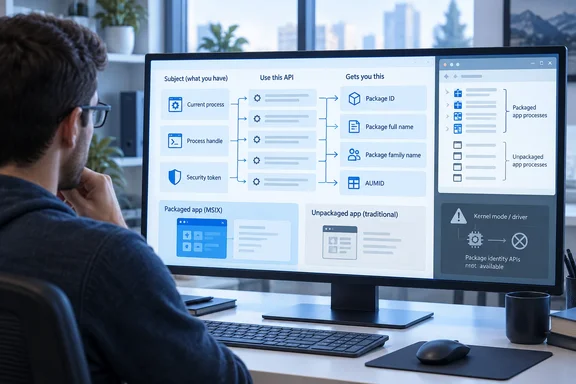
The API map: pick your identity, then pick your subject
The post lists four identity types and three ways to point at a subject. The subject can be the current process, another process by HANDLE, or a token.
| Identity | Current process | By process HANDLE | By token |
|---|---|---|---|
| PACKAGE_ID | GetCurrentPackageId() | GetPackageId() | N/A |
| Package full name | GetCurrentPackageFullName() | GetPackageFullName() | GetPackageFullNameFromToken() |
| Package family name | GetCurrentPackageFamilyName() | GetPackageFamilyName() | GetPackageFamilyNameFromToken() |
| Application User Model ID (AUMID) | GetCurrentApplicationUserModelId() | GetApplicationUserModelId() | GetApplicationUserModelIdFromToken() |
The only gap is PACKAGE_ID, which has no token-based variant. The post gives no sample code for these functions. Treat it as an API-selection guide, not an implementation recipe.
Microsoft Learn's package query API reference describes the AUMID functions as getting the application user model ID for a specified process, a specified token, or the current process.
Package identity versus application identity
Developers often assume that an app is its package. They are related but separate.
- Package full name: Microsoft Learn describes it as an opaque string with the format
<Name>_<Version>_<Architecture>_<ResourceId>_<PublisherId>. Learn's package query API overview describes these APIs as a way to get info about the app packages installed on the system. - Package family name: this carries only the name and publisher ID, so it survives version updates. That is why data and security are typically scoped to the family.
- AUMID: this identifies an application within a package. Windows uses it for things like taskbar grouping and notification routing. One package can declare anywhere from zero to a hundred applications.
If your code needs to identify the running app, a package name is not enough. You want the AUMID.
WinRT alternatives
If you prefer WinRT, the post offers two entry points for the current process:
Windows.ApplicationModel.Package.Current.Idreturns aPackageId.Windows.ApplicationModel.AppInfo.Currentreturns anAppInfo.
Both have a boundary that matters. Microsoft's documentation says the Package class works in an unpackaged process, but the Package.Current property is supported only in a packaged process. To get a package object from an unpackaged process, use Windows.Management.Deployment.PackageManager.
AppInfo.Current is stricter. Accessing it from an unpackaged application throws an InvalidOperationException with HRESULT 80073D54, "The process has no package identity." It also requires Windows 10, version 2004 (10.0.19041.0).
This exception is a real-world nuisance. Public GitHub issues show developers hitting "The process has no package identity" from library code that assumed packaging. If your code can run both packaged and unpackaged, guard these calls.
Handling the "no package" case
The native APIs report this case through an error code, not an exception. Take GetCurrentPackageFullName, which Microsoft Learn documents as getting the package full name for the calling process.
- It returns
APPMODEL_ERROR_NO_PACKAGEwhen the process has no package identity. That is a normal answer for an unpackaged process, not a failure of the API. - It returns
ERROR_INSUFFICIENT_BUFFERwhen the buffer is too small. The required size, in characters, comes back in the length parameter. - The documented pattern is two calls. The first passes a null buffer to get the size. The second passes an allocated buffer to get the value.
- It requires Windows 8 or later (desktop apps),
appmodel.h, andKernel32.lib.
A related Inside MSIX post, "Is This a Packaged Process?", uses the same behavior as a canonical check. ERROR_INSUFFICIENT_BUFFER means the process has package identity, APPMODEL_ERROR_NO_PACKAGE means it lacks it, and any other value is a genuine error.
Choosing an API
Ask three questions:
- Which identity do you need? Use the package full name for an exact version, the family name for a version-independent key, or the AUMID for the application itself.
- Who is the subject? Use
GetCurrent...for the caller, theHANDLEform for another process, or the...FromTokenform when you hold a token. - What mode are you in? User mode has the full table. Kernel mode is limited, as the next section explains.
Kernel mode: limited, with a caveat
The post says nearly all MSIX APIs require a user-mode caller. For drivers, the Windows Driver Kit provides RtlQueryPackageIdentity() and RtlQueryPackageIdentityEx(), which query package identity from a token.
The post's footnote gives a key limit. These routines return the package full name but only the Package-Relative Application ID (PRAID) part of application identity. They do not return a full AUMID, and composing one takes additional work. The author calls that advanced territory and leaves it for a future post. Don't treat the kernel routines as a drop-in replacement for the AUMID APIs.
One related user-mode function may help. Microsoft's reference lists FormatApplicationUserModelId, which constructs an application user model ID from the package family name and the package relative application ID (PRAID). That is a user-mode function, and it doesn't resolve the kernel-mode limitation. The Inside MSIX post doesn't say how it would handle that case.
What's next
The post ends by pointing to Part 3, which will cover tools that do the same job without writing code. This article doesn't speculate about what those tools are.
Bottom line
This is not a new feature. It is a tidy reference for developers and IT pros who work with MSIX. The practical rules are:
- Match the API to the identity type and the subject.
- Expect
APPMODEL_ERROR_NO_PACKAGEfrom unpackaged processes. - Remember that
Package.CurrentandAppInfo.Currentassume package identity. - Don't expect a full AUMID from the kernel-mode routines.
References
- Is it MSIX? Part 2: Finding Package Identity with APIs Inside MSIX · 2026-10-06T16:00:16+00:00
- The process has no package identity · Issue #21215 · dotnet/efcore github.com
- An overview of Package Identity in Windows apps - Windows apps | Microsoft Learn learn.microsoft.com