

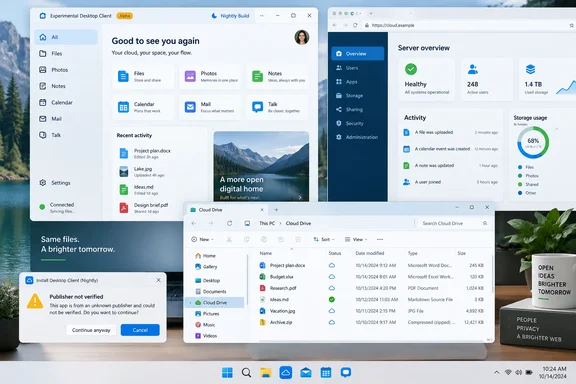
The project was highlighted by XDA Developers in a September 16 article about replacing Nextcloud’s official apps with a more native-feeling client. The underlying repository and release notes confirm that nati.ve is a real open-source client rather than a WebView wrapper, with Android, Linux and Windows packages available. They also show a more constrained picture than the article’s “must-install” conclusion: several of its most appealing capabilities are unfinished, platform-dependent, or explicitly described by the developer as alpha software.
For Windows users, the practical appeal is clear. Nextcloud’s official desktop application is primarily a synchronization client, while nati.ve is attempting to add a unified application shell around the wider set of apps installed on a Nextcloud server. That could make a self-hosted deployment feel less like a collection of web tabs and protocol-specific companion apps. It is also a technically ambitious goal that will be difficult to make dependable across the highly variable Nextcloud app ecosystem.
The project is broader than a replacement sync client
nati.ve, also still visible in some places under its earlier “Nextcloud Native” name, is an independent project maintained by Obiente and is not affiliated with Nextcloud GmbH. Its stated approach is to use Nextcloud APIs and server capability data to render native screens, rather than loading the server’s web interface inside a desktop application.
That distinction explains why the project is drawing attention. A conventional Nextcloud desktop install gives Windows users a synced folder, Explorer status overlays, sharing actions and, where supported, virtual-file behavior. It does not attempt to place Nextcloud Mail, Deck, Notes, Talk, Calendar, Contacts and Photos into one Windows application. Users generally reach those services through a browser or separate clients using WebDAV, CalDAV, CardDAV, Talk or individual app APIs.
The official Nextcloud desktop client is therefore not the web wrapper that XDA Developers’ description can imply. Nextcloud documents it as a native synchronization application for Windows, macOS and Linux, with Explorer integration and options for managed deployment. It supports conventional local sync roots, and its Windows deployment documentation includes configuration for virtual files where the client build and operating environment support them.
What nati.ve is proposing is a different layer: one account-aware native interface that sits above synchronization and draws several Nextcloud applications into a common navigation model. Its repository lists Files, Photos, Notes, Activity, global search, Dashboard surfaces and portions of Mail, Calendar, Contacts, Tasks, Deck, Tables, Music and Cookbook as implemented to varying degrees. That is a larger proposition than simply “a faster Nextcloud app.”
It is also why a direct feature comparison with the official client is misleading. An administrator who needs predictable file synchronization across managed Windows PCs is solving a different problem from a home-lab user who wants a unified front end for a personal Nextcloud server.
Windows builds exist, but Microsoft trust prompts are part of the installation
The clearest issue omitted by the favorable XDA Developers account is the state of Windows distribution. The project’s own releases page says its Windows x86-64 MSI is currently unsigned. Windows may therefore display a Microsoft Defender SmartScreen warning, and the project instructs users to use the “More info” path and run the installer only after confirming the download’s origin.
That is a reasonable disclosure for an experimental open-source build, but it changes the recommendation considerably. On a personally owned test machine, an experienced user can inspect the release, validate its checksum and verify GitHub build provenance as the developer instructs. On a corporate endpoint, many organizations will block an unsigned MSI through application-control policy, endpoint protection rules or software deployment controls before a user gets that choice.
nati.ve’s release notes say the project offers GitHub artifact attestations and SHA-256 checksums for verification. Those are useful supply-chain signals, especially for people comfortable with command-line validation. They are not a substitute for normal Windows code signing in the environments where IT staff use trusted publisher rules, Intune deployment, WDAC, AppLocker or other controls to approve software.
The Windows package is also not presented as a stable channel. Direct installations use Nightly as the only in-app update track, according to the project documentation. Updates are not silently installed, which is preferable to surprise binary replacement, but an application that begins with a SmartScreen exception and then tracks nightly builds does not belong in a production baseline.
There is a more fundamental operational concern. The nati.ve roadmap identifies resumable transfers, conflict handling, large-folder behavior, crash-safe sync journals, durable error reporting and multi-account isolation as ongoing work. Those are not cosmetic refinements. They are the reliability features that decide whether a file client is safe to trust with working documents rather than a handful of disposable test files.
File Explorer integration is promising, not a finished migration path
Windows support is more than a compiled desktop window. The project says it is building Cloud Files API support so remote Nextcloud content can appear as placeholders in File Explorer and hydrate when a user opens it. Microsoft’s Cloud Files API is the mechanism used by desktop sync engines to create placeholders that look like normal files while consuming minimal local space until needed.
That could be the most meaningful Windows feature in nati.ve if it matures. It would let a user browse a large self-hosted file estate without fully mirroring every folder to local storage, while still giving applications and Explorer a recognizable file-system view.
But the project’s own platform-status documentation says Cloud Files sync is under active prerelease qualification. Its release notes already mention recovery work for failed Cloud Files activation and damaged provider roots. Those entries are evidence of active engineering, not proof that the integration is ready for an organization’s only copy of business data.
Nextcloud’s official desktop client already has the advantage of a mature sync engine, established Explorer integration and documented administrator controls. Its current administration manual covers MSI deployment, non-interactive account provisioning, remote directory selection and virtual-file configuration for supported setups. For a Windows administrator, that existing deployment story matters more than whether another client can display Mail and Notes in a prettier sidebar.
The sensible division today is straightforward:
- Use the official Nextcloud desktop client when the priority is supported synchronization, scripted rollout, established Windows integration and a predictable operational path.
- Test nati.ve only with a noncritical account or folders that are independently backed up, especially if evaluating its dashboard, app navigation, previewing or offline-access ideas.
- Do not use an unsigned Nightly MSI as a workaround for a broken production sync configuration without first resolving the underlying Nextcloud client or server issue.
The project itself makes a similar warning in plainer terms: it says prereleases are for testing and contribution and should not be the only copy of important data.
The macOS claim does not match the project’s current record
There is another discrepancy in the original report. XDA Developers says the writer has been using a macOS beta without problems. Yet nati.ve’s repository, platform documentation and release notes all say the current Intel macOS DMG is a packaging preview that cannot sign in to a Nextcloud account. The release notes specifically describe macOS authentication as unsupported and say updates require manual installation of future DMGs.
That does not necessarily mean the writer did not test an earlier private build, a development environment or a configuration that differs from the published package. It does mean the public project record does not support a general recommendation of the macOS download for ordinary users as of September 16, 2026.
The mismatch is important beyond Apple users. It illustrates the hazard of reading an early-stage client’s broad platform list as an availability promise. nati.ve publishes Android, Linux, Windows and macOS artifacts, but the status of a downloadable artifact and the status of a supported daily-use client are different things.
The project is unusually candid about that distinction in its documentation. It labels different app surfaces as having differing levels of completeness, says unsupported actions should be withheld when server capabilities are unclear, and describes some workflows as read-heavy. That is better behavior than pretending a server API is consistent across every Nextcloud version and app combination. It is still a warning that the client’s glossy unified-workspace concept is ahead of its proven compatibility matrix.
The useful idea is unified access, not a reason to abandon Nextcloud’s client
The strongest point in XDA Developers’ report is that self-hosted software frequently loses users through everyday friction rather than a missing headline feature. A server can expose WebDAV files, shared calendars, photos, notes, project boards and mail, yet still feel fragmented if every small task sends the user to a different browser page or application.
nati.ve addresses that usability problem directly. Its architecture tries to interrogate the connected server, understand which applications and capabilities are available, and present native controls only where it can verify an appropriate API path. If the project can make that approach reliable, it could reduce the gap between running a private cloud and actually using it every day.
For now, though, Windows users should view it as an interesting alpha client with a real security and deployment caveat, not as evidence that Nextcloud’s official desktop app has become obsolete. The official client remains the safer choice for synchronization and enterprise administration. nati.ve is the project to watch if its Windows Cloud Files work, signed installer plan and durable two-way sync reach the point where its unified interface no longer depends on accepting prerelease risk.
References
- I ditched Nextcloud's official app for a native client that made my self-hosted files actually accessible XDA · 2026-09-16T18:00:16+00:00