

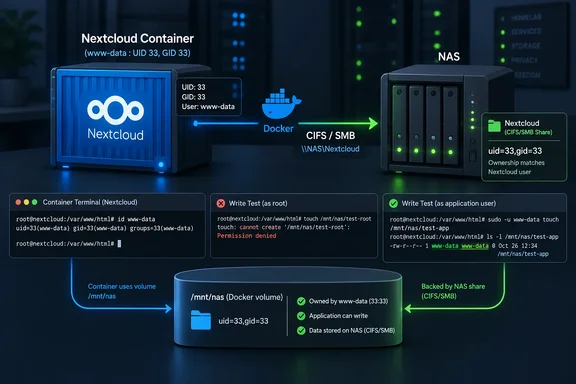
uid=33,gid=33 to the CIFS volume’s Compose mount options, according to XDA Developers’ September 21 report—a fix for that deployment’s ownership mismatch, not a universal Docker setting. The share was accessible, and a write test from the host succeeded, but that test used a different identity from the application. The useful lesson is to establish which account needs access before changing permissions across the entire storage stack.
Nextcloud’s CIFS failure exposed the limits of a root write test
The deployment described by XDA Developers used a Debian homelab server, Portainer, and a Docker Compose configuration. Nextcloud’s bulk storage lived on a NAS, exposed through a Docker-managed volume using the local driver and the cifs filesystem type. CIFS is the name used in the Linux mount configuration for accessing the SMB network share.
According to XDA Developers, Nextcloud started, but its browser-based first-run setup could not create or write to its data directory. Meanwhile, Jellyfin and Immich were already working with storage on the same NAS. Creating a file from the Debian host as root also succeeded.
Those observations made the NAS look healthy, but they answered narrower questions than the operator initially assumed. The host test demonstrated that the tested path was writable by the account performing that test. The other applications demonstrated that their own storage arrangements worked. Neither observation established that Nextcloud’s application account could write to its configured data directory.
That is the central diagnostic value of this incident. “The share is writable” needs an accompanying identity and path to be useful. A successful test performed by one account cannot, on its own, explain a failure encountered by another.
This remains a single-operator account published by XDA Developers, rather than an independently reproduced investigation. Its reported resolution is useful as a configuration-specific example; it does not establish the cause of every Nextcloud data-directory error.
The Compose change targeted mount ownership rather than the NAS account
The operator’s troubleshooting initially concentrated on the storage rather than Nextcloud’s account. According to XDA Developers, repeated chown and chmod changes on the mounted data directory did not resolve the problem. The operator also experimented with file_mode, dir_mode, and noperm, redeploying between attempts, before resetting the SMB user’s permissions and rotating the volume’s credentials.
The decisive check was:
docker exec nextcloud id www-data
Here, nextcloud was the container name in the reported deployment, and www-data was the account being examined. XDA Developers reports that the result identified that account with user ID 33 and group ID 33. The host-side tests, by contrast, had been performed as root, whose user ID was 0.
The successful edit added these two options to the existing comma-separated o: mount-options value in the Compose volume definition:
uid=33,gid=33
The number appeared twice because the configuration specified both a user ID and a group ID. According to XDA Developers, after redeployment the operator verified the resulting ownership and permissions, then completed Nextcloud’s browser-based setup without the previous error.
The practical distinction is between the application’s local numeric identity and the account used to access the NAS. In the reported deployment, changing the mount’s ownership presentation resolved the failure without a further NAS-side permissions change. It would be an overreach to conclude that the same edit can repair an invalid SMB password or an account that lacks permission on the server.
It would also be an overreach to turn the report into a blanket rule that ownership changes never work on CIFS. The evidence here establishes that the attempted ownership and mode changes did not fix this particular configuration, while explicitly supplying the matching mount IDs did. That narrower conclusion is sufficient to guide a better investigation.
Docker’s runtime user and a CIFS mount’s owner are different controls
One easy way to misapply this story would be to put 33:33 into a Compose service’s user: setting and assume that reproduces the fix. It does not reproduce the edit XDA Developers describes: the successful change was to the CIFS volume’s mount options, not the service’s runtime-user declaration.
A separate report in Docker’s GitHub issue tracker illustrates why that distinction deserves attention. The reporter describes an image with application files owned by UID 1000, then a Compose user: override that runs the process as UID 10000. According to that report, the resulting mismatch prevents the application from accessing its own directories. This is a reported configuration failure, not independent confirmation of the Nextcloud incident or a finding that Docker itself is defective.
The two accounts nevertheless support a useful comparison:
| Configuration change | What the reporting describes | Why the distinction matters |
|---|---|---|
Add uid=33,gid=33 to CIFS o: options. | XDA Developers reports that the mounted Nextcloud storage then presented the intended ownership and setup succeeded. | This was the successful storage-side change in the Nextcloud case. |
Override a Compose service’s user: value. | A Docker GitHub issue reports that changing the runtime UID away from the image’s file owner caused permission failures. | Changing the process identity can introduce a different mismatch rather than fix the existing one. |
These are separate controls, even though both involve numeric IDs. Copying a number without preserving the setting it belongs to loses the essential detail of the fix.
The same caution applies to image variants. XDA Developers attributes UID 33 to the Debian-based Nextcloud image used in the deployment and contrasts it with UID 82 for an Alpine-based image. Treat those values as reasons to inspect the actual container, not as substitutes for inspection. The report does not identify an exact image tag, so it does not support a version-specific recommendation for every Nextcloud installation.
In particular, the Debian host alone is not the reason to choose 33. The identity that mattered in this case was the one found inside the Nextcloud container.
A safer Nextcloud investigation starts with the identity and the mounted path
For an administrator facing the same symptom, the useful procedure is to narrow the failing boundary before repeating changes to the NAS. Preserve the distinction between a host-side write test, an account lookup inside a container, and successful application access.
The following sequence stays within what the reported investigation establishes:
- Confirm that the storage arrangement matches the case. Inspect the existing Compose definition for a Docker-managed volume using the
localdriver withtype: cifs. The reported fix concerns that arrangement. It is not an established remedy for every bind mount, local disk, or other network filesystem. - Identify the Nextcloud account in the running container. The reported command was
docker exec nextcloud id www-data; replace the container name if yours differs. Its output gives the numeric IDs associated with the named account. Preserve that output rather than choosing 33 simply because it worked for someone else. - Compare the reported account IDs with the volume’s existing mount options. In XDA Developers’ deployment, adding
uid=33,gid=33to the existingo:value was the successful change. Preserve the rest of the configuration rather than reconstructing an entire volume definition from this example. - Verify the result at both the storage and application levels. XDA Developers reports checking ownership and permissions after redeployment, then completing Nextcloud’s first-run setup. A successful host-side file creation alone would merely repeat the incomplete check that originally sent the investigation in the wrong direction.
One important limit belongs beside that sequence: an account lookup is not a write test. The command names www-data and asks for its identity information; its output does not show that Nextcloud has successfully written to the data directory. The application’s successful setup was the reported end-to-end confirmation.
The publication does not supply the complete Compose file, exact image tag, or precise Portainer redeployment actions. Consequently, there is no evidence-backed universal click sequence for applying this change to an existing stack. Nor does the account establish that deleting a volume, removing application data, or rebuilding storage is required. Do not introduce those consequential actions merely to imitate an unspecified redeployment.
If the symptom persists, the original investigation offers a boundary rather than an exhaustive repair recipe. A matching numeric ID does not demonstrate that every other access condition is satisfied. Avoid treating the reported success as permission to cycle through increasingly permissive settings without checking what each change is intended to resolve.
What this means for Nextcloud administrators
Investigate the identity-to-storage mismatch first when Nextcloud cannot write to a CIFS-backed data directory even though a root test succeeds. Administrators whose applications already work do not have evidence here of a defect requiring preventive changes.
- A successful write from the Docker host establishes access for the account performing that test, not automatically for Nextcloud.
- The reported fix belongs in the CIFS volume’s existing
o:mount options, rather than in a Compose service’suser:field. - Inspect the account inside the actual container before selecting numeric ownership values; the report explicitly distinguishes Debian-based and Alpine-based images.
- Keep the application identity, mounted path, and NAS credentials separate in the investigation instead of changing all three at once.
- Verify success through the application as well as the resulting storage ownership, and do not delete volumes or data to fill gaps in the reported redeployment procedure.
The lasting value of this Nextcloud incident is a more precise troubleshooting habit: identify who is failing to write, establish exactly where that write is supposed to land, and change the configuration controlling that boundary. In the reported deployment, two mount options were enough. Establishing why they were appropriate is what makes the fix reusable without making the number universal.
References
- I spent hours debugging Docker permissions until one number in my compose file fixed everything XDA · 2026-09-21T19:30:16+00:00