

What changed in the 2026 update
The review first ran in August 2024 and was updated in October 2026. The main change for buyers is that NinjaOne now publishes indicative per-endpoint pricing. You still need a custom quote for the exact cost.
Channel Insider describes NinjaOne as a cloud-based RMM platform for MSPs and internal IT teams. It combines endpoint monitoring, patching, automation, scripting, alerting and remote access in one console. It scores well on ease of use, automation, patching and support. Its main drawbacks are quote-based pricing and the need to confirm that specialised integrations are supported.
Pricing: indicative, not a quote
For commercial, non-FedRAMP customers, the published range is:
- $3.75 per endpoint per month for 50 or fewer endpoints.
- $1.50 per endpoint per month at 10,000 endpoints.
Volume discounts lower the per-device price as the fleet grows. The review says the final figure also depends on region, products purchased, promotions, incentives and contractual commitments. The two figures are anchor points, not a full tier table. A 400-seat shop should not assume it will land at any particular price between them.
The review also reports:
- a 14-day RMM trial;
- demos on request;
- no separate implementation or support fees, with free, unlimited support.
Those are vendor statements as relayed by the reviewer. They are not a guarantee about your contract.
Windows patching and Patch Intelligence AI
For Windows admins, the most useful detail is the patching workflow. The review says NinjaOne automates OS and supported third-party patching across Windows, macOS and Linux. Administrators control approvals, schedules and reboots through policies.
NinjaOne's documentation says its Windows patching works through the Windows Update Agent. If Windows can see a patch, NinjaOne can see it. If group policies or compatibility holds hide a patch from Windows, NinjaOne won't show it either. If a patch is missing, the documented checks are:
- Review local Windows Update policies, such as GPOs, Microsoft Intune and registry keys.
- Confirm whether the update source is Microsoft or WSUS.
- Check for compatibility holds or deferrals.
- Review NinjaOne activity logs and device logs for errors.
End-of-life Windows is another boundary. After EOL, devices can still install the last public patches. New patches arrive only through Microsoft's Extended Security Updates program. The ESU license must be installed and activated on the device before Windows will offer those updates. The RMM doesn't get around Microsoft's licensing.
What Patch Intelligence AI does
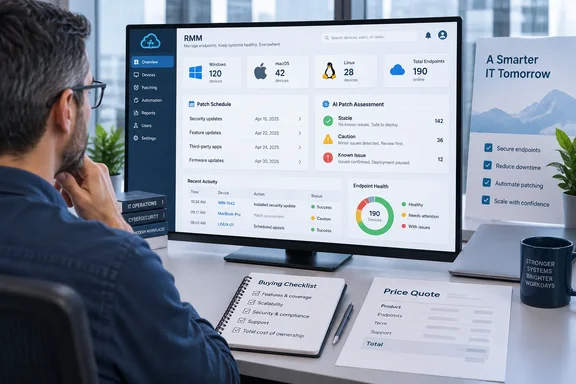
Channel Insider notes the addition of Patch Intelligence AI for Windows OS patches. NinjaOne's documentation says:
- It builds patch analysis summaries from generative AI, third-party content and anonymized internal failure or rollback data. It does not use identifiable customer data.
- Each update gets a status. A dash means no data. "Appears Stable" means no major concerns. "Caution" flags potential issues. "Known Issues" covers Microsoft-reported problems.
- The data refreshes every 6 hours for Windows updates released in the last month. Older patches refresh less often.
- You can add a KB Analysis column to the Patching dashboard pages.
NinjaOne is explicit about the limits: the analysis is meant to augment your research, not replace it, and you shouldn't make patch decisions based on it alone. That fits how patching works in practice. A model summarising KB sentiment is a useful triage signal. It is not a substitute for a pilot ring.
The approval override is a separate feature
Don't confuse the summaries with the optional approval override. During patching, the AI can override automated approvals for patches it considers to have known issues or cautions. You can then apply the patch manually or reject it. It is only available for Windows patch policies. You must activate the NinjaOne AI app and the feature in the OS patching settings first.
Per NinjaOne's documentation, the setup path is:
- In NinjaOne, go to Administration → Policies and choose a Windows policy from the Agent policies list.
- Select OS patching, scroll to the Patch Intelligence AI approvals overrides section and click Edit.
- Activate the toggles. You can trigger overrides for known issues, for cautions, or both.
If you turn it off, the policy reverts to its previous settings. The override can hold back a bad patch automatically. It can also hold back a good one, so keep someone responsible for reviewing what it blocks.
Monitoring, alerts and automation
The review says administrators can build alert policies from more than 100 monitoring conditions. Alerts can trigger scripts, service restarts or ticket creation. Notification routes include email, SMS, Slack, Microsoft Teams, PagerDuty and webhooks. Scripting and automation run on demand, on a schedule, or from policy conditions across Windows, macOS and Linux.
"More than 100 conditions" describes the menu of options. It doesn't mean your environment is covered out of the box. Plan to spend time tuning thresholds, or the alerts will be noisy.
Cross-platform doesn't mean feature parity
The review stresses that NinjaOne supports Windows, macOS and Linux. NinjaOne's compatibility documentation shows that capabilities differ by operating system. Windows-only features include disk-encryption status and keys, TPM detection, registry editing and Active Directory user management. The third-party application patch catalogue also isn't offered on Linux. If you run mixed fleets, list your must-have tasks per OS and check each against the compatibility table.
Security and the stack around it
The review lists these security controls:
- role-based access control (RBAC);
- device approval;
- encryption and credential management;
- agent uninstall protection;
- vulnerability management;
- integrations with CrowdStrike, SentinelOne and Bitdefender.
Channel Insider itself says NinjaOne relies on dedicated security products for parts of the stack. Treat the RMM as a management layer that works alongside endpoint security, not a replacement for it. This reporting doesn't include any independent test of security efficacy.
Vendor claims versus evidence
Several of the review's most favourable points come from the vendor:
- Most users are operational in under a week.
- Learning common tasks takes under three hours.
- Support responds in under 30 minutes on average.
- Customer satisfaction has been 98% for more than five years.
Channel Insider labels the first two as vendor-reported. The reviewer also describes a personal demo sign-up that felt quick and personal. That is one person's experience, not a support benchmark. Also note that the page carries affiliate-style disclosure language and "Visit" buttons for NinjaOne's competitors. That doesn't make the conclusions wrong, but read them as a buying guide, not a lab test.
Where it fits, and what to verify
The review names Atera, Pulseway and ConnectWise as alternatives. It says Atera prices per technician rather than per device, which can favour small teams managing very large fleets. It says Pulseway has a mobile-first approach, and it says ConnectWise bundles RMM with a broader operations ecosystem. I haven't independently verified those competitors' current prices or features here, so treat the comparisons as the reviewer's framing.
Before committing, check these points:
- Licence bundle: MDM, backup, documentation and vulnerability management are part of NinjaOne's broader platform. Don't assume they come with the RMM licence.
- PSA/ITSM needs: monitoring can create tickets, but the review doesn't establish the RMM as a full PSA or ITSM replacement.
- OS feature map: match your required tasks to each operating system.
- Integrations: confirm every specialised tool in your stack is supported.
- Patch governance: decide whether Patch Intelligence AI is advisory only or allowed to override approvals. Keep your test rings either way.
- Quote: get the final per-endpoint price in writing, with the products and term spelled out.
NinjaOne's published price range and its documented Windows patch controls make it easier to shortlist. The practical decision still comes down to your OS mix, your integrations and the final quote.
References
- NinjaOne RMM Review 2026: Features, Pricing & Pros and Cons - Channel Insider Channel Insider · 2026-10-06T13:20:58+00:00
- ninjaone.com ninjaone.com
- ninjaone.com ninjaone.com