

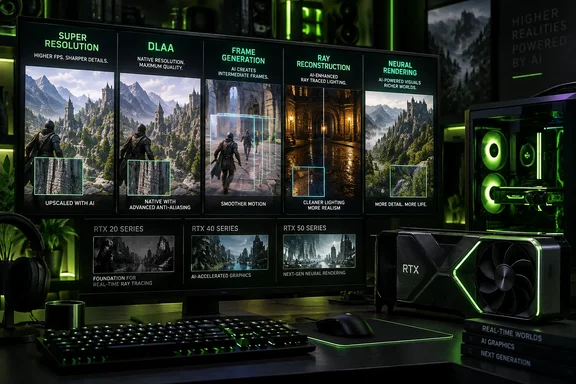
The underlying complaint in MakeUseOf’s overview is correct: “DLSS” is routinely used as shorthand for features with sharply different compatibility, image-quality, and latency consequences. But the article’s own taxonomy demonstrates the problem it identifies. DLSS is no longer a single setting whose version number tells a buyer or gamer what it does. It is Nvidia’s umbrella brand for a collection of neural-rendering tools, some bundled under version numbers and others sold beside them.
That confusion is no longer cosmetic. A game advertising “DLSS 5” may be referring to an optional visual-enhancement pipeline exclusive to GeForce RTX 50-series hardware, while a game advertising “DLSS 4” could offer a transformer upscaler usable on older RTX cards but reserve Multi Frame Generation for newer ones. The logo on a Steam feature list increasingly answers the least useful question: does this game use Nvidia AI? It does not answer whether the setting improves image quality, increases responsiveness, costs performance, or will work on the GPU in the PC.
DLSS stopped being a versioned upscaler years ago
The original DLSS was, in practical terms, Nvidia’s first attempt at neural upscaling. It required game-specific training and arrived with image-quality problems that were especially obvious in motion. DLSS 2 changed the proposition in 2020: Nvidia moved to a more generalized temporal upscaling model, allowing developers to integrate a common technology rather than wait for a bespoke model trained for each title.
For many PC gamers, “DLSS” still means this second-generation idea: render below the display’s native resolution, then reconstruct a higher-resolution image using motion vectors, depth data, prior frames, and a trained neural network. This is now formally called DLSS Super Resolution, and it remains the feature most people should mean when they say a game supports DLSS.
The trouble began when Nvidia used the next major version number to bundle a separate performance technology into the same family. DLSS 3, introduced alongside GeForce RTX 40-series cards, included Super Resolution but added Optical Multi Frame Generation. The latter examines consecutive rendered frames and motion data to synthesize an additional frame between them.
Those two features serve different purposes. Super Resolution can make a GPU render less work per genuine game frame. Frame Generation does not make the game simulation, CPU, input polling, or base renderer run faster. It raises the displayed frame count by inserting generated frames into the output stream. Nvidia’s Reflex technology can mitigate parts of the latency equation, but it cannot turn generated frames into newly simulated game states.
Nvidia’s own current DLSS material describes the brand as a “suite” rather than a single upscaler. That is technically accurate. It is also an admission that a version number is insufficient product information.
Frame Generation is not a free FPS upgrade
The broadest consumer-facing misunderstanding is treating the frame-rate number produced with Frame Generation as interchangeable with native rendering performance. It is useful information, but it is not the same information.
If a game produces 60 fully rendered frames per second and a frame-generation mode displays 120 frames per second, the display can look smoother—particularly in slower-paced games, camera pans, and controller-driven third-person titles. But the game is still responding to a 60 FPS rendered pipeline, and frame generation adds processing between input and the final image.
That distinction becomes more important as Nvidia has added higher multipliers. DLSS 4’s Multi Frame Generation can create multiple generated frames per rendered frame on supported RTX 50-series GPUs. The result can produce exceptionally high displayed frame counts, but it also makes the baseline frame rate and latency budget more important, not less. Starting from a weak, uneven, or CPU-limited base frame rate leaves the technology with less reliable source material and more visible compromises.
Frame Generation is therefore a poor fix for a game that already feels sluggish. It works best when the game’s ungenerated performance is already solid and stable, and when the player values motion smoothness more than the lowest possible click-to-photon latency. That often favors visually demanding single-player games. It is a more complicated choice for competitive shooters, fighting games, rhythm games, and any title where fast, repeatable input response matters more than an inflated overlay number.
Calling generated frames “fake” is rhetorically satisfying but imprecise. They are real displayed frames, produced from inference rather than a full game-rendering pass. The practical warning is simpler: frame generation improves output cadence, not the game’s underlying simulation rate.
DLSS 4 and DLSS 5 have made the compatibility label worse
DLSS 4, announced with Nvidia’s Blackwell-generation GeForce RTX 50-series launch, split its benefits across different generations. Its transformer models for Super Resolution, Ray Reconstruction, and DLAA were made available across GeForce RTX hardware, including RTX 20-series cards. Multi Frame Generation, however, remained tied to RTX 50-series hardware.
That is a defensible technical product split, but it is difficult to explain through a single “DLSS 4” badge. An RTX 2060 owner and an RTX 5090 owner can both encounter a DLSS 4 label while receiving very different menus and capabilities. A player may gain the newer transformer Super Resolution model but have no access to Multi Frame Generation; another may get both, plus newer frame-generation models.
DLSS 5 adds a different kind of ambiguity. Nvidia launched its 3D-Guided Neural Rendering implementation in NBA 2K27 on September 3, 2026, with official support limited to GeForce RTX 50-series GPUs. The game’s own support documentation separates “DLSS Neural Rendering” from Super Resolution, Frame Generation, and Reflex settings—which is a clearer interface than simply calling every option DLSS 5.
Independent testing by TechSpot, Tom’s Hardware, and other outlets has found a central tradeoff that Nvidia’s early promotional material did not make easy to see: enabling DLSS 5’s neural-rendering path can impose a heavy rendering cost by itself. Multi Frame Generation can raise the displayed FPS afterward, but it does not erase that cost or the associated latency concerns. In other words, DLSS 5 is not the successor to DLSS Super Resolution in the way DLSS 2 superseded the original per-game model. It is an additional neural-rendering layer with a different purpose and a much narrower hardware requirement.
That is exactly why the versioning has become unhelpful. “DLSS 5” sounds like the latest universal upscaler. In its first public implementation, it is an RTX 50-only visual enhancement that can coexist with the actual upscaler and with frame generation.
The names users should look for instead
Nvidia could resolve much of the confusion without changing the underlying technology. The company already has names for the pieces. It should make those names primary in game menus, driver profiles, marketing pages, and store listings.
A useful description of a game’s Nvidia support would identify these components separately:
- DLSS Super Resolution should state the available quality modes and whether the game supports Nvidia’s newer transformer model.
- DLAA should be identified as native-resolution anti-aliasing, not represented as an upscaling mode.
- Ray Reconstruction should be listed as a ray-tracing or path-tracing denoising feature, because it has no value in a game that is not using the relevant lighting effects.
- Frame Generation or Multi Frame Generation should state both its RTX generation requirement and its multiplier, rather than hiding behind “DLSS 4” or “DLSS 5.”
- Neural Rendering should state its separate performance cost and hardware support explicitly.
Nvidia’s DLSS Override controls in the Nvidia app illustrate another reason precision matters. They do not generally inject DLSS into games that never implemented it, despite the claim in the supplied article. Nvidia documents the feature as an override for supported games and applications that already expose the relevant DLSS functionality but have not been updated to newer models or capabilities. Depending on the title and GPU, the app can select a newer Super Resolution, DLAA, Ray Reconstruction, or Frame Generation model and alter supported modes.
That can be useful for an older DLSS-enabled game, but it is not a universal retrofit button. A title still needs the necessary Nvidia integration and driver profile support. Players should treat overrides as an optional tuning tool, not assume the Nvidia app can add DLSS to any older game in their library.
“DLSS supported” is no longer enough information
Nvidia still has a strong case for DLSS Super Resolution as a benchmark for image reconstruction at difficult internal resolutions. AMD’s FSR and Intel’s XeSS have narrowed gaps in specific games and modes, while each has its own strengths in hardware support or image handling. But the more Nvidia expands DLSS into a brand for every AI-assisted rendering technique, the less useful its established reputation for upscaling becomes.
The remedy is not to pretend frame generation, ray reconstruction, DLAA, and neural rendering are unrelated inventions. They share data, models, Tensor Core hardware, and a broader Nvidia rendering strategy. The remedy is to stop asking one version number to communicate five different technical decisions.
For buyers and PC builders, the immediate rule is to ignore the umbrella badge and inspect the exact options: Super Resolution for reconstruction, Frame Generation for output smoothness, Ray Reconstruction for advanced lighting, and Neural Rendering for a potentially expensive visual upgrade. That is the information that determines whether a setting will help a particular game on a particular GeForce card.