

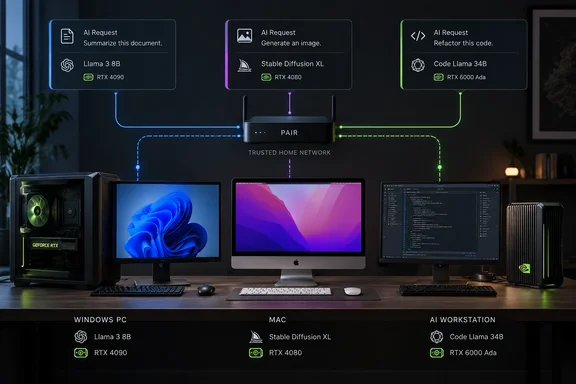
For Windows users, the interesting part is not simply connecting more hardware. It is understanding which machines can actually serve a request, how applications reach them, and where the local-first privacy promise ends.
What PAIR does—and what it does not
NVIDIA’s README identifies Ollama and LM Studio as the supported inference engines. PAIR sits around those engines, handling discovery, pairing and routing while presenting compatible API endpoints to applications. The project currently lists Ollama-compatible, OpenAI-compatible and Anthropic Messages API requests; those interfaces should not be confused with additional inference backends.
Each independent request runs on one selected node. PAIR does not:
- Pool GPU memory across computers.
- Combine separate GPUs into a larger logical GPU.
- Divide one model across multiple machines.
- Move part of an already-running request to another node.
Think of it as distributing orders among separate kitchens, not knocking down the walls to build one bigger oven.
That distinction also explains model placement. NVIDIA’s engine-management guide says a serving node must be online, have a compatible engine running, and have the requested model available. Installing a model on one computer does not automatically put it on the others. To make several nodes interchangeable for that model, prepare a copy on each eligible machine.
Requirements: validated hardware is not a model guarantee
NVIDIA’s product landing page supports the hardware figures in Gizbot’s report. Its validated configurations list:
| Category | NVIDIA’s published listing |
|---|---|
| Platforms | Windows 11, DGX OS, Ubuntu 14.04 and macOS Tahoe |
| Hardware | GeForce RTX 20 Series and newer, DGX Spark/GB10, or Mac M4 and newer |
| System memory | 8 GB RAM or higher |
| Storage | 20 GB or higher recommended |
| Internet | Not required for operation; required for model downloads |
The Ubuntu version above is reproduced exactly as NVIDIA lists it, rather than silently corrected to a different release.
There is an important distinction between that landing-page list and the broader project documentation. NVIDIA’s README lists Windows 11, Linux and macOS, with x64 and ARM64 architectures across those platforms; Windows on ARM remains experimental. It also permits Windows, Linux and macOS nodes in the same cluster.
NVIDIA’s installation guide separately explains that PAIR compatibility does not establish engine or model compatibility. Ollama and LM Studio have their own operating-system, GPU and driver requirements, and each model needs sufficient memory to load. Consequently, the 8 GB RAM and recommended 20 GB storage figures are not a promise that every model will run—or fit—on that machine.
How to set up PAIR on Windows and other nodes
The following desktop workflow follows NVIDIA’s getting-started and engine-management documentation. Use compatible systems on the same trusted local network. One machine can run local inference; two or more let you test routing between computers. The Windows installer supplies the required firewall rules.
- Install and launch PAIR on each participating computer. On Windows, run the installer and open NVIDIA Personal AI Router from the Start menu.
- Complete first-run setup. Select an available inference engine, or use an existing installation, and wait for it to report that it is running.
- Pair another system. Select Add node, choose a discovered computer, or enter its IP address.
- Accept the invitation. The inviting system displays a six-digit PIN; enter it on the invited system.
- Confirm membership. Check Settings > Cluster or the node list in Overview.
- Prepare the model. Open the node’s Engine settings, select Add model, and download the model. Use Load if the engine requires an explicit loading step. Repeat on other serving nodes when you want them eligible for the same requests.
- Connect your application. Open Endpoints, copy the displayed API address, and configure the client with that endpoint and an available model name. NVIDIA documents default proxy ports of 11434 for Ollama and 1234 for LM Studio; the engines themselves commonly move to 11435 and 1235, or another free port. Copy the displayed address rather than relying on memory.
The endpoint is local—even when inference is remote
One easily missed restriction matters more than the port numbers: an application cannot simply call another computer’s PAIR endpoint over the LAN.
NVIDIA’s security policy explains that plaintext inference requests are accepted only from loopback—the machine hosting that endpoint. Paired computers use a separate authenticated transport. The intended arrangement is therefore to run PAIR on the computer hosting your application and pair it with the serving machines, rather than expose a peer’s local API to the network.
NVIDIA’s troubleshooting guide confirms that a nonlocal plaintext request receives 403. The application’s computer does not need its own GPU or inference engine; its local PAIR instance can route work to eligible peers.
For a practical success check, NVIDIA recommends examining Jobs and opening a job card to see Ran on or Running on. Several independent requests demonstrate multi-node routing; a single request still runs on one node.
Local-first privacy still has boundaries
NVIDIA’s security policy explicitly warns that “local-first” describes the intended topology, not proof that nothing leaves the machine or network. Applications, model catalogs, inference engines and update systems may contact external services. Downloading models also requires internet access under NVIDIA’s published configuration guidance.
The architecture documentation provides a useful distinction: routed inference between paired nodes uses authenticated TLS, but selected discovery and node-information traffic remains plaintext. Hostnames, hardware inventory and utilization can be readable by other devices on the same subnet. That makes a trusted home network a different proposition from an unfamiliar shared LAN.
NVIDIA advises against forwarding PAIR ports through a router, exposing engines on untrusted interfaces, or placing an unauthenticated public reverse proxy in front of them. The six-digit pairing PIN is a bootstrap convenience, not a durable credential.
Limitations and common failure points
PAIR’s scheduler considers queued work and coarse GPU utilization. NVIDIA says it does not consider GPU model, available memory, measured latency, model warmness or estimated request cost. Similar machines are therefore a more predictable fit than a highly mixed cluster; a lightly loaded slower node can still receive work.
Before blaming routing, check these documented issues:
- No peers appear: Confirm PAIR is running on each system, check the local network and host firewalls, then try adding the peer by IP address.
- No usable engine or model: Start the engine and download or load the requested model.
- Inference works, but Jobs stays empty: The standalone Ollama desktop application may own port 11434. NVIDIA recommends quitting it completely, then toggling PAIR’s Ollama engine off and back on.
- Windows GPU memory looks unusually small: PAIR can underreport memory on integrated or unified-memory graphics because it counts dedicated GPU memory. NVIDIA says this affects the display, not routing, which does not use VRAM as a scheduling input.
The practical takeaway
PAIR’s supported architecture makes it useful for concurrent local AI workloads: several independent requests can reach several eligible computers through a consistent application-facing endpoint. But model copies, engine readiness and each machine’s capacity still determine what that cluster can accomplish.
The practical implication is straightforward: use PAIR to make existing local inference resources easier to reach, not to overcome a model’s single-machine memory requirements. That is a meaningful convenience for Windows-based AI workflows—provided the network is trusted and expectations stay grounded in what the router actually does.
References
- NVIDIA PAIR Explained: What Is Personal AI Router, How It Works, Features and Requirements - Gizbot Gizbot · 2026-10-04T03:35:06+00:00
- Personal AI Router for Local Inference | NVIDIA PAIR nvidia.com
- Managing Engines | NVIDIA Personal AI Router docs.nvidia.com