

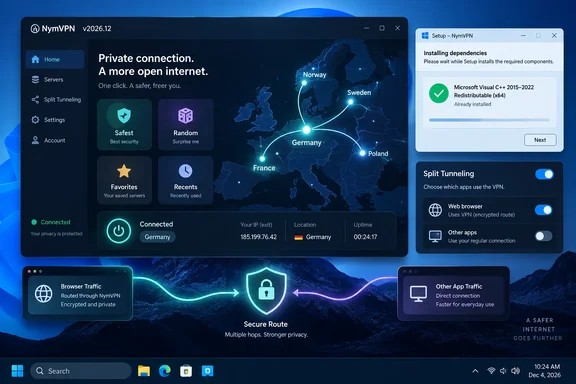
Nym detailed the update in its September 17 announcement, listing Windows v2026.12.4 alongside corresponding Android, iOS, macOS, and Linux releases. TechRadar covered the changes on September 21. The desktop routing features offer more control over which traffic bypasses the VPN, but geo-exclusion’s reported country support remains limited.
One-click connections simplify server selection
NymVPN now offers four ways to select a connection without repeatedly working through its server list:
- “Safest,” the new default, selects a strong-performing server in a neighboring country rather than the user’s own country.
- “Random” selects a different server for each connection.
- “Favorites” provides quick access to servers the user has saved.
- “Recents” makes previous connections available again.
Nym says the neighboring-country rule is intended to place the entry point outside the user’s home jurisdiction. That describes a specific selection policy: “Safest” is a feature name, not a demonstrated guarantee that the chosen route is optimal for every user’s privacy requirements.
Similarly, Random changes server selection between connections; it should not be interpreted as continuously rotating servers during an active session. Nym presents that variation as a way to disrupt patterns used in traffic analysis, rather than providing independent measurements of its effectiveness.
Favorites and Recents serve a more straightforward purpose: reducing repeated setup. They should also be distinguished from saved entry-and-exit server profiles, which Nym still lists as upcoming work.
Split tunneling and geo-exclusion make different exceptions
The important routing distinction is the scope of the exclusion.
Conventional split tunneling, as described by Nym, lets an entire application connect directly outside the VPN. Geo-exclusion works by destination, allowing some traffic from one application to bypass the tunnel while its other traffic remains inside it.
| Routing choice | What bypasses NymVPN | Practical consequence |
|---|---|---|
| Whole-app exclusion | The excluded application’s traffic. | The application connects directly, including traffic beyond the particular local service the user wants to reach. |
| Geo-exclusion | Traffic to destinations covered by the geographic exclusion. | A single application can use direct connections for those destinations while retaining VPN routing for other traffic. |
Nym gives banking services and government portals as examples of services that may need a local connection. The useful change is that accessing one of those destinations need not require disconnecting the VPN for everything else.
However, excluded traffic does not receive the VPN tunnel’s protection. Geo-exclusion narrows the exception; it does not eliminate that trade-off. A website’s own encryption is a separate protection from the VPN route.
Nym documents these features for Windows, macOS, and Linux and recommends Firefox or Mullvad Browser for per-destination routing. The release announcement does not provide an equivalent recommendation for Edge or Chrome, so Windows readers should not assume identical behavior across browsers.
TechRadar reports that geo-exclusion currently supports Chinese IP destinations. No second independent report confirming that precise country limit is available in the evidence reviewed; Nym’s own announcement does explicitly place expansion to Russia among upcoming features. Readers should therefore not treat this as an unrestricted country-exclusion selector.
The practical choice is between excluding a whole application and making a narrower destination-based exception. If the problem concerns only a supported regional service within a browser, destination-based routing better matches that requirement. If an entire application is deliberately meant to connect directly, whole-app exclusion expresses that broader choice.
Windows installation and connection reliability
For Windows, the bundled Visual C++ runtime is a concrete improvement beyond the more visible interface changes. Nym says the dependency now installs with NymVPN so that first launch works on a clean machine; it also lists installer and startup improvements. This addresses a prerequisite that could otherwise prevent a new installation from working before the user ever establishes a tunnel.
Across the apps, Nym reports improved DNS handling over IPv6, better handling of device-clock differences, and clearer messages when selected servers cannot satisfy the network’s independence requirements.
The cellular changes need a narrower reading than a blanket speed upgrade. Nym says it reworked WireGuard handshake timing to reduce failed connections and waiting on mobile data. The handshake is the connection-establishment stage, so that claim concerns getting connected reliably rather than a measured increase in download throughput.
TechRadar describes the update as improving stability when moving between Wi-Fi and mobile data. Nym’s announcement supplies no comparative handover measurements or throughput benchmarks, so these remain vendor-described reliability improvements rather than independently measured performance gains.
Mobile disguise and a clearer first run
NymVPN’s redesigned onboarding walks new users through features, plan selection, and account creation. The release also adds Traditional Chinese, Traditional Chinese for Hong Kong, Japanese, Italian, and Indonesian.
On Android, users can select a camouflage app icon through Settings → Appearance. This is an Android-specific appearance control, not a Windows feature. An alternative icon changes the app’s visible presentation; it should not be understood as concealing VPN traffic from network monitoring or making the installed application undiscoverable.
New prices change the commitment calculation
Nym’s announced subscription structure is:
| Plan | Advertised monthly equivalent | Cost over the stated term, calculated from that rate |
|---|---|---|
| One month | $8 | $8 |
| Six months | $6 | $36 |
| One year | $4 | $48 |
The six-month option fills the gap between paying monthly and committing for a year. At the listed rates, the annual term costs $12 more in total than six months while providing twice the subscription duration. Those calculations describe the advertised rates, not a separately verified checkout total.
Existing two-year subscribers keep their current subscription through its term. Nym says it then renews as a one-year plan, rather than another two-year subscription. That renewal-duration change is the important point for current customers budgeting beyond their existing term.
There is also a timing distinction between Nym’s announcements. Its September 11 pricing post described a temporary opportunity to buy the outgoing two-year plan at $2.39 per month before the new pricing took effect. The September 17 release announcement presents the replacement structure. The earlier offer should not be treated as proof that a two-year purchase remains available now.
QR-code support for free-pass activation, saved entry-and-exit combinations, and Russian geo-exclusion remain roadmap items. For current Windows users, the supported benefits are simpler connection selection, more focused routing exceptions, and fewer installation prerequisites to handle separately—not those still-planned capabilities.
References
- NymVPN’s massive new update adds one-click connections, advanced split tunneling, and fresh pricing TechRadar · 2026-09-21T15:22:56+00:00
- NymVPN v2026.12 is live | Nym nym.com