

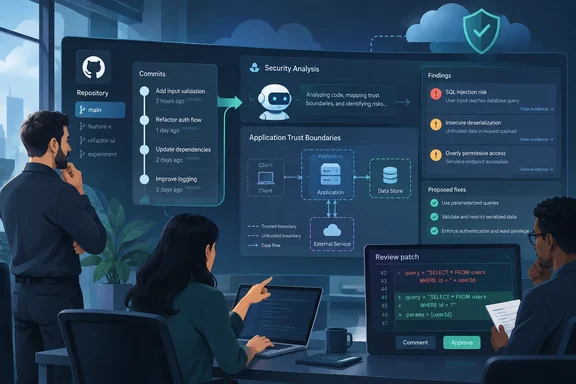
Channel Insider’s October 1 report highlights the operational shift: teams can keep security checks running as their code changes rather than initiate every review manually. OpenAI’s setup documentation supplies an important boundary: Continuous Scanning monitors new commits on the repository’s default branch. It also supports one-time scans. “Continuous” should not be mistaken for automatic coverage of every branch or a guarantee that every pull request has been checked before merging.
What is new—and what predates this update
Codex Security itself is not an October debut. OpenAI introduced its application security agent in research preview on March 6, 2026, following a private beta under the name Aardvark. An August 21 developer article already described Codex Security Cloud and ongoing commit monitoring. The October coverage therefore concerns an evolving cloud security offering, not the first appearance of Codex-based vulnerability hunting.
OpenAI distinguishes three deployment paths:
- Codex Security Cloud: Managed, ongoing scans of connected GitHub repositories.
- Codex Security plugin: Repository investigation and branch-review workflows.
- Codex Security CLI: Terminal-based checks and integration with local development or CI/CD.
Those distinctions matter when choosing where security checks belong. Cloud monitoring is not interchangeable with a local scan or a pre-merge review.
Repository context comes before the findings
OpenAI describes a workflow that first examines the application and builds an editable threat model. That model captures security-relevant assumptions, including what the application trusts and where attackers might reach it. The agent then investigates vulnerabilities using that context and, where possible, tests suspected issues in an isolated environment before proposing remediation.
The practical attraction is evidence, not simply another alert count. OpenAI’s developer guidance tells reviewers to inspect code excerpts, call paths, reproduction output, and remediation guidance. It also explicitly recommends retaining established scanners: Codex Security is positioned as complementary repository-specific investigation, not a wholesale replacement for deterministic scanning.
Validation remains conditional. OpenAI’s launch description says sandboxed testing happens where possible; it does not promise a working reproduction for every finding. Likewise, a clean scan should not be interpreted as proof that an application has no vulnerabilities. That is the sensible operational reading of a system designed to investigate likely flaws rather than certify software as secure.
Setting up continuous GitHub scanning
OpenAI’s documented Cloud workflow is available through ChatGPT on the web or desktop:
- Open Plugins, install and enable Codex Security Cloud, then open Security Cloud.
- Confirm that Codex cloud is configured for the workspace. Select Scan, connect GitHub if prompted, and grant access to the intended repositories.
- Choose the repository and review its cloud environment. Auto creates an environment; Customize selects an existing one.
- Under Scan Method, choose Continuous Scanning.
- Set Scan commit history from, optionally add threat-model scoping guidance, and select Create.
A longer history window adds context but increases the initial scan’s duration. Progress and artifacts appear under Scans; issues appear under Findings. If a repository is missing, check its GitHub connection and permissions. If plugin access is unavailable, contact the workspace administrator.
Where a finding offers Fix with Codex, reviewers can generate a patch, inspect it, and create a draft pull request. Finding a vulnerability and safely landing its fix remain separate jobs.
Permissions and funding are part of coverage
For Enterprise and Edu workspaces, OpenAI requires both Codex Cloud and Codex Security access. Administrators can scope access through roles or groups, including SCIM-synced groups, and separately authorize users to administer scan configurations.
Billing creates another operational dependency. Codex Security Cloud uses token-based charging; existing customers receive notice and must opt in before paid usage begins. Scans pause when funding is unavailable. Daybreak Blue access included with Cloud is limited to that product, not a general entitlement to other Codex Security surfaces or the API.
OpenAI recommends a small initial repository set and dedicated reviewers, particularly while onboarding and vulnerability sharing remain relatively manual. Organizations new to GitHub Cloud should consider lower-risk or non-production repositories first.
What service providers should evaluate
Channel Insider’s MSP and MSSP advice is best treated as an evaluation framework, not a newly announced partner program. Providers should compare useful, distinct findings against existing tools and establish who owns triage, remediation, and patch approval.
A practical pilot should ask three questions:
- Does the agent uncover actionable risks that existing checks missed?
- Does its validation evidence reduce investigation effort?
- Can reviewers resolve findings safely without building a larger backlog?
That approach fits OpenAI’s own guidance to retain established scanners and review proposed changes. The opportunity is additional investigative capacity—not outsourced accountability. Continuous scanning can keep watching the repository; people still have to decide what to fix.
References
- OpenAI Codex Security Cloud Adds Continuous AppSec Channel Insider · 2026-10-01T10:07:10+00:00
- Codex Security: now in research preview | OpenAI openai.com
- Codex Security | OpenAI Help Center help.openai.com