

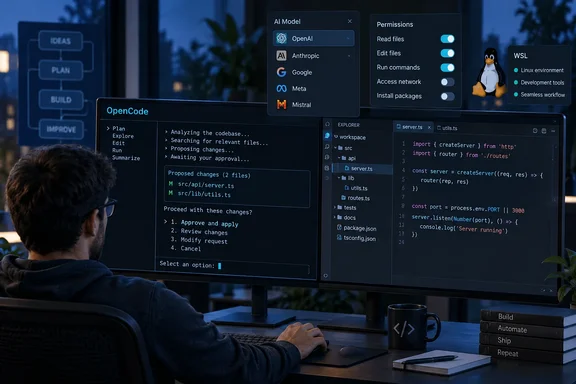
This is one person's experience, not a benchmark. The column doesn't name most of the tools it compared against, and it gives no test method or scores. Its useful point is narrower: OpenCode is built so you can change the model behind the agent without changing your tools or workflow. For Windows developers, several practical details matter before trying it, including subscription rules, permission settings, and the official advice to use WSL.
What OpenCode actually is
OpenCode's own documentation calls it an open source AI coding agent. It's available as a terminal-based interface, desktop app, or IDE extension. The project's homepage makes big adoption claims, saying that with over 208,000 GitHub stars, 950 contributors, and over 13,000 commits, OpenCode is used and trusted by over 16M developers every month. Those numbers come from the project itself, so read them as marketing rather than independently checked figures.
Shah likes OpenCode for three reasons:
- Provider freedom. You can switch models without switching tools.
- Several interfaces. It runs in a terminal, as an IDE extension, or as a desktop app.
- Extensibility. It supports custom agents, commands, permissions, MCP servers, custom tools, and plugins.
In short: this is a hands-on endorsement from one writer. The claims hold up as a description of what OpenCode does. They don't show that it writes better code than Claude Code, Codex, or anything else.
Provider freedom, with some catches
OpenCode's provider documentation says the agent uses the AI SDK and Models.dev to support more than 75 LLM providers, plus locally run models. You add credentials with the /connect command and pick a model with /models. Shah's idea is simple: use a strong reasoning model for a messy codebase, a faster one for small edits, and keep the same interface throughout.
There's a Microsoft angle here as well. The provider docs describe signing in to Azure OpenAI with Microsoft Entra ID through the Azure CLI instead of using an API key:
- Install the Azure CLI and run
az login. Useaz login --tenant TENANT_IDif the resource belongs to a different tenant. - In OpenCode, run
/connect, choose Azure, then Microsoft Entra ID (Azure CLI). - Enter the Azure resource name. This is the first part of your endpoint, such as
my-modelsinmy-models.openai.azure.com. - Make sure your identity has the right inference role. That's Cognitive Services OpenAI User for Azure OpenAI models, or Cognitive Services User for other Foundry models.
The docs say OpenCode doesn't discover deployments on its own. You need to pick a model whose catalog name matches your deployment, or set the deployment name in config. Enterprise admins who already manage Azure OpenAI access through Entra will likely find this cleaner than handing out API keys.
Using your existing subscriptions. Shah says OpenCode connects to ChatGPT Plus or Pro and GitHub Copilot, so you may not need another AI subscription. The official docs agree: both are listed under /connect, and ChatGPT Plus/Pro signs in through your browser. GitLab Duo is supported too.
The big exception: Claude Pro/Max. OpenCode's provider documentation says plugins that route Claude Pro/Max subscriptions through OpenCode exist, but Anthropic explicitly prohibits this. OpenCode stopped bundling those plugins as of version 1.3.0. If you want Anthropic models in OpenCode, the approved route is Anthropic API credentials, billed separately from a Claude chat subscription. It's a bit ironic for a story about a "Claude Code alternative": the provider you might most want to bring along is the one that limits how you can bring it.
Where your keys go. Credentials added with /connect are stored in ~/.local/share/opencode/auth.json. On shared or managed machines, treat that file like any other secret.
The "Space Bunny" anecdote and the free-model fine print
Shah says he used OpenCode's free Space Bunny model to build a client website mockup for a meeting, and that it worked well. He saves paid tokens for harder work like debugging and large refactors.
OpenCode's Zen documentation does list Space Bunny Free. It describes it as a stealth model that's free on OpenCode for a limited time, and says its provider follows a zero-retention policy and doesn't use your data for training. Keep a few things in mind:
- Free models can come and go. Zen lists several limited-time free models, so today's option may not be there next quarter.
- Privacy terms differ by model. Zen names exceptions. During their free periods, data sent to models such as Big Pickle and some MiMo variants may be used to improve those models. NVIDIA's free endpoints are marked trial-only, with a warning not to submit personal or confidential data. Check the terms before pasting client code into a free model.
- Zen is optional and pay-as-you-go. The docs say Zen isn't required to use OpenCode. Usage is charged per request, and by default the balance reloads $20 when it drops below $5. You can change or turn off auto-reload, and set monthly limits. Note that the docs warn auto-reload can push spending past a monthly cap.
In short: "free" in AI coding tools usually means free for now, for this model, under these terms. Shah's mockup is a fair example of using a free model for throwaway work. It doesn't mean every task, or every client's data, belongs there.
Terminal, IDE, or desktop: getting it running
IDE extension. OpenCode's IDE documentation says it works with VS Code and forks such as Cursor, Windsurf, and VSCodium. Shah refers to Windsurf by its newer name, Devin Desktop, but OpenCode's docs still use "Windsurf" and the windsurf command. Setup is simple:
- Open the integrated terminal in your editor.
- Run
opencode. The extension installs automatically. - Use Ctrl+Esc on Windows/Linux to open OpenCode in a split terminal, or Ctrl+Shift+Esc to start a new session. On Windows, check that Ctrl+Shift+Esc reaches your editor rather than opening Task Manager.
- Use Alt+Ctrl+K to insert file references like
@File#L37-42.
The extension can pass your current selection or tab as context, which is the part Shah found most useful.
If auto-install fails: make sure you ran opencode in the integrated terminal and that your editor's command-line launcher is on your PATH (code, cursor, windsurf, or codium). If it isn't, open the Command Palette with Ctrl+Shift+P and run "Shell Command: Install 'code' command in PATH" or your editor's equivalent. You can also search for OpenCode in the extension marketplace and install it by hand.
Windows users: the WSL question
OpenCode offers a Windows desktop build, but its official Windows guide adds an important note: while OpenCode can run directly on Windows, we recommend using Windows Subsystem for Linux (WSL) for the best experience. The stated reason is that WSL offers better file system performance, full terminal support, and compatibility with development tools that OpenCode relies on.
The documented WSL setup:
- Install WSL following Microsoft's guide.
- In the WSL terminal, install OpenCode with
curl -fsSL [!/usr/bin/env bash](https://opencode.ai/install) | bash. - Open your project, either through
/mnt/c/...for files on Windows drives or inside the Linux filesystem, and runopencode.
A community mirror of the docs adds a performance tip: for the smoothest experience, consider cloning/copying your repo into the WSL filesystem (for example under ~/code/) and running OpenCode there.
Desktop app with a WSL backend. Run opencode serve --hostname 0.0.0.0 --port 4096 in WSL, then point the desktop app at [url]http://localhost:4096[/url]. Be careful here. Binding to 0.0.0.0 accepts connections from outside, so the documentation says when using --hostname 0.0.0.0, set OPENCODE_SERVER_PASSWORD to secure the server. If localhost doesn't connect, the same source suggests using the WSL IP address from hostname -I instead.
Not everyone agrees WSL is required. A July 2026 guide from CodeAgentSwarm, which sells a Windows front end for running several OpenCode sessions, argues that native is the right default for most Windows developers; WSL 2 is there when your project depends on Linux tooling or you want Linux-native command behaviour. Weigh that alongside the vendor's own advice. Some users also find the WSL workflow clunky: one GitHub issue says the WSL recommendation was a bit troublesome for users (especially when project files are on Windows).
Power-user features and permissions
Shah's extensibility praise checks out. OpenCode ships with two main agents: Build, which has full tool access, and Plan, which by default asks before any file edit or bash command. You press Tab to switch between them. Custom agents can live in ~/.config/opencode/agents/ or in a per-project .opencode/agents/ folder, and each one can use its own model and prompt.
Agents are powerful enough that the permission settings deserve attention:
- Each tool can be set to
"ask","allow", or"deny", per agent and even per bash command pattern. When rules overlap, the last matching rule wins, so put the*wildcard first. - The older
toolssetting is deprecated. Usepermissionin new configs. - The max steps option limits how many actions an agent can take in a row, which helps with cost control.
- MCP servers and custom tools add capabilities, but they also add risk and use up context. Enable only what you need.
The verdict
Shah's piece is an honest personal column, not a lab test. Its core claim holds up against OpenCode's own documentation: the agent stays the same while you choose the model behind it, whether that's a ChatGPT plan, GitHub Copilot, Azure OpenAI through Entra, a local model, or a free Zen model.
Is that enough to replace Claude Code? It depends on whether you're tied to a provider or a workflow. If you want to try it, use the same repository and a few real tasks with both tools. Keep the model, permissions, and usage limits in mind, since they affect results as much as the agent does. Windows users should also expect to decide between native and WSL early on.
References
- (Question): Consider provide a call forwarding script for opencode in WSL on Windows host? · Issue #1642 · code-yeongyu/oh-my-openagent github.com
- I tried dozens of Claude Code alternatives and I keep coming back to this open-source tool XDA · 2026-09-28T15:30:17+00:00
- opencode-docs/docs/official/windows-wsl.md at main · mudrii/opencode-docs github.com