

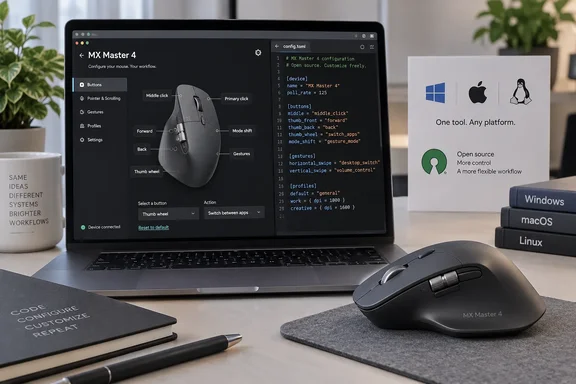
What OpenLogi is
OpenLogi is a local-first alternative to Logitech Options+, written in Rust. It remaps buttons and drives DPI and SmartShift over HID++, with no account and no telemetry. The project's documentation says it talks to Logitech mice and keyboards over HID++ and to Logitech webcams over UVC. That covers more than mice. The docs list Bolt receivers, Unifying receivers, Bluetooth, or a wired connection as supported connections.
Bindings are stored in a plain TOML file. That file can be read, diffed, version-controlled and copied between machines. The docs say settings are keyed to the physical device rather than the model, so two MX Master 4 mice on one machine never share an entry.
Is it only for Linux and macOS?
No. The XDA piece centres on Linux and macOS, but OpenLogi also supports Windows.
- Windows: The project site calls it the newest port, with signed x86_64 and arm64 installers, validated on Windows 11.
- Linux: The docs treat it as a first-class platform. It uses an evdev/uinput hook, udev rules, a systemd user unit, and
.deb,.rpmand.pkg.tar.zstpackages. - Official software: Logitech's own page offers Options+ downloads for Windows 10 or later and macOS 14 or later. Logitech has no Linux build.
Newer does not mean polished. A Pinggy review from August described macOS and Linux as solid and Windows 11 support as the newest and roughest port. Treat that as one reviewer's view, and note it predates the latest release.
What works on the MX Master 4
OpenLogi's model guide lists these controls as remappable:
- Middle click
- Mode-shift (DPI) button
- Thumb wheel
- Gesture button
- Forward and Back
- Haptic Sense panel
Gestures (up, down, left, right and click) work on Back, Forward, the gesture button and the haptic panel. The thumb wheel does not support gestures. The Actions Ring can be assigned to the haptic panel with the ShowActionsRing binding.
The same guide documents these settings:
- DPI presets
- SmartShift
- Scroll inversion and wheel resolution
- Thumb-wheel behaviour
- Haptic feedback
- Battery reporting
- Host switching
These controls appear only if your own mouse reports the matching hardware features. The docs say the authority is the openlogi diag features command, not a generic model table.
Setup tips
- Quit Logi Options+ first. OpenLogi's Quick Start says the two apps fight over HID++ access and only one can own a receiver. On Linux the same applies to Solaar. Product Hunt feedback made the same point, and BigGo's report notes the two cannot run concurrently.
- Install the package for your platform. Choose the Windows MSI, a Linux package, or the macOS build.
- Linux only: enable the user agent after installing, using
systemctl --user enable --now openlogi-agent.service. - macOS only: grant accessibility permissions. Carrasqueira says the app at first didn't register that he had done so, which is one user's experience.
- Check your unit. Run
openlogi diag featuresto see what your mouse reports. - Back up your config. The TOML file is easy to copy, which helps while the format is still changing.
What you give up
Carrasqueira says Smart Actions and Marketplace plug-ins are missing in his setup. Logitech describes Smart Actions as automating multiple tasks with a single click or keystroke, and lists Actions Ring and Marketplace as MX-device features. If you rely on multi-step automation, OpenLogi won't replace it today.
Other gaps reported elsewhere:
- OpenSourceAlternatives.to says Logitech Flow, the cross-computer feature, is on the roadmap but has not shipped.
- The same site says per-app profiles are marked "coming soon" on the product website. The OpenLogi docs, however, describe per-app bindings, so check the current build.
- The same site counted 208 open issues as of mid-2026.
OpenLogi's docs warn that it is under active development and not yet stable. They add that features and configuration may change. They also state it is not affiliated with Logitech.
Claims worth treating carefully
Account requirements. Carrasqueira says Options+ asks for a login and that Smart Actions and plug-ins require an account. The evidence here doesn't show that all of Options+ requires one. A safer reading is that OpenLogi needs no account for any of its features, while some Options+ features, especially the ones above, are cloud-tied.
Size. His figures of roughly 500 MB for Options+ and 50 MB for OpenLogi are measurements from his Mac. Pinggy cites a 200 MB-plus streaming installer for Options+. Sizes will vary by platform and version.
Future-proofing. The argument that an open tool can outlive vendor support is reasonable. A Product Hunt commenter made the same case. Carrasqueira alludes to Logitech rendering older devices useless, but gives no specifics, so I wouldn't treat that as established. An independent project also carries its own risks of slowed or abandoned maintenance, and the "not yet stable" warning applies.
Enterprise use. Logitech pitches Options+ as deployable through SCCM, Intune and Jamf, with command-line options to disable features. OpenLogi is a young community project. Fleet admins should not treat it as a drop-in replacement. A home or enthusiast setup is a different matter.
Who should try it
OpenLogi suits you if:
- You mainly want button remaps, gestures, DPI and SmartShift without an account.
- You run Linux, where Options+ isn't available.
- You like keeping config in a text file.
Stick with Options+ if you depend on Smart Actions, plug-ins, Flow or managed deployment. Because the two apps conflict, you can't easily run both at once. You can, though, switch by quitting one before starting the other.
The practical takeaway: OpenLogi has become a credible, free option for MX Master 4 owners, including on Windows 11. It's still a fast-moving project, so test it before making it your only setup.
References
- I ditched Logitech's official app for OpenLogi, and my MX Master 4 finally feels like my own mouse XDA · 2026-10-05T16:31:17+00:00
- OpenLogi: A Local-First Alternative to Logitech Options+ Built in Rust pinggy.io
- GitHub - AprilNEA/OpenLogi: ⚡️A native, local-first alternative to Logitech Options+, written in Rust 🦀 — remap buttons, DPI, and SmartShift over HID++. No account, no telemetry. github.com