

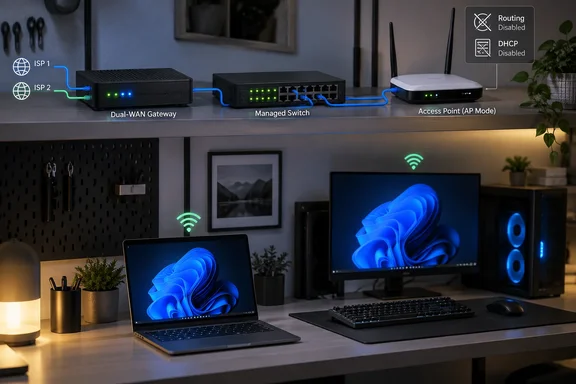
The central idea is sound: an access point does not need to perform NAT, operate a DHCP server, or maintain a separate firewall boundary to provide Wi-Fi. It needs a clean wired uplink to the LAN, correctly configured radios, and enough management capability to fit into the rest of the network. Replacing restrictive stock firmware can make that role more configurable, but it also creates responsibilities that a simple AP-mode toggle normally hides.
The practical takeaway for Windows users and homelab operators is less “flash every old router” than “separate Wi-Fi coverage from routing.” That distinction prevents needless double NAT while allowing an older device to supply wireless coverage where it is still adequate.
Why an old router becomes awkward in a newer network
The Archer C6 in the XDA Developers setup had once been the primary router. It was later displaced by a TP-Link ER605 dual-WAN gateway and an SG108E switch. Once those devices were installed, retaining the Archer as a router would have created an unnecessary second private network behind the main gateway.
That is where double NAT appears. A client connected behind the second router receives an address from that router, whose own WAN interface receives an address from the upstream router. Both devices translate private addresses before traffic reaches the internet. If the internet provider is also using carrier-grade NAT, as described in the report, a third layer may exist upstream.
Extra NAT layers do not automatically break normal web browsing, streaming, or Windows Update. They do complicate inbound connections, port forwarding, remote access, some peer-to-peer applications, and troubleshooting. A Windows PC may appear to have a healthy internet connection while a game console, VPN service, media server, Remote Desktop gateway, or self-hosted service becomes harder to reach from outside the home.
Using the Archer as a conventional access point avoids that problem. Wireless clients remain on the gateway’s LAN, receive their IP addresses from the gateway’s DHCP service, and use the gateway as their default route. In a correctly built AP configuration, the former router is primarily a bridge between Ethernet and Wi-Fi.
TP-Link continues to publish an access-point setup path for its consumer routers, so leaving stock firmware in place remains the lower-risk option for people who simply need additional wireless coverage. The limitation, as the XDA Developers report argues, is that stock AP modes can remove settings and services that power users want to control directly.
OpenWrt can add control, but model and revision matter first
OpenWrt is a Linux-based router firmware project with a web interface, command-line administration, package management, and more granular network configuration than many consumer-router interfaces expose. It supports access-point and bridged wireless configurations, and its package system can extend an installed image after setup.
That flexibility does not mean that every Archer C6 can be flashed with the same file.
TP-Link sells hardware revisions and regional variants under the same Archer C6 name. TP-Link’s own support pages emphasize checking the hardware version before any firmware upgrade, and its US Archer C6 V2 page warns that incorrect firmware can damage the device. OpenWrt’s device documentation likewise separates C6 revisions and regions; installation methods and supported images can differ substantially.
Before considering custom firmware, verify all of the following from the label on the router itself:
- The exact model name, hardware revision, and regional variant.
- That the exact device revision is listed by OpenWrt as supported.
- Whether the device requires a factory image for first installation or a different recovery path.
- The current OpenWrt release notes and device-specific warnings.
- Whether a known recovery method is available if the initial flash fails.
For example, OpenWrt’s documentation for some Archer C6 V2 variants notes a history of firmware-image acceptance issues and specific 5 GHz radio problems in certain OpenWrt releases. That is a reminder that support status alone does not guarantee every release will be equally suitable for every hardware revision.
TP-Link also states that third-party firmware is unsupported by the vendor and may void warranty coverage. On a long-retired router, that may be an acceptable trade-off. On a device that still provides essential household connectivity, it is a decision worth treating as maintenance work rather than a casual experiment.
A “dumb AP” still needs deliberate network configuration
The phrase dumb AP can be misleading. It does not mean the device is useless or incapable; it means that routing duties are intentionally disabled. The upstream gateway remains the one place that makes routing, DHCP, firewall, and internet-edge policy decisions.
A typical wired OpenWrt access-point design has these characteristics:
- The AP is connected to the existing LAN with Ethernet rather than used as a wireless repeater.
- The AP has a fixed management address on the main LAN, outside the main DHCP pool or reserved by the gateway.
- DHCP and DNS service on the AP are disabled when the primary gateway already provides them.
- The AP’s WAN-side routing and firewall functions are not used for ordinary client traffic.
- Wi-Fi interfaces are bridged to the LAN so clients receive addresses and gateway settings from the upstream router.
The result is simple from a Windows PC’s perspective. A laptop connected over Wi-Fi to the OpenWrt device should be on the same IP subnet as a desktop connected directly to the switch. Both should identify the same default gateway and, assuming the network allows it, discover or reach local resources without traversing another private network.
This is also the point at which a wired uplink matters. A former router connected to the network wirelessly as a repeater must use radio capacity both to receive and retransmit traffic, often reducing available throughput. A wired AP preserves the radio for client connections and makes performance problems easier to isolate.
Packages are useful only when their placement makes sense
The XDA Developers account highlights WireGuard, banIP, SQM, and nlbwmon as reasons to use OpenWrt. All are legitimate OpenWrt capabilities, but an access point is not automatically the right place to run each one.
WireGuard is a VPN protocol that OpenWrt can operate as a client or server. A WireGuard interface configured on a routed gateway can carry traffic for selected clients or subnets when its firewall and routing rules are designed accordingly. On a basic bridged access point, however, installing WireGuard does not automatically tunnel all Wi-Fi-client traffic. The AP is mostly forwarding Ethernet frames to the upstream gateway; the VPN may apply only to traffic generated by the AP itself unless additional routing or policy design is added.
The same caution applies to network-wide filtering. banIP can load blocklists into firewall rules, but ordinary bridged client traffic in a dumb-AP design is not necessarily traversing the AP firewall in the way it would on the primary router. A DNS-based tool, such as AdGuard Home or Pi-hole, can affect clients if the network’s DHCP and DNS design explicitly directs them to it. The report says its author later moved AdGuard Home and Pi-hole duties to the gateway, which is generally the more natural location for services intended to cover the whole LAN.
SQM, or Smart Queue Management, is also most effective where the bottleneck exists—usually the internet-facing WAN connection on the gateway. Running it at an access point can be appropriate for a deliberately shaped local segment, but it is not a substitute for controlling queues at the actual broadband uplink.
Traffic accounting with nlbwmon is more plausible on an AP because the AP can observe traffic crossing its interfaces. Even then, it only provides a view of traffic that reaches that device; it is not automatically a complete household-wide usage monitor.
The broader rule is straightforward: install services on the device through which the relevant traffic actually passes. A flexible firmware image does not remove topology constraints.
Channel width tuning requires measurements, not assumptions
The report’s most useful practical lesson may be its correction to a common Wi-Fi assumption: wider channels do not guarantee better real-world performance.
The author experimented with channel width, channel selection, interface settings, and transmit power, then returned to the automatic 80 MHz setting. No throughput figures, client hardware details, or test method were provided, so the claimed improvement should be treated as a personal result rather than a general Archer C6 benchmark.
Still, the conclusion is sensible. An 80 MHz channel in 5 GHz can offer more potential throughput than a narrower channel when the radio environment is clean and the connected devices support it. It also occupies more spectrum, leaving fewer non-overlapping choices and increasing the chance of interference in apartment buildings or dense neighborhoods.
For a Windows laptop or desktop, the usable result depends on more than the AP setting:
- The wireless adapter’s supported standards and channel widths matter.
- Signal strength and wall construction can matter more than a theoretical top speed.
- Nearby networks and radar-related channel restrictions can influence stability.
- The wired uplink and switch port speed place an upper bound on what the AP can deliver.
- A speed test to the internet measures the broadband connection as well as Wi-Fi, not Wi-Fi alone.
The sensible approach is to retain a stable baseline, adjust one setting at a time, and compare local results under similar conditions. File transfers between devices on the LAN, a local performance test, and repeatable checks from the same Windows client are more informative than changing several radio parameters at once and relying on a single internet speed test.
The right upgrade is often a narrower job
The Archer C6 did not need to compete with the ER605 in the reported setup. Its value came from being relieved of router duties and focused on radio coverage, local management, and selected features that the owner could actually use.
That pattern is useful beyond one TP-Link model. A retired router can be a capable wired access point, guest-network node, isolated lab device, or test platform if its hardware remains supported and its Wi-Fi capabilities fit the environment. It should not be forced back into the path of every connection merely because it still has a router label on the case.
For users satisfied with stock AP mode, the safest choice is often to keep it. For users who need OpenWrt’s configuration depth, the essential safeguards are exact hardware identification, a documented recovery plan, and a clear understanding that VPN, filtering, and QoS features belong where the network design allows them to work.
References
- My old router became useless until I wiped its firmware and gave it one job XDA · 2026-09-20T17:00:17+00:00