

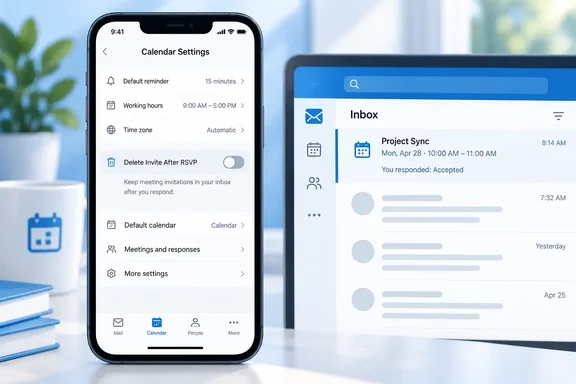
It is a small preference with a practical purpose. Responding to a meeting and tidying up its invitation are two different jobs; users can now decide whether Outlook should do both.
How to keep invitations after responding
The roadmap describes the setting for Outlook on iOS and Android. To retain invitation messages:
- Open the Outlook mobile app and go to Settings. Microsoft’s mobile quick-start guidance documents access through the account avatar or logo on iOS, and through Menu > Settings on Android.
- Open Calendar.
- Find Delete Invite After RSVP.
- Turn the toggle off to keep invitations in your inbox after responding. Turn it on if you want Outlook to remove them automatically.
The setting path and toggle behavior come from Microsoft’s roadmap record. That record does not specify the default position, so check the switch rather than assuming it is already configured either way.
To check the result, use a subsequent invitation you genuinely need to answer. Microsoft documents the response procedure on both mobile platforms: tap RSVP, then choose Accept, Tentative, or Decline. With automatic deletion disabled, the expected result is that the invitation message remains in your inbox after that response.
For someone who likes to revisit the original invitation text, keeping the message may be useful. For someone pursuing inbox zero with the determination of a competitive sport, automatic removal may be the better fit.
Invitation emails are not declined calendar events
An important distinction: Delete Invite After RSVP concerns the invitation message after responding, not a new way to answer a meeting request. Outlook mobile already supports Accept, Tentative, and Decline responses, as Microsoft’s quick-start documentation confirms.
It should also not be confused with Hide Declined Events, another option under Settings > Calendar. Microsoft Support says that, when declined events are enabled in new Outlook, this separate mobile setting filters them out of the iOS or Android calendar while leaving them visible in new Outlook. It controls calendar visibility—not post-RSVP inbox cleanup.
In short, choose the invitation-deletion toggle when your concern is the email message. Choose the declined-event setting when your concern is what appears on the calendar.
Availability and documented limits
Microsoft’s roadmap record marks the feature Launched, with May 2026 general availability, and lists:
- Platforms: Android and iOS.
- Release ring: General Availability.
- Cloud environments: Worldwide (Standard Multi-Tenant), GCC, and GCC High.
May 2026 is the recorded availability month, not an exact launch day. The live roadmap page retrieved for this report did not expose item 559794’s detailed contents; Microsoft also cautions that roadmap information can change and that entries may be removed after general availability. The feature-specific status and scope above therefore reflect the roadmap record, rather than a fresh confirmation of every deployment.
The record supplies no minimum app version, eligible account-type list, administrator control, or cross-device synchronization behavior. If the toggle is missing, there is not enough documented evidence here to identify the cause or promise a particular fix. Nor does this item establish a corresponding change in Outlook for Windows or Outlook on the web.
The useful takeaway is straightforward: on Outlook mobile, turn off Delete Invite After RSVP if you want responding to a meeting to leave its invitation in your inbox.
References
- Outlook: Keep Invitations After Responding in Outlook Mobile Microsoft 365 Roadmap · 2026-09-30T23:31:03.389585Z
- Outlook for iOS and Android Quick Start | Microsoft Support support.microsoft.com
- What is the Hide Declined Events Setting? | Microsoft Support support.microsoft.com