

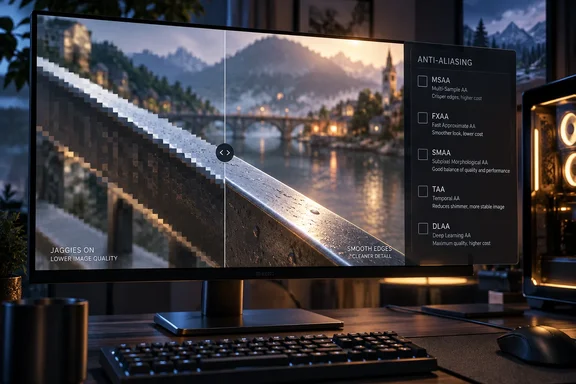
The practical point is that "maximum AA" stopped being a useful goal some time ago. Running 8x MSAA used to be a way to show off a gaming rig. Now the right choice depends on which rendering path a game uses, which options its developer actually implemented, and whether you notice blur more than shimmer. The engine documentation from Epic, Unity and Microsoft, together with NVIDIA's own description of DLAA, makes those trade-offs clear enough to choose from.
Why Pixel Grids Create Jaggies, and What Anti-Aliasing Does About Them
A game has to draw a 3D scene onto a fixed grid of pixels. When a diagonal or curved edge crosses that grid, each pixel records a limited number of samples, so the edge can come out as a series of steps. Pixels are arranged in a grid on your display, so when a diagonal line shows up on-screen, it creates a blocky, stair-stepping effect. These are known as jaggies. Anti-aliasing techniques try to fill in the gaps between pixels, leading to a smoother edge on objects.
Unity's documentation places this within the wider idea of aliasing: a side effect of turning continuous real-world information into digital samples. Audio and video have the same problem. A rendered line looks jagged because the pixels don't line up exactly with the path the line is supposed to follow. Aliasing also affects moving images. Thin wires, fences and glossy highlights can flicker or crawl as the camera moves, even when a single still frame looks fine.
Anti-aliasing estimates what a pixel sitting on an edge ought to look like, usually by blending its colour toward its neighbours. That makes outlines smoother and motion steadier. It cannot recover detail that was never captured in the first place, which is why every method ends up with some compromise.
A higher-resolution monitor helps, but only partly. Unity's glossary says more pixels make jagged edges less visible because they can approximate a curve more closely, but aliasing is not eliminated. Fine detail and fast motion still benefit from AA on high-resolution displays.
The useful division is between spatial and temporal methods. Spatial methods work only with the current frame, using neighbouring pixels or extra samples inside each pixel. Temporal methods also reuse information from previous frames. That lets them resolve detail a single frame misses, but it also creates new kinds of artifacts when the image changes quickly.
MSAA's 4x and 8x Settings Smooth Polygon Edges, Not Shimmer
Multisample anti-aliasing, or MSAA, is the setting behind the old 4x and 8x numbers. Microsoft's Direct3D 9 documentation describes full-scene anti-aliasing as smoothing the edges of each polygon while it is rasterized, in a single pass, using multisampling on each pixel. The samples collected for each pixel are then blended into the final colour. That same page shows the limits: the technique applies only to triangles and groups of triangles, and Direct3D's services cannot anti-alias lines.
This explains why MSAA can make polygon silhouettes look very clean and still leave a scene shimmering. Epic's Unreal Engine 5.8 documentation says MSAA only smooths some parts of the frame, mainly geometry edges and other trouble spots, and that aliasing from materials, textures and transparent surfaces is untouched. Unity's Universal Render Pipeline (URP) documentation says the same thing: MSAA handles triangle-edge aliasing better than the other techniques, but it does nothing for shader aliasing such as specular highlights or textures.
The multiplier is the number of samples. Epic's documentation says more samples mean better quality at a higher GPU cost, and Unreal offers 2, 4 and 8. The multiplier only applies to MSAA. You can't line up "4x MSAA" against FXAA or TAA as though they were steps on one quality scale, because those methods don't count samples in the same way.
MSAA is also increasingly absent from game menus. Unreal Engine 5.8 lists it for the Forward Renderer only, not for the Desktop/Console Deferred Renderer. Unity's glossary says forward rendering pipelines typically support MSAA, while deferred pipelines rely on post-processing options such as FXAA or TAA. Unity URP will not let MSAA run alongside its TAA option. So when a modern game offers no MSAA, it is usually a result of how the engine renders the scene, not a missing feature.
FXAA and SMAA Clean Up the Finished Frame
Post-process methods skip the extra samples. They let the frame render normally and then look for edges to smooth. Epic describes FXAA (fast approximate anti-aliasing) as spatial-only: a high-contrast filter finds edges and blends pixels across them. The documentation calls it fast to render and well suited to low-end devices and desktops. It also warns that the final image can lose fidelity compared with other techniques. Unity names FXAA as the least resource-intensive AA method in URP.
The weakness follows from how it works. FXAA can't tell a polygon edge from fine texture detail that happens to have high contrast, so it can blur both, which is why FXAA images often look slightly soft. Unreal exposes this trade-off through its r.FXAA.Quality console variable. That controls how many samples the blending uses, and Epic says more samples give higher fidelity at greater GPU cost.
SMAA (subpixel morphological anti-aliasing) is a more selective post-process filter. Unity's documentation says SMAA looks for patterns along image borders, blends pixels according to the pattern it finds, and gives much sharper results than FXAA. That comparison holds in Unity's implementation. It doesn't rank every game's SMAA against every game's FXAA, since both cost and quality depend on how a developer tuned them.
Because these filters run after rendering, they can sometimes be combined with other methods. Unity notes that MSAA is a hardware technique, so it can be used together with its post-processing AA options, though not with TAA.
TAA Borrows From Previous Frames, and Ghosting Is the Cost
Temporal anti-aliasing is the default in many modern games. Unity says its TAA uses frames from a colour history buffer to smooth edges across several frames, and relies on motion vectors, which record how each part of the image moved between frames. Epic's description of Temporal Anti-Aliasing Upsampling (TAAU) adds that it samples different positions within each frame and blends them with past frames.
This handles the shimmer that MSAA leaves behind. Accumulating slightly different samples over time can steady fine detail that a single frame undersamples, including specular highlights and texture crawl, which MSAA can't do.
The cost appears when the history no longer matches the present. Unity warns that because TAA works over time, it often produces ghosting artifacts in extreme cases, for example when an object moves quickly in front of a surface that contrasts with it. Unity's glossary also notes that TAA can add slight blur or ghosting on fast-moving objects. Those trails behind characters and the soft look some players complain about in TAA-heavy games are side effects of how the technique works, and how bad they get varies from one implementation to the next.
Epic's own documentation shows that implementations differ. Unreal Engine 5's Temporal Super Resolution (TSR) is listed as producing less ghosting against high-frequency backgrounds than Unreal Engine 4's default TAA, and less flickering on complex geometry. Two games labelled "TAA" can therefore look quite different in motion.
Supersampling, DLAA and Upscalers Combine AA With Resolution
Supersampling (SSAA) is the brute-force method. The game renders the scene at a higher resolution than your display and then scales it down. Unity's glossary calls it one specific anti-aliasing method that delivers high quality at a heavy performance cost. Don't confuse it with a sharpening slider. Supersampling actually draws more pixels before scaling down.
Most other new entries in the graphics menu come from temporal upscaling. These techniques render at a lower internal resolution and use data from the current and previous frames to reconstruct a higher-resolution output. Epic's documentation groups Unreal's TAAU, its TSR, NVIDIA DLSS 2 and later Super Resolution, AMD FSR 2.0 and later, and Intel XeSS together, saying they all plug into the engine in the same way. AMD's FidelityFX documentation says FSR's temporal upscaler pursues the same goal as TAA while also raising output resolution, so a game using it doesn't need a separate TAA pass. That is why choosing an upscaler often greys out the game's regular AA setting.
Epic's numbers for TSR show the appeal. In one comparison, 1080p input upscaled to 4K reached image quality close to native 4K and halved GPU frame time. That comes from an engine demonstration scene, so it isn't a promise for any particular game or PC. Epic lists TSR as running on any hardware that supports D3D11, D3D12, Vulkan or Metal, as well as PlayStation 5 and Xbox Series S|X.
NVIDIA's DLAA runs the same kind of reconstruction without upscaling. According to NVIDIA, DLAA uses the same Super Resolution technology developed for DLSS, constructing a more realistic, high-quality image at native resolution. Digital Trends puts it more simply: it's DLSS with the upscaling portion removed. Instead of upscaling the image, Nvidia is putting its AI-assisted tech to work for better anti-aliasing at native resolution. NVIDIA also says DLSS Super Resolution, Ray Reconstruction, and DLAA use cutting-edge transformer AI models trained on its supercomputers.
The two features aim at opposite goals. DLSS Super Resolution is meant to raise frame rate by rendering fewer pixels. DLAA renders every native pixel and spends extra GPU time on image quality. In TechPowerUp's 2022 review, The Elder Scrolls Online was the first DLAA game, and the outlet found that DLAA indeed provides better image quality than both TAA and DLSS, at a small performance cost. That was one game tested with an early version. Wikipedia's entry notes that DLAA depends on and requires Tensor Cores available in Nvidia RTX cards, so GTX-series and non-NVIDIA GPUs won't offer it. DLAA also only appears in games that implement it.
What This Means for You
Set anti-aliasing the way you would any image-quality setting: try the options in the game you're actually playing, while you're moving, and pick what looks best at a frame rate you can live with. Don't just push it to maximum. Epic's advice to developers works for players too. Static comparison shots don't show temporal behaviour, so judge AA in a scene with varied materials where you can move around freely.
Start with what bothers you most. If polygon edges look jagged but the image is otherwise stable, and the game offers MSAA, it handles geometry well, though shimmering textures and highlights will stay. If the image looks soft, try SMAA instead of FXAA, lower the TAA strength if the game has that control, or compare with AA off. If moving objects leave trails, compare the temporal option with whatever else the game provides, including DLAA or an upscaler's native-resolution mode, because implementations vary a lot.
If performance comes first, measure frame rate and image quality together. An upscaler such as DLSS, FSR, XeSS or TSR may outperform native rendering with TAA, because it combines anti-aliasing and reconstruction in one pass while rendering fewer pixels.
- The 4x and 8x multipliers are MSAA sample counts, so they can't be compared across FXAA, SMAA, TAA or DLAA.
- MSAA smooths polygon edges but does nothing for aliasing from textures, materials, specular highlights or transparent surfaces.
- MSAA missing from a menu usually means the game uses a deferred renderer; Unreal Engine 5.8 offers MSAA only with its Forward Renderer.
- FXAA is the cheapest option and the most likely to soften fine detail, while SMAA is designed to stay sharper.
- TAA reduces shimmer by reusing previous frames, but it can ghost and blur on fast motion against contrasting backgrounds.
- DLAA needs an NVIDIA RTX GPU and a game that supports it, and it spends extra GPU time on native-resolution image quality instead of raising frame rate.
The old habit of maxing out AA made sense when MSAA was the only option and more samples reliably meant cleaner edges. Most modern engines render in ways that MSAA doesn't fit, and anti-aliasing has become part of the upscaling pipeline, so what used to be a quality slider is now a choice between sampling, filtering and reconstruction. As more games ship with temporal upscalers built in, choosing AA increasingly means choosing a reconstruction technique, and the best one is the one that looks right in motion on your own hardware.